
Income and costs land in the right period when you mark the invoice lines as deferred and let Odoo spread them month by month. The test for what qualifies is single and sharp: is there still a performance owed against the amount?
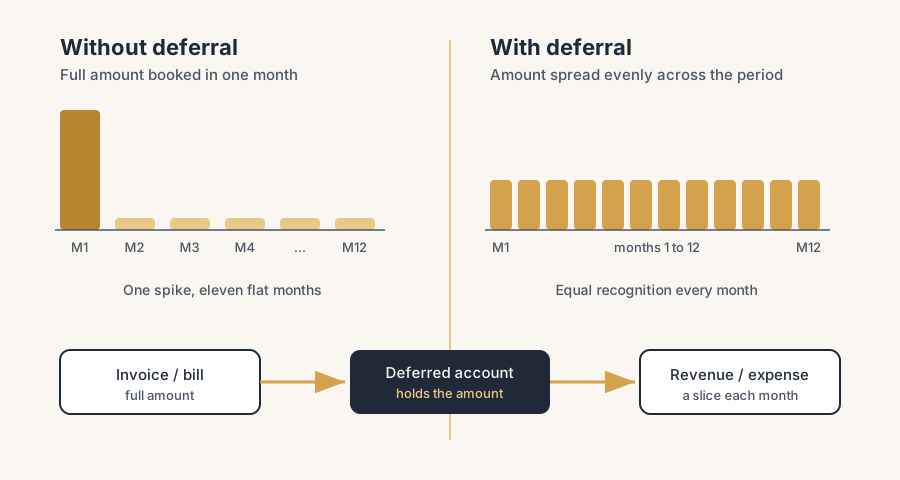
You sell a one-year support contract for 1,200 and invoice it in January. Your January profit jumps by 1,200. Then for the next eleven months that revenue is gone, even though you are still delivering the service. Your monthly figures swing all over the place, and your accountant sends the invoice back at year-end to spread it out by hand.
Same story on the cost side. You prepay a 6,000 insurance premium for the full year. It lands as a single 6,000 expense in one month, and the other eleven months look better than they really are. The cash went out once, but the cost belongs to all twelve months.
Both are timing problems. The money moved in one period, but the income or cost belongs to several. Odoo can spread these automatically with deferred revenue and deferred expense. You set it up once, validate the invoice or bill, and the recognition happens month by month without you touching it.
Why it happens
Accounting works on the matching principle: you book income and costs in the period they actually belong to, not the period the money moved. A yearly subscription invoiced up front is one cash event but twelve months of service. A prepaid premium is one payment but twelve months of cover.
By default an invoice books the full amount to revenue straight away, and a bill books the full amount to expense straight away. That is correct for a one-off sale, but wrong for anything that covers a future period. Deferred revenue parks the amount on a liability account and releases it to revenue over time. Deferred expense parks the amount on an asset account and releases it to expense over time. Odoo automates the release with recurring journal entries.
The fix, in steps
Turn on the deferred settings
Go to Accounting, then Configuration, then Settings, and scroll to the Deferred Revenue and Deferred Expense sections. Set the accounts and the journal here once, and every deferral in the company uses them.
Set the Deferred Revenue Account (a Current Liability account, this is where unearned revenue waits), the Deferred Expense Account (a Current Asset account, this is where prepaid cost waits), and the Journal the recognition entries post to. These live at company level, so you set them once.
Choose when Odoo generates the entries
Still in Settings, set Generate Entries. You have two options and the choice matters.
On invoice/bill validation: the moment you confirm the invoice or bill, Odoo creates all the deferral entries. Clean and hands-off, but it makes a lot of journal entries.
Manually and Grouped: Odoo holds the deferred amounts and you generate one combined entry per month from the reporting screen. Fewer entries, but you have to remember to run it.
For most companies, On invoice/bill validation is the right default. Pick Manually and Grouped only if your accountant wants fewer, batched entries.
Set how the amount is spread
Choose the Amount Computation method. This decides how the first and last month are handled.
Months: spreads the amount per day within each month. A contract starting on the 15th gets roughly half a month in month one.
Full Months: treats every started month as a full month. A contract starting on the 15th still gets a full month in month one.
Use Full Months when your contracts run in clean monthly blocks. Use Months when the start date really matters and you want it exact to the day.
Mark the invoice or bill lines as deferred
On the customer invoice (for revenue) or the vendor bill (for expense), open the line and set the Start Date and End Date. That range tells Odoo over which period to spread the amount. A January-to-December support contract gets a start of 1 January and an end of 31 December.
If the dates are not visible on the line, enable the Start Date and End Date columns through the optional-columns toggle on the invoice lines.
Validate and check the deferred entries
Confirm the invoice or bill. If you chose On invoice/bill validation, Odoo creates the deferral entries straight away. A Deferred Entries smart button appears at the top of the invoice or bill. Click it to see the full schedule: one entry per month that moves a slice from the deferred account to revenue or expense.
If you chose Manually and Grouped, go to Accounting, then Reporting, then Deferred Revenue or Deferred Expense at the end of each month and click Generate Entries to post that month's recognition.
Let the schedule run
From here Odoo handles it. Each month the right slice moves from the holding account to revenue or expense. Your monthly figures now reflect what you actually earned and spent, not when the cash moved.
The part that trips people up
A few things catch almost everyone
The daily posting lag. Entries are created in draft and a server job posts them once a day. It can take up to 24 hours before a draft flips to posted. If you check right after validating and see drafts, that is normal, not a bug.
Right account type or nothing happens. Deferred revenue needs a Current Liability account and deferred expense needs a Current Asset account. Point it at the wrong type and the spread will not behave. Set these in Settings before you start, not per invoice.
Start and end dates drive everything. If the lines have no period dates, there is nothing to defer and Odoo books the full amount immediately. Most "it did not split" tickets come down to missing dates on the line.
Full Months versus Months changes the numbers. A contract starting mid-month gives different month-one figures depending on this setting. Pick one method and keep it consistent, or two similar contracts will recognise differently and your accountant will ask why.
The feature is not on by default. Deferred revenue and expense need the accounts and journal configured first. A fresh database has nothing set, so the option does nothing until you complete the Settings step.
Tax stays in its own period. Deferral spreads the net amount only. VAT is reported when the invoice or bill is issued, not spread across the months. Do not expect the tax to move with the recognition.
Defer against an obligation, not against a calendar. The question is never "does this amount cover a year" but "is something still owed". Deferral exists for income and costs that stand against a performance yet to be delivered: the remaining support months, the insurance cover still running. An earned commission that cannot be clawed back fails that test. You received it for a period, but nothing is owed anymore, so it belongs in the result now and in your budget, not smeared across the months to flatter the curve. Spreading is matching, not smoothing. The mirror case follows the same logic: a commission you have earned but not yet received belongs in the result now as accrued income, with the cash following later. The performance decides the period, never the payment.
Quick checklist
- Deferred Revenue Account set to a Current Liability account
- Deferred Expense Account set to a Current Asset account
- Recognition Journal selected
- Generate Entries set (On invoice/bill validation for most companies)
- Amount Computation chosen and used consistently (Months or Full Months)
- Start Date and End Date filled on every invoice or bill line you want to spread
- Deferred Entries smart button checked after validation
- Aware of the up-to-24-hour posting lag
FAQ
What is the difference between deferred revenue and deferred expense in Odoo?
Deferred revenue spreads income you have invoiced but not yet earned, parking it on a liability account and releasing it to revenue over the contract period. Deferred expense spreads a cost you have paid but not yet used, parking it on an asset account and releasing it to expense over the period. Both fix the same timing problem, one for what you sell and one for what you buy.
Where do I set up deferred revenue in Odoo?
Go to Accounting, then Configuration, then Settings, and use the Deferred Revenue and Deferred Expense sections. Set the deferral accounts, the journal, when entries are generated, and the amount computation method there. The settings apply to the whole company, so you configure them once.
Why did Odoo not split my invoice into monthly amounts?
The most common cause is missing Start Date and End Date on the invoice or bill lines. Without a period to spread across, Odoo books the full amount immediately. Check that both dates are filled and that the deferral accounts are set in Settings.
How long before deferred entries are posted?
Entries are created in draft and a daily server job posts them, so it can take up to 24 hours for a draft to become posted. Seeing drafts right after you validate the invoice is normal.
Does deferred revenue spread the VAT too?
No. Only the net amount is spread across the recognition period. VAT is reported in the period the invoice or bill is issued, in the normal way.