
You have outgrown spreadsheets the moment your numbers need a person to vouch for them. The way out is one connected system where data lives once, entered at the source and read everywhere else, moved to in phases rather than a big bang.
Someone asks a simple question on Monday: what did we sell last month, and what is our margin on it. Three people open three spreadsheets and come back with three different numbers. One pulled from a file that still has last quarter's prices. One forgot the credit notes. One was looking at a copy a colleague mailed around two weeks ago. Nobody is wrong, exactly, and that is the problem. The spreadsheets were never wrong on purpose. They just drifted, and now no single file is the truth.
This is what outgrowing spreadsheets looks like. It does not arrive as a crash. It arrives as a slow loss of trust in your own numbers, an extra hour here and there spent reconciling files, and a quiet rule that the owner has to check everything personally before anyone acts on it. Spreadsheets are excellent tools and a terrible system of record once a business has more than a couple of people touching the data. Below are the signs, what the situation actually costs, and how to move onto one connected system without stopping the business while you do it.
The signs you have outgrown them
You rarely notice the moment. You notice the symptoms.
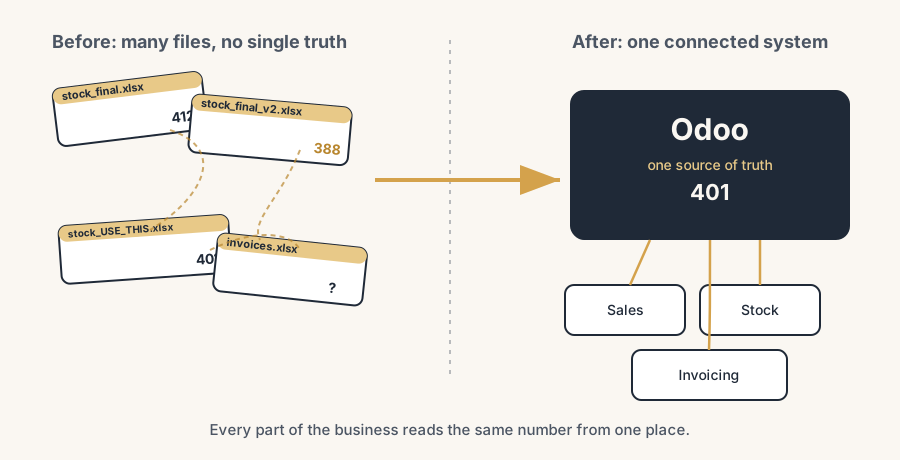
There are versions everywhere. stock_final.xlsx, stock_final_v2.xlsx, stock_final_USE_THIS_ONE.xlsx, plus the copy in someone's inbox and the one on the shared drive. The moment a file gets emailed or copied, it forks, and from then on two realities exist. Nobody can say with confidence which one is current.
Nobody fully trusts the numbers. Before anyone acts on a figure, they check it against another source, or they ask the one person who "knows how the sheet works". When a number needs a human to vouch for it, it is not a system, it is a rumour with a person attached.
Work is copy-paste between tools. Orders come in by email, get typed into a sales sheet, retyped into an invoice template, and the stock count gets adjusted by hand in a third file. Every retype is a chance to fat-finger a quantity or skip a line, and every one of them is unpaid, invisible work.
One person is the system. The whole thing runs on the one colleague who built the formulas. When they are on holiday, the business slows down, because the knowledge lives in their head and in a tab nobody else dares touch. If they leave, you do not lose a file, you lose the operation.
Questions take days, not minutes. "How many of these did we sell to customers in Germany this year?" should be a thirty-second answer. Instead it is an afternoon of filtering, copying and cross-checking, by which point the question has either been answered by gut feel or quietly dropped.
The same data lives in five places. A customer's address is in the sales sheet, the invoice template, the shipping list and the mailing tool, and updating one does not update the others. So customers get post at an old address while their invoice shows the new one, and both are technically "in the system".
If three or more of these sound like your week, you have outgrown spreadsheets. The tool is not failing. It is doing exactly what a spreadsheet does, which is hold numbers in a grid with no idea that they are supposed to agree with each other.
A client of ours showed how sneaky this is. On the surface they looked fully digital: a Shopify store wired straight into a 3PL, orders flowing without anyone touching them. But purchasing lived in Excel. The result was that nobody could see real stock across the chain, and a cashflow forecast was guesswork, because the money going out to suppliers sat in a file the sales side never saw. Outgrowing spreadsheets is not about how modern your front end looks; one Excel in a critical spot is enough.
Why it happens
A spreadsheet has no concept of a single shared truth. Each file is a snapshot, frozen the moment someone saved or copied it, and it has no way to know that a newer reality exists somewhere else. There is no link between the stock number in one file and the order that should have lowered it. There is no rule that says an address can only have one current value. There is nothing stopping two people from editing two copies at once and both being sure they are right.
That works perfectly when one person owns the data and the business is small. It breaks the moment the data is shared, because sharing a spreadsheet does not share one truth, it makes copies of a guess. The business did not do anything wrong. It outgrew the tool, the way you outgrow a filing cabinet. The fix is not a better spreadsheet. It is a different kind of system, one where the data lives in one place and every screen reads from it.
What it actually costs
The cost is easy to underestimate because it never shows up as a single line. It hides in three places.
Time. Add up the hours spent reconciling versions, retyping data between tools, and answering questions that should be instant. For a small team this is routinely a day or more a week of skilled people doing clerical work. That is salary spent on copying, not on selling, making or serving.
Mistakes. Every manual retype carries an error rate. A wrong quantity ships, an old price gets quoted, a credit note gets missed, an invoice goes out twice. Each one costs money directly and costs trust with the customer on top. Most of these never get counted because they get quietly fixed, but the firefighting is real work.
Decisions made blind. This is the expensive one. When the numbers cannot be trusted, the owner stops deciding on data and starts deciding on feel. You hold too much stock because you are not sure what is moving. You chase the loud customer instead of the profitable one because nobody can show you the margins cleanly. The cost here is not an hour, it is the better decision you never made because you could not see straight.
There is also a ceiling cost. A business run on spreadsheets cannot easily take on more volume, more people or more channels, because every one of those multiplies the copying and the reconciling. The spreadsheets are quietly capping how big you can get before the admin eats you.
The fix is moving to one connected system
The fix is to stop keeping the same data in many files and start keeping it once, in a system where every part reads from the same place. An ERP like Odoo is built for exactly this. Sales, stock, invoicing, purchasing and contacts are not separate files that have to be kept in sync by hand. They are views onto one shared database. Here is how the move works in practice.
Pick the one thing that hurts most, and start there.
Do not try to replace every spreadsheet at once. Find the worst pain, often stock or invoicing, and move that first. In Odoo that means putting your products, customers and stock into the system as the single record, so the order that ships and the invoice that goes out both lower the same stock number automatically. One process working in one place beats ten processes half-moved.
Make the data live once.
A customer, a product, a price exists as one record that every screen reads. Change an address in one place and the next invoice, delivery and mailing all use it, because there is no second copy to forget. This is the whole point of an ERP: it removes the copy step that spreadsheets force on you.
Let the system do the retyping.
An order becomes a delivery becomes an invoice without anyone re-entering the lines. The data flows through the process instead of being copied between files. The unpaid, invisible work of retyping disappears, and so does the error rate that came with it.
Get answers from the data, not from a person.
Because everything reads from one place, "what did we sell in Germany this year" is a filter, not an afternoon. The reports and dashboards are built on the live data, so the number on the screen is the number, not a figure someone vouches for. The dependence on the one person who "knows the sheet" goes away.
Move in phases, not in a big bang.
Run the new system alongside the spreadsheets for the first process, check the numbers match, then switch that process over and move to the next. The business keeps running the whole time. You are not betting the company on a single go-live weekend, you are walking one process at a time onto solid ground.
The part that trips people up
A few things catch almost everyone
Do not rebuild your spreadsheets inside the new system. The temptation is to recreate every column and quirk exactly as the sheet had it. That just imports the chaos. The point of moving is to adopt a clean, standard way of working, not to wrap the old mess in new software. Where Odoo has a standard process, use it.
The data you are carrying over is dirtier than you think. Years of spreadsheets hold duplicate customers, half-finished products and addresses that contradict each other. If you load that straight in, you move the mess, not just the data. Clean it on the way in, because a fresh system is the one chance you get to start clean.
Going live is the start of the work, not the end. People have muscle memory for the old files and will keep a "quick sheet on the side" out of habit. That side-sheet quietly becomes a second source of truth and undoes the whole point. The switch only sticks if the team actually stops using the old files, and that takes a deliberate cutover, not just a login.
One connected system is not the same as ten tools bolted together. Buying a separate app for sales, another for stock and another for invoicing and wiring them up with point-to-point connectors recreates the spreadsheet problem in a more expensive form: data in many places, kept in sync by fragile links that break. The win is one system of record, not more integrations.
Spreadsheets do not have to disappear entirely. They are still excellent for a quick one-off analysis or a scratch calculation. The rule that matters is simple: a spreadsheet is fine as a tool, never as the place the truth lives.
Quick checklist
- You can name the one process that hurts most and would move first (often stock or invoicing).
- Your core records (customers, products, prices) are clean enough to load, or you have a plan to clean them on the way in.
- You have decided what "the truth" is for each piece of data, so there is one current value, not several.
- You are moving in phases, running new and old side by side per process, not in one big-bang weekend.
- There is a deliberate cutover where the old spreadsheets are actually retired, not just left open "just in case".
- You are adopting standard ways of working where the system has them, not rebuilding every spreadsheet quirk.
- You are aiming for one system of record, not a pile of separate tools held together by connectors.
FAQ
How do I know if my business has outgrown spreadsheets?
The clearest sign is that nobody fully trusts the numbers without checking them against another file or asking the one person who built the sheet. Other signs: multiple versions of the same file with names like final_v2, work that is copy-paste between separate tools, simple questions that take days to answer, and the same data (like a customer address) living in several places that do not update together. If three or more of those describe your week, you have outgrown spreadsheets as a system of record.
What does it cost to keep running on spreadsheets?
More than it looks, because the cost never shows up as one line. It is the hours spent reconciling versions and retyping data between tools (often a day or more a week for a small team), the errors from manual retyping (wrong quantities, old prices, missed credit notes), and most expensively, decisions made on gut feel because the numbers cannot be trusted. Spreadsheets also cap how much volume, staff or channels you can add before the admin overwhelms you.
Can I move from spreadsheets to Odoo without stopping the business?
Yes, if you move in phases instead of all at once. Pick the process that hurts most, set it up in Odoo, run it alongside the spreadsheet until the numbers match, then switch that one process over and move to the next. The business keeps running throughout. The risky approach is a single big-bang weekend where everything moves at once; the phased approach avoids betting the company on one go-live.
Why not just buy separate apps for sales, stock and invoicing and connect them?
Because that recreates the spreadsheet problem in a more expensive form: your data lives in several places and is kept in sync by point-to-point connectors that break, especially after updates. The reason an ERP like Odoo solves the spreadsheet problem is that it is one system of record, where sales, stock and invoicing read from the same database, so there is nothing to keep in sync by hand.
Should we get rid of spreadsheets completely?
No. Spreadsheets stay excellent for a quick one-off analysis or a scratch calculation. The rule is that a spreadsheet is fine as a tool but never as the place where the truth lives. Once a number has to be shared and acted on by more than one person, it belongs in the system of record, not in a file that forks the moment it is emailed.