
You prevent negative stock in Odoo by blocking below-zero validation on the products where it matters, and you repair a valuation that has already drifted with an inventory adjustment plus a value correction. Both take an afternoon once you see the mechanics.
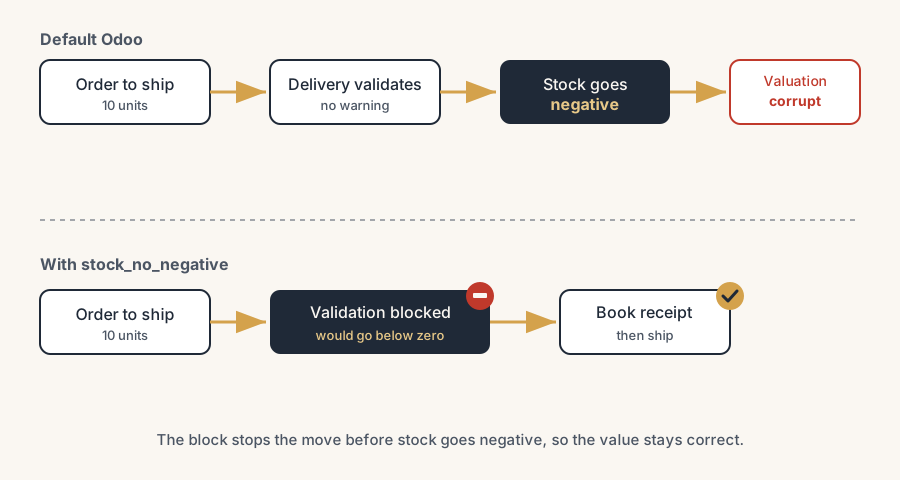
Your warehouse ships an order for ten units. Odoo shows minus three on hand afterwards, and nobody flinched, because the delivery validated without a single warning. A week later your accountant asks why the stock value on the balance sheet does not match the count on the floor.
Negative stock is not a display glitch. By default Odoo lets you deliver or consume more than you have, the quantity goes below zero, and every outgoing move it values from then on uses a guessed cost. That guess quietly poisons your inventory valuation. Here is why it happens, how to stop it, and how to repair the value once it has drifted.
Why negative stock happens in Odoo
Standard Odoo does not block you from shipping stock you do not physically have. It assumes you will receive the goods soon and lets the move validate, so the on-hand quantity drops below zero. This is deliberate. It keeps the warehouse moving when paperwork lags behind reality, for example when a delivery leaves before the matching receipt is booked.
The problem starts with valuation. When you use automated valuation with AVCO (average cost) or FIFO, Odoo values each outgoing move at the cost of the units leaving. If there are no units on hand, there is no real cost to apply, so Odoo falls back to the last known cost. When the real receipt finally lands at a different price, the earlier move was valued wrong, and the correction layers do not always net to zero. Your stock value and your stock count stop agreeing.
So there are two jobs. Stop new negative stock from being created, and correct the value that already drifted.
The fix: block negative stock, then repair the value
Confirm where you stand.
Open Inventory and check current on-hand quantities for the affected products. A negative number on hand is your signal. Note which products and which locations are negative, because you will fix both the block and the value per product.
Block negative stock at validation.
Standard Odoo has no setting that refuses a move for going below zero. The clean route is the OCA module stock_no_negative. Once installed, Odoo blocks the validation of any stock move that would push a stockable product below zero at a location, and shows an error instead of silently going negative. Consumable products are not affected, by design.
Set your exceptions deliberately.
The same module adds an "Allow Negative Stock" option on the product, the product category, and the location. Leave it off everywhere you want hard enforcement. Turn it on only where negative is genuinely fine, for example a transit or production location where stock is expected to dip below zero for short periods. Decide this per location and per category, not ad hoc.
Fix the broken value with inventory adjustments.
For each product that went negative, do an inventory adjustment so the counted quantity matches reality. This corrects the quantity. It does not automatically repair a wrong average cost, so check the product's cost and its valuation layers after adjusting. If the value is still off, post a manual valuation correction so the stock value matches the corrected quantity at the correct cost.
Close the gap that caused it.
Negative stock almost always comes from a process order problem: deliveries booked before receipts, manufacturing consuming components that were never received, or returns processed out of sequence. Fix the sequence so receipts land before the goods leave. The block from step 2 will now catch the cases your process still misses.
There is a deeper choice underneath all of this: do you run Odoo as an administrative package, or as the system that drives your operation. If Odoo is only where you record what already happened, you will never reach zero negative stock, because you are always acting after the fact. The day you let Odoo be the living system that tells the floor what to do next, keeping stock accurate stops being a chore and becomes the only way the work flows. In our experience that shift prevents more negative stock than any module does.
The part that trips people up
A few things catch almost everyone
Blocking negative stock changes daily behaviour. A delivery that used to validate in one click will now stop with an error until the receipt is booked. Warn the warehouse before you switch it on, or you will get a flood of support tickets on day one.
The block does not retroactively fix old negative stock or old valuation. It only stops new cases. The products that already went negative still need the inventory adjustment and the valuation check from step 4.
AVCO and FIFO behave differently once stock goes negative, and neither self-corrects cleanly. Do not assume that receiving more stock will quietly heal the average cost. Check the valuation layers; the math often needs a manual entry.
Allowing negative stock on a parent location can silently allow it on the children. If you set exceptions, confirm the location hierarchy does what you think, or one permissive transit location can undo the whole block.
Quick checklist
- You know which products and locations are currently negative.
- Negative stock is blocked at validation (OCA
stock_no_negativeor equivalent). - "Allow Negative Stock" is on only where you truly want it, per product, category and location.
- Each negative product has had an inventory adjustment, and its cost and valuation layers have been checked.
- The process order that caused it (delivery before receipt) has been fixed.
- The warehouse team knows deliveries now stop when stock would go negative.
FAQ
Does Odoo allow negative stock by default?
Yes. Standard Odoo lets you deliver or consume more than you have on hand, so the quantity goes below zero without a warning. There is no built-in setting that refuses the move. To block it you install a module such as the OCA stock_no_negative.
How do I stop negative stock in Odoo?
Install the OCA stock_no_negative module. It blocks validation of any move that would push a stockable product below zero, and adds an "Allow Negative Stock" exception on the product, the product category, and the location. Set those exceptions only where negative stock is genuinely acceptable.
Why does negative stock break my inventory valuation?
Because Odoo values each outgoing move at the cost of the units leaving. With nothing on hand, it has no real cost and falls back to the last known cost. When the real receipt arrives at a different price, the earlier move was valued wrong, and with AVCO or FIFO the correction does not always net back to zero. Your stock value and your stock count then disagree.
How do I fix a stock valuation that has already gone wrong?
Do an inventory adjustment so the counted quantity matches reality, then check the product's cost and its valuation layers. The adjustment fixes the quantity, not always the value, so if the value is still off, post a manual valuation correction. For widespread or long-running drift, get a partner to reconcile it against your accounts.