
Component traceability in Odoo rests on three settings: lot and serial tracking enabled on the products, lots captured when components arrive, and component lots assigned on every manufacturing order. With those in place, the traceability report answers a recall question in minutes.
A customer calls. One of your finished units failed in the field, and they want to know if other units from the same run are affected. You open Odoo, find the finished serial number, and then the questions start. Which batch of the motor went into this one? Was it the supplier lot you later flagged for early wear, or the one before it? Which other finished units used the same component lot, and where did they ship?
If you cannot answer that in a few minutes, you have two bad options. Recall everything to be safe, which is expensive and damages trust. Or recall nothing and hope, which is a risk no manufacturer should take. The same gap hurts you on warranty claims (you cannot prove a unit was built with the right parts) and on quality audits (you cannot show the genealogy of a product). The fix is to set up lot and serial traceability properly, so the component-to-product link is recorded automatically while you build.
Why it happens
Odoo can record the full genealogy of a manufactured product, but only for products you have told it to track. By default a product is not tracked. It moves through stock as an anonymous quantity, so when a manufacturing order consumes ten motors, Odoo records that ten motors were used, not which ten. There is no link from the finished unit back to a specific supplier batch.
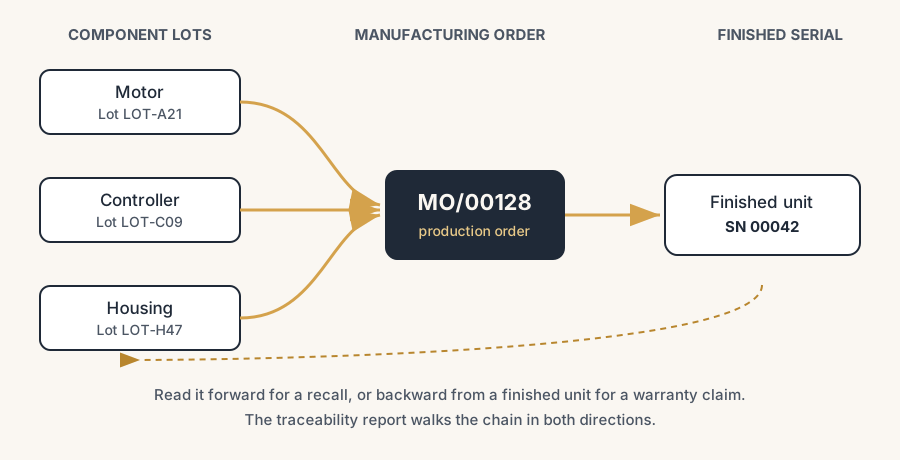
Traceability is a per-product setting. You turn it on for the components you care about and for the finished product, and from that point Odoo forces a lot or serial number at every stock move. Once that data exists, the traceability report can walk the chain in both directions: from a finished serial down to every component lot inside it, and from a suspect component lot up to every finished unit and customer it reached.
The fix, in numbered steps
Enable lots and serial numbers in Inventory
Go to Inventory > Configuration > Settings and switch on Lots & Serial Numbers under the Traceability section. This is the master switch. Without it, the tracking field on the product is hidden and nothing downstream works. Save.
Decide lot or serial per product, then set the tracking field
Open each product you want to trace (Inventory > Products), go to the Inventory tab, and set the Tracking field. You have three options:
- No Tracking for parts you do not need to trace (screws, generic packaging).
- By Lots for batches, where many units share one number. Use this for components bought in batches: a reel of resistors, a drum of adhesive, a supplier delivery of motors.
- By Unique Serial Number for one number per unit. Use this for the finished product and for high-value components you track individually.
The usual pattern in manufacturing is to track components By Lots (you receive them in batches) and the finished product By Unique Serial Number (each unit gets its own identity). Set the tracking before you have stock of that product, because changing it later with stock on hand causes friction.
Capture lots on the components when you receive them
Traceability is only as good as the data you put in. When you receive a tracked component on a purchase receipt, Odoo asks for the lot number. Enter the supplier's batch number (or scan it). That lot now exists in Odoo and is available to consume in a manufacturing order. If you skip this and let Odoo auto-assign meaningless numbers, the chain still works technically but the numbers no longer match your supplier's, which defeats the point on a recall.
Assign component lots and the finished serial on the manufacturing order
Create or open the manufacturing order (Manufacturing > Operations > Manufacturing Orders). On the Components lines, set the Lot/Serial Number for each tracked component, picking the lot you actually pulled from the shelf. On the finished product, assign the serial number for the unit you are building (or let Odoo generate the next one). When you mark the order done, Odoo records the link: this finished serial consumed these component lots. That single action is what makes the whole report possible later.
Read the traceability report
Open the lot or serial you want to investigate. From Inventory > Products > Lots/Serial Numbers, find the finished serial, then click the Traceability smart button (or go to Inventory > Reporting > Traceability). The report shows the genealogy: the finished serial at the top, the component lots that went into it below, and every stock move with its date and document. From a component lot you can read it the other way: which manufacturing orders consumed it, which finished serials came out, and where those shipped. That is your recall scope in one screen.
The part that trips people up
A few things catch almost everyone
Serial numbers are entered one by one. This is the friction that surprises most manufacturers. If your finished product is serial-tracked and you produce fifty units in one manufacturing order, Odoo does not let you wave them through. Each unit needs its own serial, and entering fifty by hand on the order is slow. In practice you use the Generate Serials option to auto-create a sequential range, scan barcodes if your parts carry them, or split serial-heavy production the way Odoo expects (one unit per serial). For high volume, plan the numbering scheme up front so generation is one click, not fifty.
Booking finished goods into stock is a separate, easy-to-forget step. Marking the manufacturing order done is not always the end. The finished units have to actually land in a stock location, and if your setup uses a separate stock-in step or a two-step manufacturing route, the units sit in a transfer until someone validates it. People assume "done" means "in stock" and then cannot find their product. Check that the production output transfer is validated, so the finished serial shows real on-hand stock and the traceability report reflects where it physically is.
Changing tracking on a product that already has stock. Odoo resists switching a product from untracked to tracked (or between lots and serials) while you hold stock, because it cannot retroactively invent the missing numbers. Set tracking when the product is new or at zero stock. If you must change it later, clear stock first, change the setting, then bring stock back in with proper lots.
Tracking everything. It is tempting to serialise every part. Do not. Tracking adds a data-entry step at every move. Track the components that matter for recall, warranty and quality, and leave the cheap, low-risk parts untracked. The goal is a defensible chain, not maximum bureaucracy.
Underneath every step here sits one requirement no module solves: discipline. Traceability only works if the lot is captured at every receipt and every manufacturing order, every time. That holds only when Odoo is the leading system that drives the work, not an administrative record you tidy up afterwards. Treat it as admin and you will always be a step behind the facts, on the one day a recall needs you to be ahead of them. In our experience this is a management belief that has to be carried as a vision from the top, not a setting you switch on once.
Quick checklist
- Lots & Serial Numbers enabled in Inventory settings.
- Tracking field set on every component and finished product that needs it (By Lots or By Unique Serial Number).
- Tracking set before the product has stock on hand.
- Supplier lot numbers captured on purchase receipts, matching the real batch.
- Component lots picked on the manufacturing order, not auto-assigned blindly.
- Finished serial assigned on the order, generated in bulk where volume is high.
- Production output transfer validated so finished goods are really in stock.
- Traceability report opened once as a test, so you know the path before a recall forces you to learn it.
FAQ
How do I trace which components went into a finished product in Odoo?
Track the finished product by serial number and the components by lots, assign those lots on the manufacturing order, and then open the finished serial's Traceability report. It shows every component lot consumed by that unit, with dates and documents.
What is the difference between lot and serial number tracking in Odoo?
A lot is one number shared by many units (a batch), used for components you receive in bulk. A serial number is one number per single unit, used for finished products and high-value items you track individually. Both give full traceability; serial is finer-grained and slower to enter.
Where is the traceability report in Odoo manufacturing?
Go to Inventory > Reporting > Traceability, or open any lot or serial number under Inventory > Products > Lots/Serial Numbers and click the Traceability smart button. It works in both directions: from a finished unit down to its components, or from a component lot up to the finished units and customers it reached.
Why does Odoo make me enter serial numbers one by one?
Because a serial number identifies a single unit, so each unit needs its own. For batch production, use the Generate Serials option to create a sequential range in one step, or scan barcodes, instead of typing each number on the manufacturing order.
Can I turn on tracking for a product that already has stock?
Not cleanly. Odoo blocks changing the tracking field while stock is on hand, because it cannot invent the missing lot or serial numbers for stock you already hold. Set tracking when the product is new or at zero stock, or clear stock, change the setting, and receive stock back in with proper numbers.