
Odoo plans realistically once the four numbers on your work centers are real: parallel capacity, measured efficiency, setup and cleanup time, and actual working hours. By default it assumes infinite capacity, and that is why the Gantt looks clean while the floor disagrees.
You open the planning view and it looks great. Every work order has a neat start and end time, the dates line up, the Gantt chart is a clean staircase. Then you walk onto the floor and the CNC machine has three jobs stacked on it for the same Tuesday morning, two of which Odoo cheerfully scheduled in parallel on a machine that does one part at a time. The plan said you would ship Friday. The floor knows you will ship the following Wednesday. The plan was never wrong on paper. It was wrong about reality, because it never asked whether the machine was free.
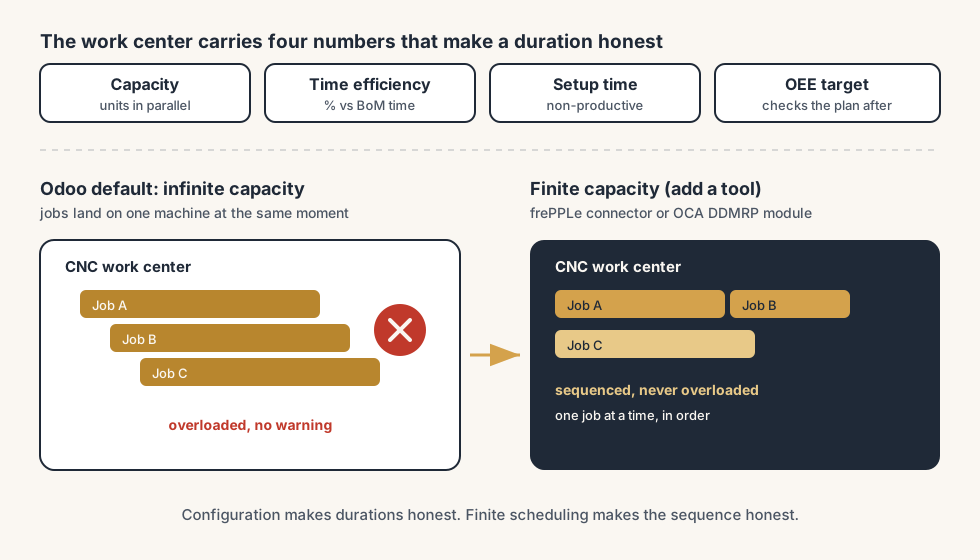
This is the gap between Odoo's default scheduling and what actually happens at your work centers, and it trips up almost every manufacturer who turns on Work Orders for the first time. Out of the box, Odoo plans with infinite capacity. It lays out each operation back to back using the durations on your bill of materials, but it does not check whether the work center can take the job in that window. The result is a schedule that is internally consistent and externally fiction. The fix is partly configuration (set up your work centers with real capacity and efficiency so the durations are honest) and partly knowing where Odoo's standard scheduling stops and you need a different tool for the bottleneck. Here is how the pieces fit, and where to be honest about the limits.
Why the plan looks perfect and the floor disagrees
The mismatch comes from a handful of things, and they all trace back to either a work center that was never configured properly or to the scheduler assuming a constraint that does not hold.
Odoo schedules with infinite capacity by default. This is the big one. When Odoo plans a manufacturing order, it places each work order based on the operation duration and the work center's working hours, but it does not stop a work center from being booked for two jobs at the same time. The scheduler is happy to put three orders on one machine at 9am. On screen it looks planned. On the floor only one of them can run.
The durations are guesses, not measured. The duration of a work order comes from the operation time on the BoM, adjusted by the work center's capacity and time efficiency. If you left efficiency at the default and never timed the real operation, the plan inherits a number nobody checked. Optimistic durations make the whole schedule optimistic.
Capacity is set as if every machine runs one unit at a time, or as if it runs infinitely many. A work center's capacity is how many units it can produce in parallel. Leave it wrong and the duration for a multi-unit order is wrong: too long if the machine actually batches, too short if you assumed it batches and it does not.
Setup and cleanup time is invisible. A machine that needs twenty minutes to set up and ten to clean down between jobs has thirty minutes of non-productive time per changeover that the plan ignores if you never entered it. Run ten short jobs and that is five hours the schedule does not know about.
Working hours do not match the real shift. If the work center's working hours say 8 to 5 but the line actually runs one shift with a real lunch and a handover, the available time is overstated. Every order downstream inherits the optimism.
What it costs you
A plan that lies is worse than no plan, because people trust it and commit to it.
You promise delivery dates you cannot hit. Sales quotes a ship date off the planned finish. The planned finish assumed infinite capacity at the bottleneck. The customer gets a date that was never real, and you spend the back half of the order managing a disappointment you created at the start.
You cannot see the bottleneck until it bites. The whole point of capacity planning is to know which work center is the constraint so you can protect it, feed it, and quote around it. If the plan pretends every center is infinite, the bottleneck is invisible in the schedule and only shows up as a pile of late jobs in front of one machine.
You either overstaff or firefight. Without a real picture of load per work center, you cannot plan shifts, overtime, or a second machine with any confidence. You react. A surprise crunch on the constraint becomes weekend overtime that a realistic plan would have flagged weeks earlier.
You lose trust in your own system. Once the floor learns the plan is fiction, they stop reading it and run on memory and shouting. The expensive ERP becomes a place to record what already happened, not a tool to decide what happens next.
Work center, capacity, efficiency, OEE: the four numbers that make a plan honest
Before the steps, get the four configuration numbers straight, because they are what turn a guessed duration into a real one.
A work center is a place where work happens: a machine, a bench, a station, or a group of identical ones. Work orders run at work centers, and the work center carries the numbers that decide how long an operation really takes and when it can run.
Capacity is how many units the work center can produce in parallel. A capacity of 1 means one unit at a time, so a 10-unit order takes ten times the per-unit operation time. A capacity of 5 means the duration for that 10-unit order is roughly halved, because five run together. Set this to what the machine actually does.
Time efficiency is a percentage that scales the expected duration. At 100% the work center runs at exactly the time on the BoM. Below 100% it runs slower (a center that is consistently 20% slower than the standard should be at around 83%, so the plan stops being optimistic). Above 100% it runs faster. This is the dial that makes planned durations match measured ones.
OEE (Overall Equipment Effectiveness) is the report, not a planning input. It measures how much of a work center's available time was fully productive, so you can see where time is lost. Odoo splits the lost time into productivity-loss categories you define and tracks it against an OEE target you set per work center. OEE tells you afterwards whether the center is as available as the plan assumed. A center with low OEE is one whose plan you should not trust until you fix the losses.
The division is short: capacity and efficiency feed the plan, OEE checks the plan against reality, and the work center is where all four live.
The fix, in numbered steps
You make Odoo's planning realistic by configuring the work centers properly first, then being honest about where standard scheduling cannot model your bottleneck. The steps build on each other.
Turn on Work Orders and create your real work centers.
In Manufacturing, enable Work Orders in Settings. Then create a work center for each real constraint on your floor, not one generic "production" center. The granularity matters: if the CNC machine is your bottleneck, it has to be its own work center, because that is the only way its load shows up separately in the plan. Lumping it into a catch-all center hides the exact thing you are trying to see.
Set capacity to what the machine actually does in parallel.
On each work center, set Capacity to the number of units it genuinely produces at once. One part at a time is capacity 1. An oven that cures forty units in one cycle is capacity 40. This single number decides whether the duration of a multi-unit order is realistic, so get it from the floor, not from a hopeful guess.
Set time efficiency from measured runs, not the default.
Time a few real operations and compare them to the expected duration on the BoM. If the center consistently runs slower, drop its time efficiency below 100% so the plan stretches to match. A plan built on honest efficiency is a plan you can quote against. Leaving every center at 100% when the floor runs at 80% is how you promise dates you miss.
Enter setup time, cleanup time and the real working hours.
Add the setup and cleanup time per work center so changeovers stop being invisible, and set the working hours to the actual shift, lunches and handovers included. Now the plan accounts for the non-productive time that eats real days. This is where a lot of the optimism quietly leaves the schedule.
Turn on OEE tracking and watch the bottleneck.
Set an OEE target per work center and let operators log time against productivity-loss categories (setup, breakdown, material wait, and so on). After a few weeks you can see, per center, how much available time was actually productive. The center with the lowest OEE and the most load is your real bottleneck, and now you can prove it instead of guessing.
Decide honestly whether standard scheduling is enough.
Here is the limit you have to face. Even with every work center configured perfectly, Odoo's standard scheduler still plans with infinite capacity: it will not stop two jobs landing on one machine at the same moment. For many small shops with one clear bottleneck and slack everywhere else, well-configured durations plus a human checking the bottleneck by eye is enough. For a shop where capacity is tight across several centers and the sequence really matters, it is not. At that point you need finite capacity scheduling, which standard Odoo does not do on its own. And before you blame the scheduler, look at your batch size, because that decides whether planning works at all. A floor full of five-minute jobs cannot be scheduled meaningfully, and giant jobs with hours of possible overrun blow up every plan around them. Measure real runs first; when a process estimates well, the schedule holds. When the variation stays large, stop pretending and plan in sprints instead: a day or a week of work the team commits to, rather than a Gantt chart promising times nobody can keep.
The part that trips people up
A few things catch almost everyone
A few things catch almost everyone, and most of them come from not knowing where Odoo's standard scheduling stops.
Odoo's default scheduling is infinite capacity, and no amount of work center configuration changes that. This is the single biggest misunderstanding. People configure capacity and efficiency beautifully and then assume the scheduler will now refuse to overload a machine. It will not. Capacity and efficiency make each operation's duration realistic; they do not make the scheduler respect that two operations cannot share one machine at the same time. The plan can still book three jobs on one center at 9am. You have to either check the bottleneck manually or add a tool that does finite scheduling.
The fix for real finite capacity lives outside standard Odoo. When one bottleneck is not enough and you need the system to sequence jobs so no center is overloaded, the established routes are an Advanced Planning and Scheduling tool such as frePPLe (there is a community Odoo-frePPLe connector), or the Demand-Driven MRP (DDMRP) modules maintained by the Odoo Community Association (OCA), which model buffers and balance load. Both are real options, both add complexity, and neither is something you turn on with a checkbox. Treat finite scheduling as a project, not a setting.
Capacity is per work center, not per machine inside it. If you model "three identical lathes" as one work center with capacity 3, the plan treats them as one pool of three parallel slots. That is fine until the lathes are not actually interchangeable, or until you need to know which physical lathe is free. If individual machines matter, model them as individual work centers, and accept the extra setup.
OEE is a rear-view mirror, not a planning input. People sometimes expect a low OEE to automatically stretch the plan. It does not. OEE reports lost time after the fact so you can fix the cause; it is your signal to lower a center's time efficiency or add setup time, but you make that change by hand. The loop only closes if someone reads the OEE report and feeds the lesson back into the configuration.
Garbage durations make every downstream date garbage. The whole schedule is only as honest as the operation times on your BoMs and the capacity and efficiency on your centers. If those are guesses, the beautiful Gantt chart is a beautiful guess. Spend the time measuring the few operations that sit on your bottleneck before you trust any date the system gives you.
Quick checklist
- Work Orders is enabled and each real bottleneck has its own work center, not a generic catch-all.
- Capacity on each center reflects how many units it genuinely produces in parallel.
- Time efficiency is set from measured runs, not left at a hopeful 100%.
- Setup time, cleanup time and real working hours (shifts, lunches, handovers) are entered, so non-productive time is visible.
- OEE tracking is on, with a target per center, so you can see which center is the real bottleneck.
- You have decided honestly whether standard infinite-capacity scheduling is enough, or whether the bottleneck needs finite scheduling via frePPLe or an OCA DDMRP module.
FAQ
Does Odoo schedule production with finite or infinite capacity?
By default, Odoo schedules with infinite capacity. It plans each work order using the operation duration and the work center's working hours, but it does not stop a work center from being booked for two or more jobs at the same time. The schedule looks complete, but it can overload a machine without warning. To get true finite capacity scheduling, where the system sequences jobs so no center is overloaded, you need an external tool such as frePPLe (via the Odoo-frePPLe connector) or the OCA Demand-Driven MRP modules. Standard Odoo does not do finite scheduling on its own.
What is the difference between capacity and time efficiency on an Odoo work center?
Capacity is how many units a work center can produce in parallel; it scales the duration of multi-unit orders. A capacity of 1 means one unit at a time, a capacity of 5 means five run together. Time efficiency is a percentage that scales the expected operation duration: 100% means the center runs at exactly the BoM time, below 100% means it runs slower, above means faster. Capacity answers "how many at once", efficiency answers "how fast compared to standard". Both feed the planned duration, so both need to reflect the real floor.
What is OEE in Odoo and is it used for planning?
OEE (Overall Equipment Effectiveness) measures how much of a work center's available time was fully productive, and it is a report, not a planning input. Odoo tracks lost time against productivity-loss categories you define and compares actual productive time to an OEE target you set per work center. OEE tells you, after the fact, whether a center was as available as the plan assumed. You use it to spot bottlenecks and to decide whether to lower a center's time efficiency or add setup time, but those configuration changes are made by hand. OEE does not automatically adjust the schedule.
How do I stop Odoo from overloading a work center?
There is no single setting that makes standard Odoo refuse to overload a center, because the default scheduler assumes infinite capacity. For a shop with one clear bottleneck, the practical answer is to give that bottleneck its own work center, configure realistic capacity, efficiency and setup time so its durations are honest, and have a planner check its load by eye. For a shop where capacity is tight across several centers and sequence matters, you need finite capacity scheduling from an external tool: frePPLe through the community connector, or an OCA DDMRP module. That is a project, not a checkbox.
Should every machine be its own work center in Odoo?
Only the ones whose load you need to see or whose capacity is a real constraint. Capacity in Odoo is per work center, so if you model three identical, interchangeable lathes as one work center with capacity 3, the plan treats them as a pool of three parallel slots, which is fine. Model them as individual work centers only if the machines are not interchangeable or if you need to know which physical machine is free. Your bottleneck almost always deserves its own work center so its load shows up separately in the plan.