
The AI in Odoo 19 is real and worth switching on, the autonomous agent workflows are mostly roadmap, and none of it pays off on a messy database. That is the whole verdict; the rest of this guide is the evidence and the questions to ask.
A vendor demo shows an AI that reads your inbox, writes the purchase order, books the bill, chases the customer, and closes the month while you watch. Then you go live, open your own database, and the same feature answers a question, drafts a paragraph, and politely tells you it cannot change the record. Both things are true at the same time. Odoo now has genuine AI built into the product, and the marketing around it runs well ahead of what the software does in your hands today.
This is a buyer guide, not a launch post. It covers what AI actually ships in Odoo as of mid 2026, where it earns its keep, where the promise is bigger than the product, and how to test any AI claim before you believe it. The short version: the useful features are real and worth turning on, the autonomous "agentic" workflows are mostly roadmap, and none of it pays off on a messy database. AI only helps when it sits on a clean standard and good data.
What ships today
Odoo 19, released in September 2025, is the first version that treats AI as part of the product rather than an add-on. Here is what is actually in the box, and what each thing really does.
Ask AI: a read-only assistant. There is an "Ask AI" assistant you can reach across the database. It understands plain language, answers questions about your data, opens the right view, builds a report with filters and groups, and drafts or improves text in a field. The important limit: the standard Ask AI assistant cannot change your data. It opens views and writes drafts, it does not create the lead or post the entry. That is a sensible default, not a bug, but it is the gap between the demo and day one.
AI Agents: the part that can act, once you configure it. Odoo 19 adds configurable AI Agents: assistants you set up for a specific job, give a set of allowed topics, and point at sources of knowledge (your documents, a knowledge base). With "Restrict to Sources" on, an agent answers only from the material you gave it, which keeps it from inventing answers. An agent can be allowed to do things, like draft a reply in Helpdesk or create an opportunity, but only the actions you configure, with the topics you assign. Agents are where the real workflow value sits, and they are also where the work sits. Out of the box they do little; configured well they save real time. There is a route beside the built-in agents that we use daily ourselves: connect a general AI assistant to Odoo through MCP, the open protocol for giving assistants tool access. The assistant then reads and, where you allow it, writes through the normal Odoo access rights, and you steer it with reusable instructions instead of per-agent configuration. In practice that is more flexible than the configured agents, because the same assistant that knows your writing rules and your processes can also touch the ERP. One warning doubles in weight here: an assistant on MCP sees everything the user's access rights allow, including data hidden behind menus, so scope those rights for real, as we explained in access rights vs record rules in Odoo.
AI fields in Studio and prompt-based actions. In Studio you can add an AI field: a field whose value is generated from a prompt that reads other fields on the record, for example a product description or a task summary. You can also write server actions in plain language ("when this happens, do that") instead of building the rule by hand. Useful, and a genuine time-saver for the right repetitive job. Still something a person sets up and checks.
Voice transcription and summaries. Odoo can record a meeting, transcribe it, and generate a summary on the record. This works and is low-risk, because a wrong summary is easy to spot and fix.
Document digitization (OCR): the mature one. Reading a vendor bill or receipt and filling the fields automatically is the oldest and most reliable AI feature in Odoo. It handles real volume (Odoo cites up to 400 documents per hour) and gets better as it sees more of your documents. It is not part of the new AI app, it runs on prepaid In-App-Purchase credits, and it still needs a human to check the result before posting. This is the feature most companies should turn on first, because the value is obvious and the risk is contained.
Behind all of this, Odoo sends prompts to an external model. You choose the provider, OpenAI (ChatGPT) or Google Gemini, and the new AI features draw on In-App-Purchase credits or your own API key. That matters for cost and for privacy, which we come back to below.
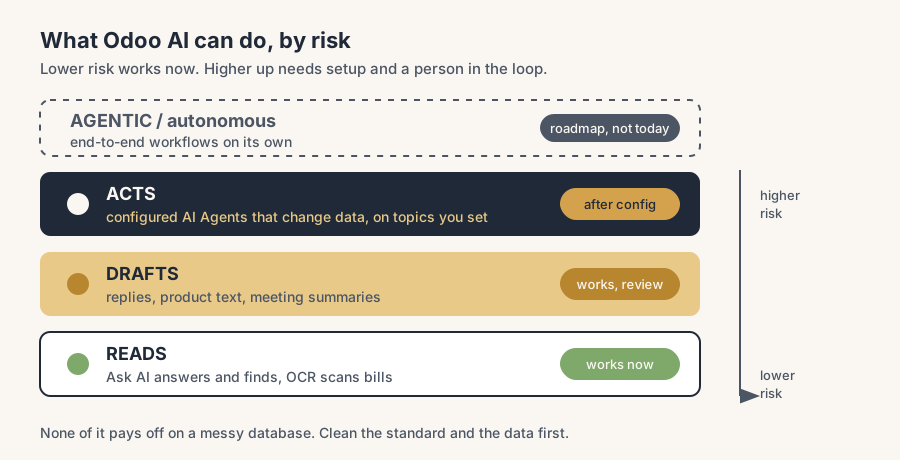
Where AI actually helps in Odoo today
Be specific, because "AI helps everywhere" is the claim that gets people burned. The wins that are real today share a shape: high volume, low stakes per item, and a human still in the loop.
- Reading documents into records. Vendor bills, receipts, expenses. High volume, easy to check, clear time saved. Start here.
- Drafting text you were going to write anyway. A first-pass reply in Helpdesk, a product description, a summary of a long thread. The draft is faster than a blank page, and you edit before it goes out.
- Answering "where is this" questions. Ask AI opening the right view or building a report saves the click-hunt, and because it does not change data, a wrong answer costs you nothing but a second look.
- A configured agent on a narrow, well-defined job. A Helpdesk agent that answers from your own documentation, scoped to topics you control, is genuinely useful and stays inside its lane.
In every one of these the AI assists a person who stays responsible for the result. That is the honest sweet spot today.
Where the promise runs ahead of the product
Now the other half, because a buyer guide that only lists the good parts is a brochure.
"Agentic" end-to-end autonomy is mostly roadmap. The demos that show AI planning and running a full cross-department workflow on its own, watching inventory, analysing suppliers, and raising the purchase order without you, describe where Odoo says it is going (talked about for version 20), not what version 19 does in your database. Today you get an assistant and configurable agents on narrow tasks, not an autonomous colleague. Buy on what ships, not on the roadmap.
Predictive features are thin. Predictive lead scoring and AI-driven supply-chain forecasting appear in marketing and previews. Treat any number you are quoted ("cuts lead times by X percent") as a vendor claim until you have seen it on your own data. Forecasting is only as good as the history you feed it, and most mid-market databases do not have clean enough history yet.
"It can do it" usually means "it can be configured to do it". Ask AI cannot change data. Agents can act only on the topics and actions you set up. So a claim like "Odoo AI updates your records automatically" is true only after someone built and tested that agent. The capability is real; the out-of-the-box behaviour is much smaller. The gap is configuration work, and that work is the project.
The hidden cost is credits and tokens, not licence. The headline AI features are included in the Standard and Custom plans, which sounds free. The running cost is the In-App-Purchase credits or API tokens each request consumes. On real volume that is a line item, not a rounding error. Ask what a typical month costs at your volume before you assume it is included.
Your prompts leave the building. Every AI call sends data to an external model (OpenAI or Google). For some records that is fine, for others it is a question your data-protection officer should answer first: which provider, which region, what data is allowed to flow out. This is a setup decision, not a detail to discover after go-live.
How to judge any AI claim
Use these five questions on any Odoo AI feature, in a demo or in a sales deck. They separate what works from what is hype.
1. Does it ship in the version I am buying, or is it roadmap? "Coming in 20" is not a feature you have. Pin every claim to a version you can install today. 2. Does it read, draft, or act? Reading and drafting are low-risk and work now. Acting on your data needs a configured agent and a human check. Know which one you are being shown. 3. Show it on messy data. Anyone can demo on Odoo's clean sample database. Ask to see it on a realistic, half-tidy record. If the feature falls apart, the feature was never the point, the clean data was. 4. What does it cost per month at my volume? Included in the plan is not the same as free. Get the credit or token cost for your real document and request volume. 5. Where does my data go, and can I prove who is responsible for the output? Which provider, which region, and who checks the result before it counts. If nobody owns the output, you do not have a process, you have a risk.
The part that trips people up
A few things catch almost everyone
A few things catch almost everyone who switches AI on.
Nobody turns it on, or everybody turns it all on. The common failure is paying for AI features that sit unused because no one enabled them during the project. The opposite failure is enabling everything at once and trusting output nobody checks. Pick the one or two features with obvious value (OCR first), turn those on properly, and grow from there.
Garbage in, confident garbage out. AI does not fix a messy database, it speeds it up and states the wrong answer with confidence. A bad agent answer on top of bad data is worse than a slow human, because it looks finished. Clean the data and standardise the process first. The AI is the last layer, not the first.
A draft is not a decision. Drafted replies, generated descriptions and meeting summaries are starting points. The moment you stop reading them before they go out, the quality drops and you will not notice until a customer does.
"Restrict to Sources" is not optional for agents that answer customers. An agent that can answer from the open internet will eventually say something you did not authorise. Scope every customer-facing agent to your own sources, and review what it is allowed to say.
The roadmap is not a purchase order. It is easy to buy on what Odoo says is coming. Build your business case on what version 19 does today. If the roadmap lands, that is upside, not the plan.
Quick checklist
- You can name which AI features ship in the version you run, and which are roadmap.
- You know, per feature, whether it reads, drafts, or acts on data.
- Document digitization (OCR) is on and checked by a person before posting.
- Customer-facing agents are scoped with "Restrict to Sources" and a reviewed topic list.
- You have the monthly credit or token cost at your real volume, not just the licence price.
- Your provider, region and data-flow choices are signed off before go-live, not after.
- The underlying data and process are clean enough that a fast answer is also a right answer.
FAQ
Does Odoo have AI, and what can it actually do?
Yes. As of Odoo 19 (released September 2025) there is a built-in AI app with an "Ask AI" assistant, configurable AI Agents, AI fields in Studio, prompt-based server actions, and meeting transcription, plus the older document digitization (OCR) for vendor bills. Ask AI answers questions, opens views, builds reports and drafts text, but by default it cannot change your data. Acting on data needs a configured agent. The features run on external models (OpenAI or Google Gemini) and use In-App-Purchase credits or your own API key.
Can Odoo AI update or create records automatically?
Not by default. The standard Ask AI assistant is read-only: it can open views, build reports and draft text, but it does not create or change records. To let AI act on your data you configure an AI Agent, give it specific topics and actions, and point it at trusted sources. So a claim that "Odoo AI updates records automatically" is only true after someone has built and tested that agent. The capability is real, the out-of-the-box behaviour is much smaller.
Is Odoo AI free if it is included in my plan?
The headline AI features are included in the Standard and Custom plans, but running them is not free. Each AI request uses In-App-Purchase credits or API tokens, and document digitization runs on prepaid credits too. At real volume that is a recurring cost, not a rounding error. Ask for the monthly credit or token cost at your actual document and request volume before you assume AI is included.
Where does my data go when I use Odoo AI?
To an external model. Odoo's AI features send your prompt to a provider you choose, OpenAI (ChatGPT) or Google Gemini. That makes provider, region and allowed data a setup decision you should make before go-live, especially under GDPR. For agents that answer from your own material, turn on "Restrict to Sources" so the agent only uses the documents you supplied instead of the open internet.
What is "agentic AI" in Odoo, and does it work today?
Agentic AI means software that plans and runs a multi-step workflow across departments on its own, for example watching inventory and raising a purchase order without you. In Odoo this is mostly roadmap (discussed for version 20), not what version 19 does in your database today. Today you get an assistant and configurable agents on narrow, defined tasks with a human in the loop. Buy on what ships now, and treat the autonomous workflows as upside if they land.