
Every Odoo 20 feature from the official release notes, sorted by the business problem it fixes, with its edition and what is confirmed today.
The Problem
Someone forwards you the Odoo 20 release notes. They run to dozens of new features across sales, stock, accounting, phone, AI and the register, plus a new price list. Every line sounds useful. You have three questions: which Odoo 20 new features change how your business runs, which ones need Enterprise, and what will it cost?
A list sorted by app does not answer that. You need it sorted by the problem each change solves, with the edition it needs and what you can actually see working today.
Odoo 20 at a Glance
Odoo 20 is out with official release notes and a public 20.0 code branch, and the rollout is staged. The biggest changes are editable margins and reusable sections on quotes, Pay on Invoice for B2B web orders, demand-based replenishment, direct bank payments, product snooze and courses in Point of Sale, VoIP with phone numbers you buy inside Odoo, AI agents, and a native MCP endpoint for AI tools. On pricing, the new Light User license is on Odoo's pricing page and the Custom plan costs more from 1 October 2026.
- Best for wholesale: Pay on Invoice, margin editing on sales lines, mixed-order receiving (Enterprise), package splitting.
- Best for retail and hospitality: product snooze across register, kiosk and online ordering; courses; auto-combos. All in Community and Enterprise.
- Best for finance: direct bank payments, bulk reconciliation, multiple depreciation boards. All Enterprise.
- Watch the price: the Custom plan went up on 1 October 2026; Light User lowers the cost for occasional users; AI, calls and OCR are billed per use.
Why the Odoo 20 Feature List Is Hard to Read
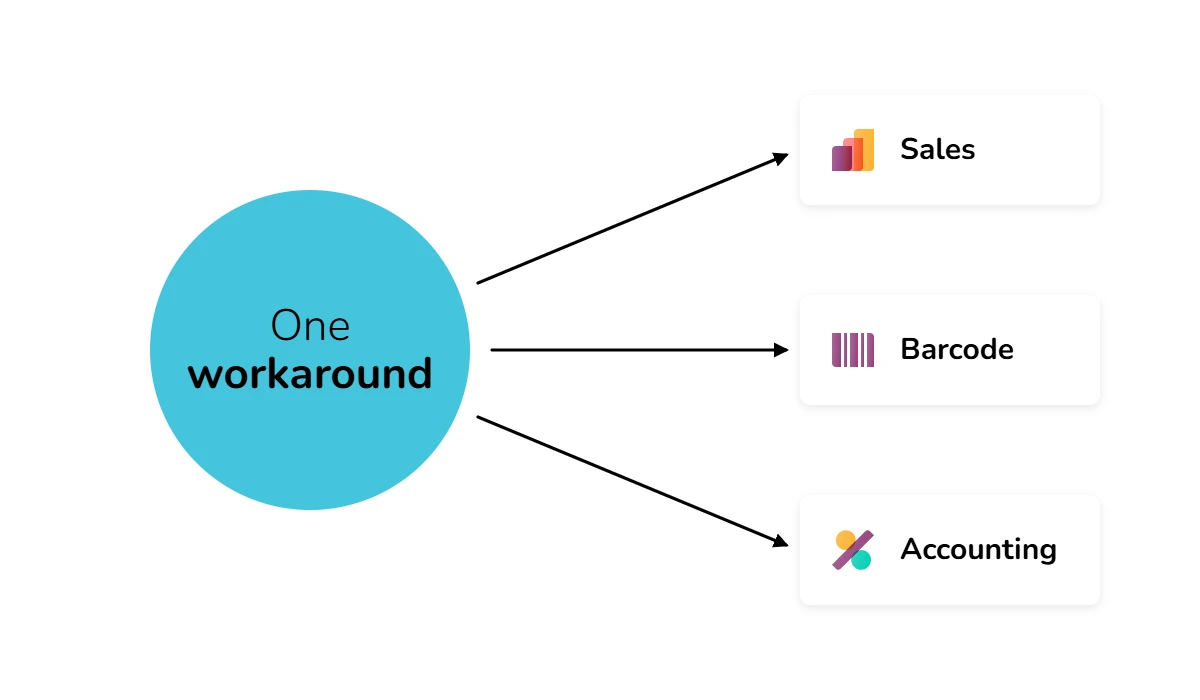
Odoo lists changes by app. Your problems do not live in one app. A wholesaler who loses margin on quotes, receives goods from three suppliers at once, and pays vendors through a bank portal has one problem spread across Sales, Barcode and Accounting.
Two more things blur the picture. Odoo comes in two editions: Community, which is free and open source, and Enterprise, which is a paid subscription with extra apps. Many headline features need Enterprise, and Enterprise code is closed, so nobody outside Odoo can check it in code. And Odoo 20 is rolling out in stages, so "in the release notes" and "live in your database" are different moments.
Odoo 20 New Features by Business Area
Each table shows what changed, the problem it fixes, which edition it needs and its status on 1 October 2026. Edition is based on the edition the app lives in today; Odoo can move features between editions, so confirm on your own database. In release notes means listed in Odoo's official Odoo 20 release notes. Confirmed in code means we also read it in Odoo's public 20.0 branch, which only covers Community.
Odoo 20 Sales, eCommerce and Wholesale Features
|
Change |
The problem it fixes |
Edition |
|
Editable cost and margin on sales lines |
You set a price, then do margin maths in a spreadsheet. Now you type the margin and Odoo sets the price. |
Community + Enterprise |
|
Reusable quote sections with multipliers |
You rebuild the same bundle of lines in every quote. Save a section once, reuse it, and scale all its lines with one quantity. |
Community + Enterprise |
|
Tax included / excluded toggle |
B2B wants prices ex tax, B2C wants them incl tax. One button switches quotes and purchase orders. |
Community + Enterprise |
|
"Pay on Invoice" at checkout |
Trade customers cannot order online because the shop demands payment up front. They can now confirm and pay on the invoice. |
Community + Enterprise |
|
Delivery date and self-service returns |
Customers email to ask for a delivery day or a return label. Both move into checkout and the portal. |
Community + Enterprise |
|
Variant search and thumbnails |
Searching "red" lands on a generic product page. Search now opens the matching variant. |
Community + Enterprise |
Odoo 20 Inventory, Barcode and Manufacturing Features
|
Change |
The problem it fixes |
Edition |
|
Demand-based replenishment wizard |
Min/max rules set by gut feeling. Odoo now proposes them from recent demand, lead times and target stock days. |
Community + Enterprise |
|
Mixed-order barcode scanning |
One delivery covers three purchase orders and you receive them one by one. Odoo spots the POs and offers one batch. |
Enterprise only (Barcode app) |
|
Automatic package splitting |
Suppliers pack in 50, you store in 10. Odoo splits packages into your own units at receipt. |
Community + Enterprise |
|
Bill of materials comparison |
Comparing two BOM versions means two screens and a notepad. A pivot view puts them side by side. |
Community + Enterprise |
Odoo 20 Accounting Features
|
Change |
The problem it fixes |
Edition |
|
Direct bank payment initiation |
You export a SEPA file and upload it to the bank portal. Pay vendor bills from Odoo with your bank login instead. |
Enterprise only |
|
Bulk bank reconciliation |
Validating transactions one at a time. Select many, validate or request documents in one action. |
Enterprise only |
|
Inter-company balance report and CTA line |
Group closings where company balances do not match. A comparison report and an automatic translation adjustment line help. |
Enterprise only |
|
Multiple depreciation boards per asset |
Running local GAAP and IFRS schedules outside Odoo. One asset can now carry both. |
Enterprise only |
Odoo 20 Point of Sale: Retail and Restaurant
|
Change |
The problem it fixes |
Edition |
|
One-tap product "snooze" |
An item runs out and keeps selling online and at the kiosk. Long-press to pause it everywhere at once. |
Community + Enterprise |
|
Courses and kitchen notes |
Starters and mains reach the kitchen as one ticket. Categories now map to courses. |
Community + Enterprise |
|
Auto-combo detection |
Customers pick a burger, fries and a drink separately and pay more than the menu price. Odoo offers to merge them. |
Community + Enterprise |
|
Stripe refunds from the register |
Refunds handled in the Stripe dashboard, not at the till. |
Community + Enterprise |
|
Expired lot and serial alerts |
Selling a product past its date without noticing. |
Community + Enterprise |
|
Local printer discovery without SSL certificates |
Printer setup that needs IT help every time. |
Community + Enterprise |
|
Receipt options: paper size, WhatsApp, QR self-invoicing |
Customers asking for an invoice at the till, or a digital receipt. |
Community + Enterprise (WhatsApp needs Enterprise) |
|
New floor plan and reservation view |
Allergy notes on paper and table swaps done by hand. |
Community + Enterprise |
Odoo 20 VoIP: Phone Numbers and Call Rates Inside Odoo
VoIP is in Odoo's official Odoo 20 release notes. Odoo's VoIP app lets your team call from a contact, lead or ticket and logs the call on the record. What is new is how you pay for the line: phone numbers and per-minute call rates are now in-app purchases, bought inside Odoo. For a small sales or support team, that can mean one bill instead of a separate telephony contract.
VoIP is an Enterprise app, so it is not in the free Community edition, and its code is not public. Before you switch, check that Odoo sells numbers in your country, compare the per-minute rate with your current provider, and ask your partner to run a test call on a 20.0 database.
Odoo 20 AI, MCP and Offline Mode
|
Change |
The problem it fixes |
Edition |
|
AI agents that build native views and automations |
AI answers in text you then rebuild as a report. It now produces real pivots, graphs and automated actions. |
Enterprise only |
|
Native MCP endpoint for external AI tools |
Connecting assistants like Claude, ChatGPT or Gemini to Odoo needs custom work. MCP lets them read and write Odoo data within the user's access rights. |
Not stated |
|
Read/write offline mode |
Warehouse or field staff lose work when the connection drops. Edits queue and sync later. |
Not stated |
Odoo 20 Pricing: Light User, the Custom Plan Increase and In-App Purchases
Odoo 20 changes what you pay in three ways: a new cheaper license for occasional users, a higher price for the Custom plan, and a wider set of services you pay for per use. Licenses only apply to paid Odoo subscriptions (Odoo Online, Odoo.sh and on-premise Enterprise). Community has no license fee.
Licenses and Plans
|
Change |
What it means for you |
|
New Light User license |
A restricted, lower-cost license for staff who only use HR self-service (time off, expenses, attendance, appraisals) or operational apps (POS, barcode and inventory, shop floor, planning and field service). Reported at about €7.90 per user per month. |
|
Custom plan price increase |
Reported at about 20%. Odoo emailed customers that the new pricing applies from 1 October 2026; subscriptions paid before the change keep the old price until renewal. |
|
Standard plan |
Reported unchanged. |
In-App Purchases: What You Pay per Use
Odoo 20's release notes list in-app purchases for the services below. You buy credits inside Odoo and pay as you use them, on top of your licenses. SMS, snail mail, OCR and lead generation were already pay-per-use in earlier versions; AI agents and phone numbers with call rates are the new additions.
|
Service |
What you use it for |
|
AI agents and prompts |
Run AI agents and prompts inside Odoo, for example turning an emailed PDF into a draft sales order. |
|
Phone numbers and per-minute calls |
Buy a number and pay per minute to call from Odoo VoIP. |
|
OCR (document digitization) |
Read vendor bills, receipts and expenses automatically instead of typing them in. |
|
CRM lead generation |
Generate new leads by country, industry and company size. |
|
SMS |
Send order updates, reminders and campaigns by text. |
|
Sending Post |
Post invoices and letters from Odoo without printing them yourself. |
For budgeting, treat these as running costs. Estimate a month of AI prompts, scanned bills, calls and texts before you compare Odoo 20 with your current setup.
Odoo 20 Community vs Enterprise: What You Get in Each
If you run Community, Odoo 20 still brings real gains in sales, stock and the register. Most of the accounting, phone and AI news needs Enterprise. Here is the split, based on which edition each app lives in today.
- Community and Enterprise: editable margins, quote sections, tax toggle, Pay on Invoice, delivery dates and returns, variant search, the replenishment wizard, package splitting, BOM comparison, all checked Point of Sale features (snooze, courses, combos, Stripe refunds, kiosk and self-ordering), the Xendit payment provider, and pay-per-use SMS, snail mail and lead generation.
- Enterprise only: mixed-order barcode scanning, direct bank payments, bulk reconciliation, inter-company and CTA reporting, multiple depreciation boards, AI agents, VoIP with in-app phone numbers, OCR, and WhatsApp receipts.
- Paid subscriptions only: the Light User license and the Custom plan increase. Community users pay no license.
- Not stated by Odoo: which edition gets MCP, offline mode, Belvo and PayWay. Ask your partner before you plan around them.
Thinking of moving from Community to Enterprise for Odoo 20? Count which Enterprise-only items above remove a real workaround, then compare that with the license cost for your team, using Light User where it fits.
How to Work Out What Odoo 20 Means for You
- Write down your three most expensive workarounds. The spreadsheet next to your quotes, the SEPA upload every Friday, the paper list of snoozed menu items, the calls nobody logs. These are your filter.
- Match each workaround to a row above. If nothing matches, Odoo 20 is a routine upgrade for you, not a reason to rush.
- Check your edition. Go to Settings and look at the edition label. On Community, the Enterprise-only rows above will not apply unless you upgrade.
- Recalculate your licenses. Count the users who only book leave, scan stock or run a register; those are your Light User candidates. If you are on the Custom plan, ask for your renewal quote at the new price.
- Estimate pay-per-use costs. Add a month of AI prompts, OCR, calls and SMS to the budget, so the first invoice is not a surprise.
- Ask for a live look, then plan around one real gain. Have your partner show each matched feature on a copy of your own database, and schedule the upgrade to deliver the biggest gain first.
The Part That Trips People Up
The biggest trap is upgrading for a feature that does not fit your setup or your edition. Direct bank payments depend on your bank and country. Pay on Invoice changes your credit risk, so you still need credit limits and approval rules. VoIP and AI agents need Enterprise and add usage costs. Offline mode helps a warehouse with bad Wi-Fi, not an office with good Wi-Fi.
The second trap is custom code. If your current Odoo has custom modules or fragile integrations, some of these new features overlap with things you built yourself. Two ways of doing the same job in one database is worse than one. Before you upgrade, list what your custom code does and decide per item: keep it, or replace it with the new standard feature.
Quick Checklist Before You Upgrade to Odoo 20
- List your three most expensive workarounds.
- Match them to Odoo 20 changes, or accept that nothing matches.
- Confirm your edition (Community or Enterprise) and which rows need Enterprise.
- Count your Light User candidates and get a renewal quote at the new Custom price if it applies.
- Estimate monthly in-app purchases: AI, OCR, calls, SMS, snail mail.
- See each matched feature working on a copy of your own data.
- List custom modules that overlap with new standard features.
Not Sure What Odoo 20 Means for You? Get a Partner to Map It
You can do the first five checks yourself in an afternoon. The last two are harder: testing new features on a copy of your data, and deciding what to do with custom code that overlaps. That is where a local partner pays off. Not by reading you the release notes, but by showing you in a staging copy of your own database what changes, which edition you need and what it costs.
dooPartners is a worldwide network of independent, certified Odoo partners. Wherever you are, there is one near you who can walk through Odoo 20 with your processes in mind, at:
dooPartners.com/for-businesses#find.
FAQ: Odoo 20 New Features
- What are the new features in Odoo 20?
- The main Odoo 20 new features are editable margins and reusable sections on quotes, Pay on Invoice and self-service returns in eCommerce, demand-based replenishment and mixed-order receiving in inventory, direct bank payments and bulk reconciliation in accounting, product snooze, courses and auto-combos in Point of Sale, VoIP with in-app phone numbers, AI agents, a native MCP endpoint, new payment providers (Xendit, Belvo, PayWay) and a new Light User license.
- When is Odoo 20 released?
- Odoo 20 is out with official release notes and a public 20.0 branch in Odoo's code, but the rollout is staged rather than tied to one date. When it reaches your database depends on your edition, your hosting (Odoo Online, Odoo.sh or on-premise) and your region, so ask your partner for the date that applies to you.
- Which Odoo 20 features are Enterprise only?
- In Odoo 20, mixed-order barcode scanning, direct bank payments, bulk reconciliation, inter-company reporting, multiple depreciation boards, AI agents, VoIP with in-app phone numbers, OCR and WhatsApp receipts need Enterprise. The sales, eCommerce, replenishment and Point of Sale changes work in both Community and Enterprise.
- Did Odoo raise its prices with Odoo 20?
- Yes, for the Custom plan. Odoo emailed customers that new pricing applies from 1 October 2026, while subscriptions paid before then keep the old price until renewal; the reported increase is about 20%. The Standard plan was unchanged at our last check, and the new Light User license lowers the cost for staff who only need a few apps.
- What is the Odoo 20 Light User license and what does it cost?
- The Light User license is a lower-cost tier for staff who only use HR self-service or operational apps like POS, barcode, shop floor and planning. It is listed on Odoo's pricing page; the reported price is about €7.90 per user per month, so check the exact amount for your currency there.
- What does Odoo 20 change for wholesale businesses?
- The biggest wholesale changes in Odoo 20 are Pay on Invoice for B2B web orders, editable margins on sales lines, a tax-excluded toggle on quotes, automatic package splitting and, in Enterprise, mixed-order barcode receiving. Ask your partner to show them on your own data.
- Does Odoo 20 support MCP for AI tools like Claude and ChatGPT?
- Yes, according to Odoo's official Odoo 20 release notes, which list a native MCP endpoint that lets external AI tools read and write Odoo data within the user's access rights. The public pull request we tracked was closed without merging, so ask your partner how it ships for your edition and hosting before you build on it.
- Does Odoo 20 include VoIP?
- Yes. VoIP is in Odoo's Odoo 20 release notes, and phone numbers and per-minute call rates can now be bought as in-app purchases inside Odoo. VoIP is an Enterprise app, so it is not in the free Community edition.
- What's new in Odoo 20 Point of Sale?
- Confirmed in Odoo's public code: one-tap product snooze across register, kiosk and online ordering, restaurant courses, the combo model behind auto-combo detection, and Stripe refund handling. Also in the release notes: expired lot alerts, local printer discovery, WhatsApp and QR receipts, and a new floor plan and reservation view.
- Should I upgrade to Odoo 20 right away?
- Only if a specific Odoo 20 feature removes a workaround that costs you real time or money, and it is available in your edition. Otherwise, wait until the features you need are live for your hosting and region, and test them on a copy of your data first.