
An upgrade breaks customizations because Odoo migrates its own code and data, not yours. Building upgrade-safe comes down to staying close to standard, keeping custom work contained, and testing every upgrade on a staging copy before it touches production.
You upgraded from Odoo 17 to 18 over the weekend. Monday morning a Studio field is gone, an automation rule fires on the wrong record, your custom invoice layout is blank, and the website page that worked on Friday now throws an error. Nobody touched anything. The upgrade did.
This is the most common reason teams stay stuck on an old version for years: the last upgrade hurt, so they never risk another. But the breakage is not random, and it is largely avoidable. Here is why an upgrade breaks customizations, and how to build so the next one does not.
Why an upgrade breaks your customizations
An upgrade does two things at once. It migrates your data to the new version, and it loads new versions of every module. Standard Odoo is migrated for you by Odoo's upgrade service. Your customizations are not, because Odoo does not know what is in them.
That gap is where things break:
Studio tweaks sit on top of standard views. When the new version moves a field, renames it, or rebuilds a screen, your Studio change is pointing at something that no longer exists. The view fails to load or your field quietly disappears.
Automation rules and server actions reference fields, models and triggers. If a field is removed or a trigger changes behaviour between versions, the rule still runs but on the wrong assumption. Worst case it fires on every record instead of one.
Custom modules are code written against a specific version's API. Method names, field definitions and view inheritance change between versions. Code that worked on 17 can raise an error on 18 because the thing it called was renamed or removed.
Website and email layouts inherit from standard templates. When the standard template changes, your override can land in the wrong place, show blank, or break the page.
There is also a cascade effect. Modules depend on each other. Upgrade one and Odoo upgrades everything it depends on, which can pull in changes you did not plan for. And the deprecation warning you ignored for two versions ("this method will be removed") becomes a hard failure the moment the method is actually removed.
The fix is to build close to standard and test every upgrade first
You cannot stop Odoo from changing. You can change how much of your setup depends on those changes. Two principles do most of the work: build close to standard, and never upgrade production blind.
Build as close to standard as you can.
Every customization is a promise to maintain it forever. Before you build, ask whether standard Odoo already does this, or nearly does. A configuration setting, a different workflow, or accepting Odoo's way is free to upgrade. A custom module is not. The less you sit on top of standard, the less an upgrade can break. In our own projects we take this one step further: we never intervene in Odoo's flow, we feed it. Instead of custom logic that allocates stock across warehouses, we compute the minimum and maximum on the standard reordering rules and write those values in. Odoo then does the allocating itself, the way it always does, and the upgrade has nothing of ours to break.
Keep customizations clean and contained.
When you do need custom code, put it in proper modules, not scattered Studio tweaks and one-off automation rules across the database. A field defined in a versioned module is something a developer can fix and test. A Studio field added by hand in production is something nobody documented and the upgrade does not understand. Inherit standard views and models the supported way, so your changes layer on cleanly instead of replacing core screens.
Take deprecation warnings seriously.
When a log says a method or field is deprecated, that is your one warning. Fix it on the current version while everything still works. If you wait, it stops being a warning and becomes a broken screen on the day you upgrade.
Test the upgrade on a staging copy first.
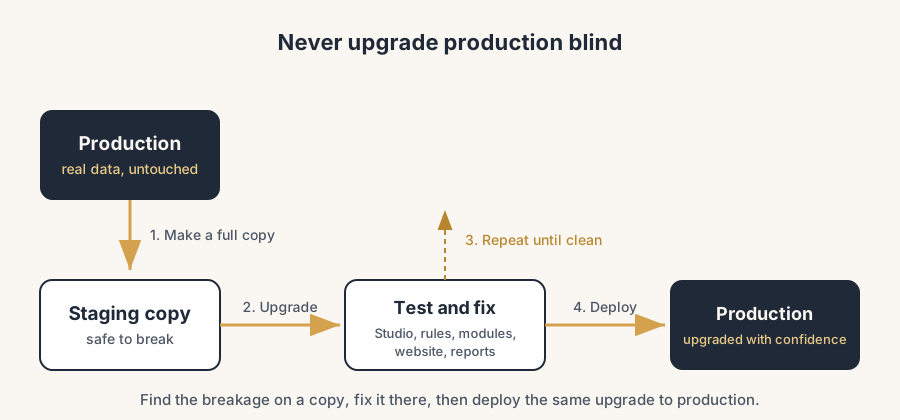
This is the step that prevents the Monday-morning surprise. Make a full copy of your production database, run the upgrade on that copy, and check everything: your Studio screens, your automation rules, your custom modules, your website pages, your reports. You find the breakage in a safe place, fix it, and only then touch production. Staging exists so you can break things without consequences.
Fix on staging, then deploy.
Work through the broken items on the staging copy until the upgraded database is clean. Adjust the custom modules to the new API, repoint or rebuild the Studio changes, retest the automation rules. When staging passes a real run with real data, you deploy the same upgrade to production with confidence, not hope.
The part that trips people up
A few things catch almost everyone
A staging test on empty or sample data proves nothing. The breakage lives in your real customizations and your real data. Test on a true copy of production, not a fresh demo database.
Studio changes are the silent risk. They feel like configuration, so people forget they exist, then act surprised when an upgrade drops them. Treat every Studio tweak as a customization that needs testing.
The cascade is bigger than you think. Upgrading one module can pull dependent modules with it. Test the whole database after an upgrade, not only the parts you think you changed.
"It worked in the upgrade preview" is not the same as "it works". Odoo's upgrade service migrates standard modules and gives you a test database. It does not fix your custom code. The custom side is your responsibility, every time.
Quick checklist
- You build close to standard and treat every customization as something to maintain.
- Custom code lives in proper, versioned modules, not loose Studio tweaks and ad-hoc rules.
- Standard views and models are inherited the supported way, not replaced.
- You act on deprecation warnings on the current version, before they become failures.
- Every upgrade runs first on a full copy of production, with real data.
- You test Studio, automation, custom modules, website and reports on staging before deploying.
FAQ
Why did my Odoo upgrade break my Studio customizations?
Because Studio changes sit on top of standard views, and the upgrade changed those views underneath them. When a field moves, is renamed, or a screen is rebuilt in the new version, your Studio tweak points at something that no longer exists, so it fails to load or disappears. Odoo migrates standard modules for you, but not your customizations.
Does Odoo migrate custom modules automatically during an upgrade?
No. Odoo's upgrade service migrates standard Odoo data and modules. Custom modules are code written against a specific version's API, and adapting them to the new version is your responsibility. Test them on a staging copy and fix the breakage before you upgrade production.
How do I test an Odoo upgrade safely?
Make a full copy of your production database, run the upgrade on that copy, and check your Studio screens, automation rules, custom modules, website pages and reports. Fix everything that breaks on the copy. Only deploy to production once the staging run passes with real data. Never upgrade production blind.
What does "upgrade-safe" mean in Odoo?
It means your setup stays as close to standard as possible, your customizations live in clean versioned modules instead of scattered Studio tweaks, you inherit standard views the supported way, and you act on deprecation warnings early. The closer you are to standard, the less an upgrade can break, and the faster each upgrade goes.