
Candidates stop going cold when every application lands in one pipeline per vacancy, gets an automatic acknowledgement, and moves through the same stages with a name on each step. Odoo Recruitment does all of that out of the box, including the one-click hire into an employee record.
You posted a vacancy, the CVs came in, and three weeks later you find a strong candidate sitting in your inbox who never got a reply. Someone meant to call her. Someone else thought the first person had. By the time anyone looks again she has taken another job. Meanwhile two applicants got a fast interview because they happened to email the right manager directly, and the rest are scattered across a mailbox, a spreadsheet and a few sticky notes. You are not short on candidates. You are short on a process that says who owns each one and what happens next.
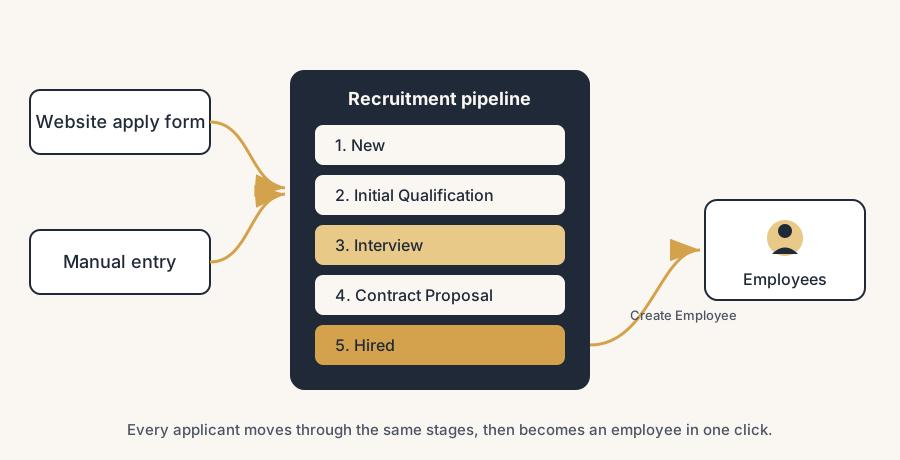
This is what hiring without a pipeline looks like. Applications arrive through different routes, land in different places, and wait for a human to remember them. Odoo Recruitment fixes that with one place per vacancy where every applicant moves through the same stages, gets an automatic acknowledgement, can book their own interview, and turns into an employee with one click when you hire them. Here is how to set up the job positions, the pipeline, the website jobs page, the interviews and the hand-over to Employees, what trips people up, and when the hiring gets complex enough to call a partner.
Why candidates slip away
Nobody owns the applicant, so nobody moves them. When a CV lands in a shared inbox or a spreadsheet, the responsibility spreads across everyone, which means it lands on no one. The candidate who needs a quick yes sits next to the one you were never going to hire, and both wait for the same busy manager to look.
There is no shared view of where each person stands. One applicant has had two interviews, another has heard nothing, a third was rejected but never told. Without a single board per vacancy, every status lives in someone's head or some thread, and the moment that person is out, the hiring stalls.
The deeper issue is that the steps between "applied" and "hired" are all manual: acknowledging, sorting, scheduling, rejecting, and finally re-typing the hire's details into your HR records. Each manual step is a place to forget someone. The fix is to give every vacancy one pipeline that does the routing, the reminders and the hand-over for you, so the human spends time judging people, not chasing paperwork.
The fix, in steps
Set up the position, the pipeline, the jobs page, the interviews and the hire in that order. Each step builds on the one before.
Create a job position for every role you are hiring
In Odoo, a job position is the container for one vacancy: its description, its recruiter, its target number of hires, and its own pipeline of applicants. Go to Recruitment > New (or Configuration > Job Positions) and create one per role you are actually hiring for, not one per department. Fill in the title, the department, the recruiter, and the Expected New Employees count so the system knows when the role is filled. Each position card shows a New Applications smart button that takes you straight to that vacancy's board, so getting the positions right first means every applicant lands in the correct place from the start.
Set the pipeline stages once, for all positions
Odoo ships with a default pipeline that fits most companies: New (where every fresh application lands), Initial Qualification, First Interview, Second Interview, Contract Proposal, and Contract Signed (folded by default, because it is the end of the line). Open any vacancy's Kanban view to see the stages as columns, with applicants as cards you drag from left to right.
Edit the stages from the board: rename them to match how you actually hire, add a "Phone screen" column if you use one, remove one you never touch. By default a stage applies to every job position, which keeps your whole company hiring the same way. You can scope a stage to specific positions only if one role genuinely needs an extra step, but resist the urge: one shared pipeline is far easier to read at a glance than ten slightly different ones.
Publish the vacancy on your website jobs page
If you have the Website module, you can put a vacancy on your careers page in one click. On the job position, use the Publish control (or open the page and toggle it published) and the role appears on your public jobs page with an apply form. The point is what happens next: an application from that form lands straight in the New column of that exact vacancy's pipeline, with the name, email, CV and answers already filled in. No copy-paste from a mailbox, no separate intake. The website is not a brochure here, it is the front door of the pipeline.
Acknowledge and schedule interviews automatically
A candidate who hears nothing assumes they are out. You can attach an email template to a stage so that the moment an applicant's card enters it, Odoo sends a set message. Use this for the basics: a confirmation when an application lands in New, and the Recruitment: Schedule Interview template when you move someone to the interview stage. That template includes a link to the recruiting team's calendar, so the candidate picks a slot themselves and the meeting lands in your calendar without the back-and-forth of "does Tuesday work for you". Set the few templates that matter, leave the rest manual, and every applicant gets a timely, consistent reply without anyone remembering to send it.
Turn the hire into an employee with one click
When you have your person, do not re-type anything. Open their applicant card and click Create Employee. Odoo copies the name, contact details and what it already knows straight into a new record in the Employees app, links it back to the application, and gives you the starting point for the contract, the onboarding and the rest of HR. The recruitment pipeline and your employee records stay connected, so the person you hired is the same record you manage from day one, not a fresh row you keyed in by hand.
The part that trips people up
A few things catch almost everyone
A few things catch almost everyone.
A stage with no email template sends nothing. Moving a card to "First Interview" does not, on its own, tell the candidate anything. If you expect applicants to be notified, you have to attach the template to the stage. Decide which stages send an automatic mail and which you handle by hand, then check that the templates are actually attached, or you will think people are being kept warm while they sit in silence.
The self-scheduling link needs a calendar behind it. The Schedule Interview template offers the candidate a slot, but it can only show times the recruiter or interviewers have free. If working hours and calendars are not set, or the interviewers are not on the meeting, the candidate either sees nothing useful or books a time nobody is available. Set the calendars before you rely on self-scheduling.
"Refuse" is not the same as deleting, and it should not be silent. Odoo lets you refuse an applicant with a reason, which can send a polite rejection. If you just drag cards away or delete them, candidates never hear back and your numbers lie. Use the refuse action with a reason so rejections are tracked and the person actually gets a reply.
A published vacancy you forgot about keeps collecting applicants. Once a role is on the website, the form stays open and applications keep arriving into New even after you have hired. Set the position to filled, or unpublish it, when you are done, so you are not ghosting people who applied to a role that closed.
Create Employee copies what exists, not what you never entered. The hand-over to Employees is only as complete as the applicant card. If half the candidate's details live in an email thread and never made it onto the card, they will not appear on the employee record either. Get the key fields onto the card before you click, so the employee starts with real data, not blanks.
If hiring is not your daily work, the pipeline hides things. A recruitment board you only open when you remember to is where applications quietly age, because nothing pulls you toward it on the days nobody applies. Our own fix is a scheduled AI assistant: every morning it checks the pipeline and reports new applications and stalled candidates in chat, so the system comes to you instead of waiting to be opened. For a company that hires twice a year, that one scheduled nudge does more for response time than any stage design.
Quick checklist
- You have one job position per role you are hiring, each with a recruiter and an expected-hires count.
- Every position uses the same shared pipeline, edited once to match how you hire.
- Open vacancies are published to the website jobs page, and the apply form feeds the New column directly.
- An email template is attached to the stages where candidates should hear something, including the Schedule Interview template.
- Recruiter and interviewer calendars are set, so the self-scheduling link offers real, free slots.
- Rejections go through the refuse action with a reason, so no candidate is dropped silently.
- Filled or closed roles are marked filled or unpublished, so the form stops collecting applicants.
- You hire by clicking Create Employee on the applicant card, not by re-typing into Employees.
FAQ
How does the recruitment pipeline work in Odoo?
Each job position has its own pipeline, shown as a Kanban board with stages as columns: New, Initial Qualification, First Interview, Second Interview, Contract Proposal and Contract Signed by default. Every applicant is a card you move left to right as they progress. Applications from your website jobs page land automatically in the New column of the right vacancy, and you can attach an email template to a stage so the candidate is notified the moment their card enters it.
How do I post a job on my website with Odoo?
If you have the Website module, open the job position and publish it, and the vacancy appears on your public careers page with an apply form in one click. Applications submitted through that form go straight into the New stage of that vacancy's pipeline, with the candidate's name, email and CV already filled in, so there is no separate intake or copy-paste from a mailbox.
How do candidates schedule their own interview in Odoo?
Attach the Recruitment: Schedule Interview email template to your interview stage. When you move an applicant into that stage, Odoo emails them a link to the recruiting team's calendar, and the candidate picks a free slot themselves. The meeting then lands in your calendar. For this to work, the recruiter and interviewer calendars and working hours must be set, because the link can only offer times they actually have free.
How do I turn a candidate into an employee in Odoo?
Open the applicant's card and click Create Employee. Odoo copies the name, contact details and known information into a new record in the Employees app and links it back to the application, so you do not re-type anything. From there you continue with the contract, onboarding and the rest of HR on the same record, which keeps recruitment and your employee data connected.