
The Odoo Point of Sale keeps selling when the internet drops, by design. It runs in the browser and caches everything it needs when the session opens, so it can take orders, calculate totals and print receipts without a connection. The catch is what it cannot do while offline: it does not update stock, talk to the backend, or see what other registers are selling. When the connection returns, the queued orders sync back to the server. Most of the risk in a POS sits in that offline window, not in the syncing itself. The rest of this post covers what runs offline, what syncs when you reconnect, and how to run several registers without a mess.
The line at the counter is moving, then the wifi blinks out. You expect the screen to freeze. Instead the till keeps working, scans products, takes cash and card, prints receipts. The staff barely notice. Twenty minutes later the connection comes back and Odoo asks to sync the unsynced orders. You click through and everything lands in the backend.
It works, so people assume offline mode is a free safety net with no downside. It is not. While that register was offline it was selling from a snapshot taken when the session opened. It did not know that another till sold the last unit of an item, it did not lower stock in real time, and a card terminal that needs the network may not have gone through. The sale is safe. What you knew about stock and about the other registers, during those twenty minutes, was not current. That gap is where overselling and reconciliation surprises come from.
Why it happens
The POS is a browser app that runs on a local cache. When you open a POS session, Odoo loads the data the till needs into the browser: products, prices, taxes, customers, the open session. From that moment the register works against that local copy. It does not need a round trip to the server for each scan, which is why it is fast, and why it survives a dropped connection. The trade-off is that the copy is a snapshot from session open, not a live feed.
Orders are saved locally and queued, not posted instantly. Each completed order is written to the browser first. When the connection is up, Odoo pushes those orders to the server in the background. When the connection is down, they pile up as unsynced orders in the queue. Nothing is lost as long as that browser, on that device, is not wiped before it syncs.
Stock is decremented in the backend, not in the offline till. The actual inventory move happens server side, when the order reaches Odoo. Offline, the till shows you the stock figure from session open (if it shows one at all), and it keeps selling regardless. So two registers, both offline, can both sell the same last unit. Neither one is wrong locally. The conflict only becomes visible once both sync and the backend tries to reconcile two moves against one unit.
Anything that needs the server is paused, not queued cleverly. Real-time stock, looking up a customer that was created on another till today, certain electronic payment integrations, and loyalty or gift-card checks that call the backend do not work offline. Some of these resume cleanly on reconnect. Some, like a card payment that needs an online terminal, simply cannot complete while the link is down.
The fix, in numbered steps
Treat offline mode as a buffer, not a feature you lean on.
It exists to survive a short outage, a few minutes to an hour, not to run a shop on a permanently bad connection. The first fix is boring and the most effective: give the POS device a stable connection. A wired link or a dedicated access point for the tills beats sharing the guest wifi. Most "Odoo POS sync problems" are really "the shop wifi is bad" problems. And before you trust the buffer at all, test it with your own payment provider. We have seen terminals that keep working offline and terminals that refuse the moment the network goes. Pull the network cable on a quiet morning, ring up a test sale, and watch what your terminal actually does. Learn it in a drill, not on a busy Saturday.
Sync the queue as soon as the connection returns, before you close.
When Odoo shows the unsynced-orders message, push them through and confirm the queue is empty. Do not close the session, and do not close the browser or shut down the device, while orders are still sitting unsynced. Closing the session with orders in the local queue is the one way to actually lose them.
Never reopen the same session on a second device while offline.
The unsynced orders live in the browser of the device that took them. If that device is offline and someone opens the same POS session on a tablet or another PC to "keep selling", you now have two local queues that do not know about each other. Keep one device per open session, especially during an outage.
Reconcile the session, do not just close it.
At end of day, open the session summary and check the totals: expected cash versus counted cash, card totals versus the terminal report. The offline window is exactly where a card payment may have been taken on paper or skipped, so the numbers can drift. Reconcile before you post the session, and investigate a gap rather than forcing it closed.
Check stock after a known outage, not just at month end.
If you had a real outage with several tills selling, do a quick stock check on the fast movers afterwards. This is where two registers may have sold the same last unit. Catching it the same day, while you remember what happened, is far cheaper than finding a negative stock figure three weeks later.
Decide your rule for selling out-of-stock items.
Odoo lets you allow or block selling products that are not in stock. On a single connected till you might block it. With offline mode in the picture, blocking does little, because offline the till is not checking live stock anyway. Pick the rule deliberately and make sure staff know that "the till let me sell it" is not the same as "it was in stock".
The part that trips people up
A few things catch almost everyone
Offline does not mean "stock is up to date, just delayed". It means the till is selling against a snapshot and the backend has no idea until sync. The danger is not the sync, it is the decisions made in the dark: promising a customer the last unit, or two tills both selling it.
Closing the session is the real point of data loss. Orders survive a dropped connection. They do not always survive a closed browser, a cleared cache, or a forced session close with orders still queued. Train staff to never close down a till that still shows unsynced orders.
A card payment may not have gone through. A receipt printed offline proves the order was rung up, not that an online card terminal captured the money. If your payment terminal needs the network, an offline "card" payment can be a payment you never received. This is a top reconciliation surprise. Match terminal reports to POS card totals after any outage.
Two offline tills are the classic oversell. One register offline is mostly safe for stock. Two or more registers offline at once, all selling from their own snapshots, is where the same unit gets sold twice. The more tills and the longer the outage, the bigger the gap.
Master data created during the outage is invisible to the offline till. A customer added on till A, or a price changed in the backend, will not appear on till B until till B is back online and the session reloads that data. Do not assume a change you made elsewhere is live on an offline register.
Quick checklist
- The POS device has a stable, ideally wired, connection. Shop wifi is not shared with the tills.
- Staff sync the unsynced-orders queue as soon as the connection returns.
- Nobody closes the session, the browser, or the device while orders are still unsynced.
- One device per open session. No reopening the same session elsewhere during an outage.
- End-of-day reconciliation checks counted cash and terminal card totals against the POS, not just a quick close.
- After any real outage, fast-moving stock is spot-checked the same day.
- Your rule for selling out-of-stock items is set deliberately, and staff know offline tills do not check live stock.
- Card terminal reports are matched to POS card totals after an outage.
How the offline window actually flows
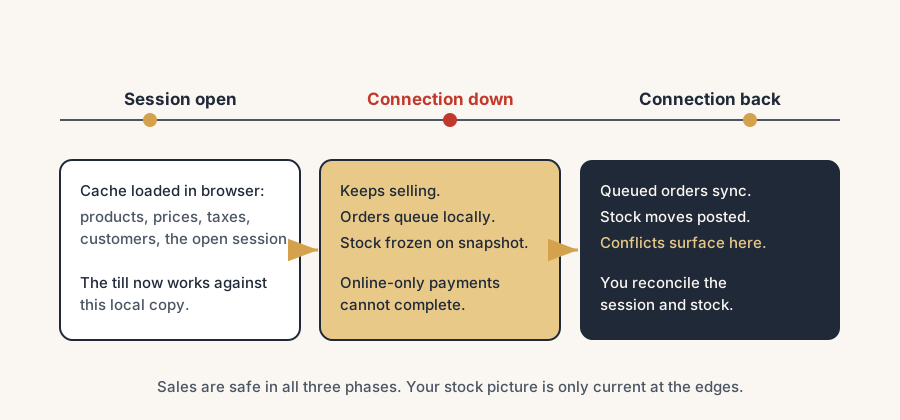
Read it as three phases. Session open: Odoo loads products, prices, taxes and customers into the browser, and the till now works against that local copy. Connection down: the till keeps selling, orders queue locally, stock and backend lookups are frozen on the snapshot, and online-only payments cannot complete. Connection back: the queued orders push to the server, stock moves are posted, conflicts (like two tills selling one unit) surface in the backend, and you reconcile. The sales are safe across all three phases. What is not guaranteed is that your stock picture and your other registers were current during the middle phase. Plan for that phase, and the rest takes care of itself.
This stays manageable on one or two tills with a decent connection. The more registers you run, the longer your outages, and the more you depend on live stock at the counter, the more the offline window can hurt, and the more worth it is to design around it.
FAQ
Does Odoo POS work offline?
Yes. The Odoo Point of Sale runs in the browser and caches the data it needs when the session opens, so it keeps taking orders, calculating totals and printing receipts without an internet connection. Orders are stored locally and sync to the server when the connection returns.
What happens to Odoo POS orders when the internet comes back?
They sync automatically. When the connection is restored, Odoo shows an "unsynced orders" message and pushes the queued orders to the backend, where stock moves and accounting entries are then posted. Sync the queue before closing the session, and never close the device while orders are still unsynced, or you can lose them.
Does Odoo POS update stock while offline?
No. Stock is decremented in the backend when the order reaches the server, not on the offline till. While offline the register sells against a snapshot taken when the session opened, so it does not see real-time stock or what other registers are selling. Stock catches up once the orders sync.
Can two Odoo POS registers oversell the same product offline?
Yes. If two tills are offline at the same time, each sells from its own snapshot and neither knows the other sold the last unit. The conflict only shows up in the backend after both sync. Keep registers connected where possible, and spot-check fast-moving stock after any outage.
Why is my Odoo POS card payment missing after an outage?
Because a receipt printed offline proves the order was rung up, not that an online card terminal captured the money. If the terminal needs the network, an offline card payment may never have been collected. Match terminal reports to POS card totals after any outage and reconcile before closing the session.