
Your Odoo website does not need an SEO plugin: titles, descriptions, clean URLs, redirects, sitemap, image compression and structured data are all built in. Ranking is mostly the discipline of actually filling them in, page by page.
You launched your Odoo website or webshop, the pages look good, and then nothing happens. Weeks pass and the traffic from Google barely moves. Someone suggests you "do the SEO", so you start hunting for a plugin or a developer, convinced that the standard Odoo site cannot rank without extra tooling.
Here is the part most people miss: Odoo already ships with the SEO basics built in. Page titles and descriptions, clean URLs, automatic redirects when a URL changes, a sitemap, a robots file, image compression and structured data all sit inside the product you already pay for. The problem is almost never a missing feature. It is that the built-in fields were left empty and nobody told Google what each page is about. This article walks through the tools Odoo gives you, in the order that matters, and the mistakes that quietly cost you rankings.
Why it happens
Odoo generates a working website out of the box, so the pages are live before anyone thinks about search engines. The title tag falls back to the page name, the meta description stays empty, the URL is whatever Odoo slugified from the title, and the product photos go up at full resolution. None of that throws an error. The page works, it just does not tell a search engine why it should rank.
The other half of the problem is that the SEO tools are not where people look for them. There is no big "SEO" app in the menu. The controls live in a small panel per page (Optimize SEO) and in a single SEO block in the website settings. If you never open those two places, every page keeps its default, generic signals, and you assume Odoo "has no SEO" when in fact it was waiting for you to fill it in.
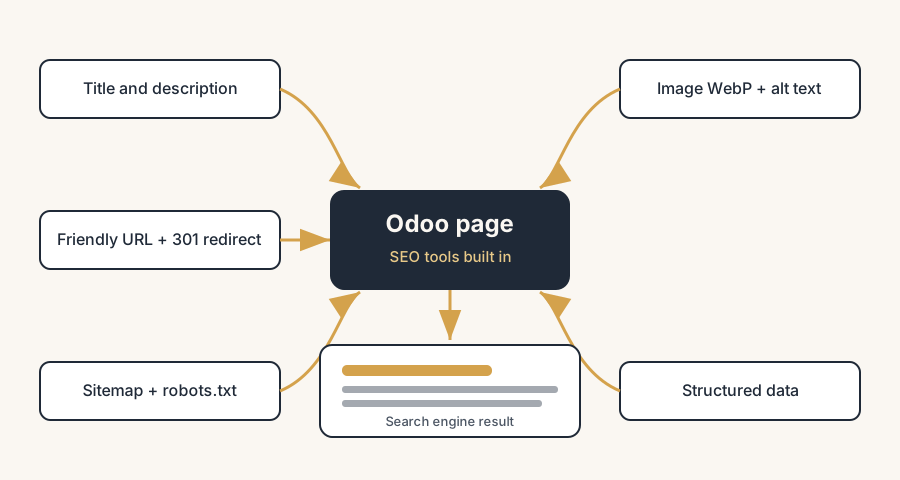
The fix, in numbered steps
Set the page title and meta description per page
This is the highest-impact change and the one most people skip. Open the page you want to rank, then go to Website > Site > Optimize SEO (the panel opens on the right). Set the Title: the clickable blue line in Google results. Keep it concise, descriptive and specific to the page. Set the Description: the grey summary under the title that talks the searcher into clicking. Aim for around 150 characters so it does not get cut off.
If you leave these empty, Odoo uses a default based on the page content. That default is rarely the phrase your customer actually searches for. Write the title and description for the search you want to win, one page at a time, starting with your money pages (homepage, top category, best-selling products).
Clean up the friendly URL
In the same Optimize SEO panel you can edit the page's URL. By default Odoo slugifies the title, so a product called "Blue Cotton T-Shirt (M)" becomes a readable URL automatically. Keep URLs short, lowercase and keyword-relevant. Drop filler words and stray punctuation. A clean URL like /shop/blue-cotton-t-shirt reads better to both people and search engines than a long, messy one.
Decide the URL early. Changing it later is safe in Odoo (see the next step), but every change still means external links point at the old address until they update.
Let Odoo handle redirects when a URL changes
This is the feature that removes the usual fear of editing URLs. When you change the URL of a page in Odoo, it automatically updates all the internal links to the new address, and it sets up a 301 redirect from the old URL to the new one. So a visitor or a search engine that still has the old link lands on the right page instead of a 404, and the ranking value of the old URL carries over.
You do not have to build the redirect by hand for a simple rename. Odoo does it. For bulk moves or a full site migration you can manage redirects in Website > Configuration > Redirects, where you set the type (301 permanent for SEO) and the target.
Check the sitemap
Odoo automatically generates a /sitemap.xml for your site and keeps it updated as you add pages. You do not create it by hand. Search engines use it to discover and crawl your pages faster. Check that it exists by visiting yourdomain.com/sitemap.xml, then submit that URL once in Google Search Console so Google knows where to look. That single submission is often the fastest way to get new pages indexed.
Edit robots.txt only when you need to
When a search engine crawls your site it reads robots.txt first. Odoo creates one automatically at yourdomain.com/robots.txt. For most sites the default is fine and you leave it alone. If you need to block a section from crawling (a staging area, an internal page), go to Website > Configuration > Settings, scroll to the SEO section and click Edit robots.txt to add your rules. Be careful: a wrong line here can hide your whole site from Google.
Optimise your images
Slow pages rank worse, and on a webshop the images are usually the heaviest thing on the page. Odoo helps you here automatically: it compresses uploaded images and converts them to WebP, a format that is roughly 25 to 35 percent smaller than the same JPEG at similar quality. That cuts page weight without you doing anything.
You still have two jobs. First, do not upload a 4000-pixel photo for a thumbnail; resize large source images before upload so Odoo is not compressing a giant. Second, fill in the image Description field, which Odoo uses as the alt text. Alt text tells search engines (and screen readers) what the image shows and is a real ranking signal for image search, so describe the product plainly with the keyword, not "IMG_2043".
Add structured data for rich results
Structured data is extra markup that tells search engines exactly what a page is about, so they can show rich results: star ratings, prices, stock status, breadcrumbs. Odoo's eCommerce pages output product structured data, so your shop pages can qualify for rich product snippets without you writing code. For other page types you can add structured data through the website builder or a developer.
Rich results make your listing stand out and lift click-through even when your ranking position does not change. Treat it as the finishing layer once titles, URLs and speed are in order, not the first thing you reach for.
The part that trips people up
A few things catch almost everyone
Empty title and description fields are the default, not a bug. Odoo fills them with a generic fallback and shows no warning. A page can look "done" while sending search engines nothing useful. Fill the fields in by hand on every page that matters.
Odoo version changes where the menus sit. The exact path to the SEO panel and settings moved between versions (the docs split it across Pages, Structure and Configuration depending on the release). If a menu is not where this article says, check your version's documentation. The features are the same; the menu label moved.
Changing a URL is safe, but only inside Odoo. Odoo updates internal links and adds the 301 redirect. It cannot update links on other people's websites, in your printed flyers, or in old email campaigns. Those still point at the old URL and rely on the redirect, so do not rename URLs casually once they are out in the world.
The sitemap only helps if Google knows about it. Odoo generates the sitemap, but it will not submit it for you. If you never add it to Google Search Console, you are leaving the easiest indexing win on the table.
A bad robots.txt edit can deindex everything. A single Disallow: / blocks your entire site from search engines. If you edit robots.txt, change one thing, save, and verify the file in a browser before you walk away.
Image compression is not a free pass to upload huge files. WebP conversion shrinks images, but a 6 MB source photo is still doing extra work on every page load. Resize before upload and let Odoo finish the job.
Structured data is not a ranking shortcut. It changes how your result looks, not where it sits. If the title, description and speed are weak, rich snippets will not save the page.
The filling-in is work you can hand to AI, on one condition. Writing titles, descriptions and alt text for hundreds of pages is exactly the job to delegate to an AI assistant, and we do it ourselves. But hold it to strict writing rules: the answer in the first sentence, no buzzwords, no interchangeable template phrasing across pages. Search engines do not punish AI-written text as such; they punish what AI produces when nobody steers it, thin look-alike copy. Let the machine do the volume, keep a human on the rules, and spot-check before it goes live.
Quick checklist
- Title and meta description set by hand on every important page (homepage, top categories, key products)
- Friendly URLs short, lowercase and keyword-relevant
- URL changes left to Odoo so the 301 redirect is created automatically
/sitemap.xmlconfirmed live and submitted in Google Search Consolerobots.txtleft at default unless you have a specific reason to block a section- Source images resized before upload; Odoo handles WebP and compression
- Image Description field filled in as alt text, with the keyword, on product photos
- Structured data working on shop pages (check with Google's Rich Results Test)
- Page speed checked on a real page, not just the homepage
FAQ
Does Odoo have built-in SEO tools?
Yes. Odoo includes SEO tools as standard, no plugin needed: per-page title and meta description, friendly URLs, automatic 301 redirects when a URL changes, an auto-generated sitemap, an editable robots.txt, automatic image compression to WebP, and product structured data on eCommerce pages.
Where do I set the page title and meta description in Odoo?
Open the page, then go to Website > Site > Optimize SEO. The panel lets you set the Title and the Description for that page. Leave them empty and Odoo uses a generic default based on the page content, which rarely matches what people search for.
Does Odoo create a sitemap automatically?
Yes. Odoo generates a sitemap at yourdomain.com/sitemap.xml and keeps it updated as you add pages. You still submit that URL once in Google Search Console so Google can find and crawl your pages faster.
What happens to my rankings if I change a page URL in Odoo?
Odoo automatically updates all internal links to the new URL and creates a 301 redirect from the old address to the new one. Visitors and search engines following the old link land on the right page, and the ranking value carries over. External links you do not control still rely on that redirect.
Does Odoo compress images for the website?
Yes. Odoo automatically compresses uploaded images and converts them to WebP, which is around 25 to 35 percent smaller than a comparable JPEG. Resize very large source images before upload, and fill in each image's Description field so Odoo uses it as alt text.