
There are four ways to connect Odoo to another system: the native API, a custom module, a prebuilt connector, or an iPaaS sync layer. They are not better or worse in the abstract. Each fits a different situation, and each has a cost you pay later, not just upfront. Here is how they differ, where each one breaks, and how to choose.
Odoo runs your orders, stock and invoicing, but it is never the only system you have. There is a webshop, a marketplace, a warehouse system, a shipping tool, maybe a separate accounting package the finance team refuses to give up. The question is not whether to connect them. It is how. Pick the wrong way and you spend the next two years patching a link that breaks every time anything updates.
Why connecting Odoo is harder than it looks
Connecting two systems sounds like a one-time job: read data here, write it there. The trouble is that the connection has to keep working while both systems keep changing.
Odoo upgrades once or twice a year. Your webshop platform updates on its own schedule. Field names change, an endpoint gets renamed, an authentication method is deprecated. A connection that was correct on the day you built it slowly drifts out of date. And when an order does not sync, you usually find out from an angry customer, not from the system, because most quick integrations have no monitoring at all.
So the real question behind "how do I connect Odoo" is "who keeps this working when both ends move". That is what separates the three options.
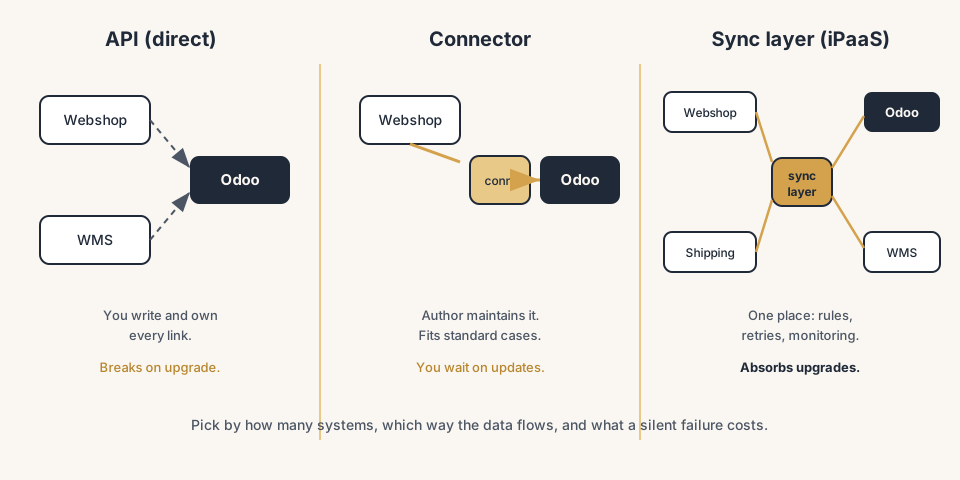
The four ways to connect Odoo
The native API (XML-RPC, JSON-RPC, or the new JSON-2 API). Odoo exposes almost everything through a built-in API. You authenticate, then call methods on any model to search, read, create or update records. Historically this is XML-RPC and JSON-RPC; from Odoo 19 there is a cleaner External JSON-2 API. It is powerful and free, and it is the foundation everything else is built on.
You use the API directly when you have a developer and a specific need that no off-the-shelf tool covers: a custom internal app, a one-direction data feed, a script that runs nightly. You write the code, you own the code, you maintain the code. The catch is that everything is on you: authentication, error handling, retries, field mapping, and a way to know when it stops working. And the old XML-RPC and JSON-RPC endpoints are scheduled to be removed in a future major version, with the JSON-2 API as the replacement.
A custom module inside Odoo. Here is the honest version from our own integration work: the bare native API almost never carries a serious integration on its own. What actually gets built is a custom module in Odoo itself. The module exposes exactly the endpoints the other system needs, or calls the other system directly, and the field mapping and business rules live where the data lives. It is real development, with versioning, staging and tests, but it survives upgrades far better than an external script poking at raw models, because the module is upgraded and tested with the database like any other code.
A prebuilt connector. For common pairings there is usually a ready-made connector. Odoo ships connectors for Shopify, WooCommerce, Amazon and several shipping carriers, and the App Store has hundreds more. You install it, enter your credentials, map a few fields, and it syncs. It is the fastest path when your pairing is standard and your needs match what the connector does.
The catch shows up at the edges. A connector does what its author decided it should do; if your process is slightly different, you bend your process or you do without. It also depends on its author keeping it current with both Odoo and the other platform. When Odoo releases a new version, you wait for the connector to support it before you can upgrade, and an unmaintained connector quietly becomes a liability.
An iPaaS sync layer. An iPaaS (integration platform as a service) sits between your systems as a dedicated layer. Instead of system A talking straight to system B, both talk to the sync layer, which holds the mapping, the rules, the queue of changes and the monitoring in one place. This is the right shape when you have more than two systems, when the data has to flow both ways, or when getting it wrong is expensive: overselling stock, double invoices, orders that vanish.
The value is not the connection itself, it is everything around it: retries, error queues, a dashboard that tells you a sync failed before the customer does, and one place to change a rule instead of editing three integrations. The catch is that it is a layer to run, not a box to tick. It has a cost and it must be set up to match your actual data. The payoff is that an upgrade on either side is absorbed by the layer instead of breaking a direct link. We run our own sync layer, System2System, for exactly this reason: it absorbs an Odoo upgrade on one side and a platform update on the other, and the connections come through with barely any work.
The four side by side
The same four options, compared on the things that decide it in practice. The last column is the one to read twice, because the maintenance question is the one people skip.
| Method | Strongest when | Pros | Cons | Who fixes it at an upgrade |
|---|---|---|---|---|
| Native API (XML-RPC, JSON-RPC, JSON-2) | One-direction feeds, nightly scripts, internal tools | Free, full access to every model, no extra layer to run | Auth, retries, mapping and monitoring are all on you; rarely enough on its own for a serious integration; old endpoints being phased out | You, at every Odoo release |
| Custom module | A serious integration with business rules close to the data | Rules live where the data lives; versioned, staged and tested with the database | Real development cost; needs a developer and staging discipline | You, but inside your normal module test cycle |
| Prebuilt connector | A standard pairing with a standard process (Shopify, Amazon, carriers) | Fastest start, low cost, maintained by its author | Your process must fit the connector; unmaintained connectors become liabilities | The author, and you wait for them before you can upgrade |
| iPaaS sync layer | Three or more systems, two-way data, failures that cost real money | Monitoring, retries, error queues, one place for every rule | A running cost and a layer to operate; setup must match your actual data | The layer absorbs changes on both sides |
How to choose
Work down these questions in order. The first one that fits decides it.
How many systems, and which way does the data flow?
With two systems, one direction and simple data, a connector, a small custom module or a direct API script is enough. Three or more systems, or data that has to stay in agreement both ways: you want a sync layer, because point-to-point links between many systems multiply fast and become impossible to reason about.
Does a maintained connector already fit your process?
If a well-maintained connector covers your pairing and your process matches it, use it. Do not build what you can install. Check that it is actively maintained and supports your Odoo version before you commit.
How expensive is a silent failure?
If a missed sync means one annoyed customer, a simpler link is fine. If it means overselling across channels, wrong invoices, or stock that no warehouse can trust, you need monitoring and retries, which is what an iPaaS gives you and a quick script does not.
Who maintains it when both ends change?
This is the question people skip and regret. A direct API integration is yours to fix on every Odoo upgrade. A connector is the author's to fix, and you wait on them. A sync layer is built to absorb those changes in one place. Decide who owns the maintenance before you build, not after the first upgrade breaks it.
The part that trips people up
A few things catch almost everyone
A working integration on launch day proves nothing about month six. Both systems will change underneath it. Budget for maintenance from the start, or you are not budgeting for the integration at all.
"Free" API access is not free to run. The endpoints cost nothing, but the code that handles auth, errors, retries and monitoring is real work, and so is keeping it alive across upgrades. The licence price was never the expensive part.
Two-way sync is much harder than one-way. The moment both systems can change the same record, you need rules for who wins a conflict and what happens to the loser. A quick script almost never handles this, and you find out when stock and orders quietly disagree.
No monitoring means no integration, just hope. If nothing tells you a sync failed, you will learn it from a customer. The ability to see and replay failed syncs is the difference between a link you trust and one you nurse.
Building point-to-point between many systems does not scale. Connect five systems directly and you can end up maintaining many separate links, each with its own quirks. This is exactly the mess a sync layer is meant to prevent.
Quick checklist
- You counted the systems and the direction of flow before choosing an approach.
- You checked for a maintained connector before building anything custom.
- You know what a silent failure costs your business, and matched the approach to it.
- The integration has monitoring: something tells you when a sync fails.
- Two-way syncs have clear conflict rules for who wins.
- You decided who maintains the connection across Odoo and platform upgrades.
- The approach does not create a tangle of point-to-point links between many systems.
FAQ
What is the best way to connect Odoo to another system?
It depends on three things: how many systems you connect, whether data flows one way or both, and how expensive a failed sync is. For two systems and one-direction, simple data, a prebuilt connector or a direct API script is enough. For three or more systems, two-way data, or cases where a missed sync costs real money, an iPaaS sync layer is the safer choice because it adds monitoring, retries and one place to manage the rules.
Does Odoo have an API?
Yes. Odoo exposes almost all of its data and methods through a built-in external API. Historically this is XML-RPC and JSON-RPC; from Odoo 19 there is a newer External JSON-2 API. You authenticate, then call methods on any model to search, read, create or update records. It is free to use, but you write and maintain the integration code yourself.
What is the difference between a connector and an iPaaS for Odoo?
A connector is a prebuilt integration for one specific pairing, for example Odoo to Shopify. You install it and configure it, and its author maintains it. An iPaaS is a separate layer that sits between several systems, holds the mapping and rules in one place, and adds monitoring and retries. A connector is faster for a single standard pairing; an iPaaS is built for multiple systems and two-way data that has to stay reliable.
Will the Odoo API break when I upgrade?
A direct integration can break on an upgrade if field names or endpoints change, and the old XML-RPC and JSON-RPC endpoints are scheduled to be replaced by the External JSON-2 API in a future version. A maintained connector handles this for you, but you wait for its author to support the new Odoo version before you upgrade. A sync layer is designed to absorb changes on either side in one place, so an upgrade does not break a direct link.