
Your real product cost includes freight, insurance and duty, and Odoo's landed costs push exactly those amounts into the valuation so the margin report tells the truth. The setup is six steps; the timing of the booking is the part to get right.
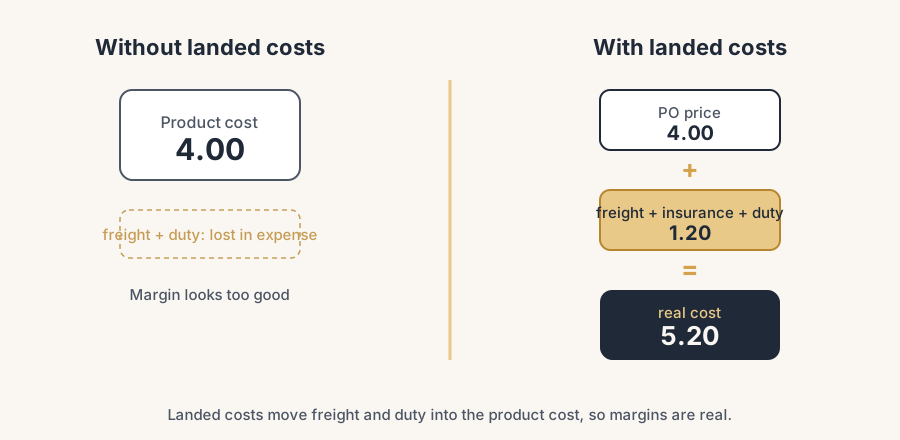
Your purchase order says a pallet of goods costs 4 euro per unit. So that is the cost in Odoo. But the container also cost you freight, the customs office charged duty, and the insurance was not free. By the time the goods sit on your shelf, the real cost is closer to 5.20 per unit. Odoo still shows 4.
That gap is invisible until you run a margin report and the numbers look too good. You price off 4, you think you make a healthy margin, and the freight and duty quietly eat it somewhere else in the accounts. Landed costs fix this by pushing those extra costs into the product cost where they belong.
Why it happens
Odoo records the product cost from the purchase order line. Freight, insurance and customs duty arrive on separate vendor bills, often days or weeks later and from different suppliers (the shipper, the customs broker, the insurer). Out of the box, Odoo has no reason to connect those bills to the goods on the receipt. So they land in a general expense account and never touch the product cost.
The result is this: your inventory is undervalued on the balance sheet, your cost of goods sold is wrong, and every margin you calculate is optimistic by exactly the freight and duty you forgot to add.
The fix, in numbered steps
Turn on Landed Costs
Go to Inventory > Configuration > Settings. In the Valuation section, tick Landed Costs and save. This unlocks the landed cost record and tells Odoo you want to redistribute extra costs onto received goods.
Check your costing method first
This is the part that decides whether landed costs work at all. Landed costs only work with FIFO or AVCO (average cost) and automated inventory valuation. They do nothing on Standard Price. Open the product category (Inventory > Configuration > Product Categories), set Costing Method to FIFO or Average Cost, and Inventory Valuation to Automated. If you skip this, the landed cost record will compute but it will not move your product cost.
Create a landed cost product for each cost type
Make one service product per cost type: Freight, Insurance, Customs Duty. Set Product Type to Service. In the Purchase tab, tick Is a Landed Cost. This is what lets you put the cost on a vendor bill and have Odoo treat it as a landed cost instead of a normal expense.
Create the landed cost record
Go to Inventory > Operations > Landed Costs and click New. Pick the receipt (transfer) the costs belong to from the Transfers field. Add your landed cost products with their amounts: the freight invoice, the duty, the insurance.
Choose how each cost is split
For each line, pick a split method that matches reality. By Weight for freight, because heavy goods cost more to ship. By Current Cost or By Value for insurance, because you insure value. By Quantity for a flat per-unit charge like an inspection. By Volume for container space. Getting this right is what makes the per-product cost honest instead of an average smeared across everything.
Compute, check, validate
Click Compute. Open the Valuation Adjustments tab. You see three columns: Original Value (the PO price), Additional Landed Cost (what you are adding), and New Value (the new real cost). Read those numbers and sanity-check them. When they look right, click Validate. Odoo posts a journal entry that moves the freight and duty out of expense and into stock valuation, and updates the product cost.
The part that trips people up
A few things catch almost everyone
It does nothing on Standard Price. This is the number one reason landed costs "do not work". If the product category uses Standard costing, the record computes and validates but your product cost never moves. Switch to FIFO or AVCO with Automated valuation before you start, not after.
Timing matters: apply it before the goods leave. Landed costs are easy and clean while the goods are still in stock. Once units have been sold or shipped, applying a landed cost gets messy. Odoo can only revalue what is still on hand, so part of your cost has already gone out as cost of goods sold at the old, too-low value. You either get odd journal entries or an incomplete correction. Apply landed costs right after receipt, before any outbound move.
One landed cost per receipt is cleanest. If freight, duty and insurance all relate to the same shipment, put them on one landed cost record against that receipt. Spreading them across several records makes the trail harder to follow and the splits harder to check.
The vendor bill and the landed cost are two steps. Recording the freight invoice as a vendor bill does not move your stock value on its own. You still create or link the landed cost record and validate it. Booking the bill alone leaves the cost sitting in an expense account.
Goods that move before the landed cost is booked cause the real pain. The freight invoice and the customs bill arrive days or weeks after the container, and by then part of the stock has often already been sold or consumed. The landed cost can only attach to what is still on hand, so the cost of the units already gone lands wrong and your valuation drifts. Our advice at clients with steady import flows is to book an estimated surcharge at receipt (a percentage or a fixed amount per unit you know from experience) rather than wait for the real invoices. A good estimate on every unit beats an exact amount on half of them, and you true the difference up periodically.
Quick checklist
- Landed Costs enabled in Inventory settings
- Product category set to FIFO or AVCO, valuation Automated (not Standard)
- A service product per cost type, each marked Is a Landed Cost
- Landed cost record linked to the correct receipt
- Split method chosen per line (weight for freight, value for insurance)
- Computed, Valuation Adjustments checked, then Validated
- Applied before the goods were sold or shipped
FAQ
Do landed costs work with Standard Price costing in Odoo?
No. Landed costs only work with FIFO or Average Cost (AVCO) and automated inventory valuation. On Standard Price the record computes but the product cost does not change. Switch the product category to FIFO or AVCO with Automated valuation first.
Where do I enable landed costs in Odoo?
Inventory > Configuration > Settings, then tick Landed Costs in the Valuation section and save.
Can I add freight to a product after it has already been sold?
Not cleanly. Odoo can only revalue stock that is still on hand. If units have shipped, part of the cost already left as cost of goods sold at the old value, so the correction is incomplete. Apply landed costs right after receipt, before any outbound move.
How does Odoo split freight across different products on one receipt?
You choose a split method per cost line: By Weight, By Volume, By Quantity, or By Current Cost (value). Pick the one that matches the real driver. Weight for freight, value for insurance.
What happens in the accounts when I validate a landed cost?
Odoo posts a journal entry that debits stock valuation and credits the expense account (for example Freight). The cost moves from a period expense into the value of your inventory, so your stock asset and your product cost both go up by the right amount.