
Goods store themselves in the right place once putaway rules and storage categories tell Odoo where each product belongs and how much fits where. The receiver scans, the system answers with the location, and the warehouse stops depending on memory.
Your warehouse used to fit in your head. One shelf for fast movers, the cold goods near the back, the bulky pallets by the dock. Everyone knew where things went. Then you added a second aisle, a few staff, and three times the SKUs. Now a delivery arrives and the receiver drops it wherever there is space. Fast movers end up in the far corner. The fridge goods sit on a warm shelf for an hour because the person was new. Pickers walk twice as far as they should, and once a month something gets stored where it does not belong and triggers a complaint.
The stock numbers in Odoo are still correct. The location of that stock is the problem. As volume grows, "everyone just knows where it goes" stops being a system and starts being a daily source of small mistakes that add up to slow picking and angry customers.
Why it happens
By default, when goods arrive Odoo books them into the receiving location (usually WH/Stock) and stops there. It does not decide which shelf, bin, or zone they belong in. That decision lives in someone's head. The moment more than one person makes that decision, or the warehouse gets big enough that the right answer is not obvious, the choices drift.
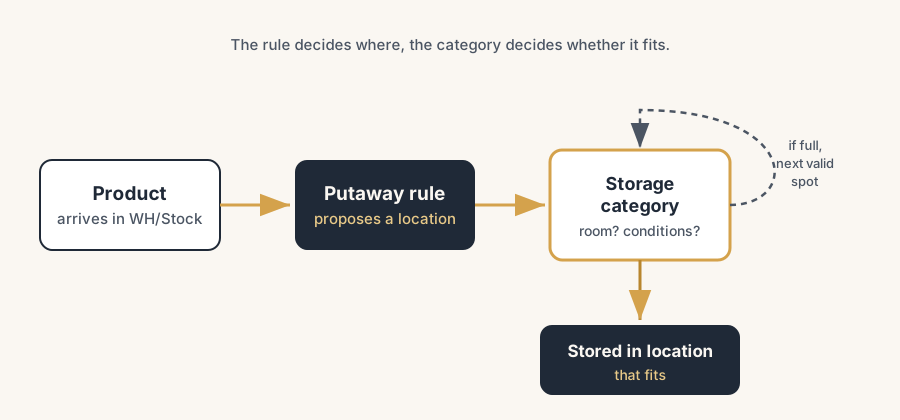
Odoo can take that decision over. Two features do it: putaway rules tell Odoo where a product should go when it arrives, and storage categories add the constraints (capacity, what may be mixed, special conditions) so Odoo picks a spot that actually fits. Set up once, applied on every receipt, the same way every time, regardless of who is on the floor.
The fix, in numbered steps
Turn on the storage features
Go to Inventory app, Configuration, Settings. In the Warehouse section, enable Storage Locations and Multi-Step Routes. These let you store goods in named sub-locations instead of one big stock bucket. If you want Odoo to also pick spots based on capacity and conditions, enable Storage Categories in the same screen. Save.
Without Storage Locations on, you only have WH/Stock and putaway has nothing to route to.
Build your locations
Go to Inventory, Configuration, Locations. Create the sub-locations that match how your warehouse is actually laid out, as children of WH/Stock. For example WH/Stock/Fast movers, WH/Stock/Cold, WH/Stock/Bulk, WH/Stock/Aisle A. Keep the names plain and match them to physical signage so staff can find them. A location structure that mirrors the floor is the foundation everything else sits on.
Create your first putaway rule
Go to Inventory, Configuration, Putaway Rules, and create one. A rule reads as: "When product arrives in location X, store it to location Y." Set "When product arrives in" to WH/Stock (the receiving location) and "Store to" to the right sub-location, for example WH/Stock/Cold for your chilled products. Y must be a sub-location of X.
You can target a rule at a single product or at a whole product category. Start with categories. One rule that says "all Frozen products go to WH/Stock/Cold" covers hundreds of SKUs and is far less to maintain than one rule per product. One automation we are fond of takes this further: have a scheduled job write the putaway rules from what already lies in the warehouse. It reads where each product currently sits and sets that location as the rule, so the next receipt joins the existing stock instead of filling the first empty gap. You get the flexibility of chaotic storage with the structure of fixed locations, and the rules maintain themselves.
Add storage categories for capacity and conditions
If a location has limits (only so many pallets fit, only one product type allowed, temperature controlled), create a storage category. Go to Inventory, Configuration, Storage Categories. On the category you can:
- limit capacity by weight,
- limit capacity by product (how many units of a given product fit),
- limit capacity by package type (for example, maximum 2 pallets).
You also set Allow New Product, which decides when the location counts as available: only if it is empty, only if the same product is already there, or allow mixed products. Assign the category to the relevant location on the location form. Now putaway will only route goods to a location that has room and meets the rule, and skip to the next valid spot when it is full.
Receive a delivery and watch it route itself
Process an incoming receipt as normal. When you validate it, Odoo reads the putaway rules and storage categories and fills in the destination sub-location for each line automatically. The receiver no longer decides; they confirm. Do one real receipt and check the moves landed where you expected before you trust it for everything.
The part that trips people up
A few things catch almost everyone
Most specific rule wins, not most recent. When several rules could apply, Odoo works down a priority list and picks the most specific match. A rule on a package type plus a product beats a rule on the product alone, which beats a rule on the category. If a product is not landing where you expect, you almost certainly have a more specific rule firing somewhere. Check the product-level rules before the category ones.
Store to must be a child of the arrival location. Odoo will not let you route from WH/Stock to a location outside that tree. If your target does not show up, it is in the wrong place in the location hierarchy.
Storage categories only constrain if capacity is set. Creating a category and assigning it does nothing on its own. The limits (weight, product count, package count) and the Allow New Product setting are what make Odoo skip a full location. An empty category is just a label.
Putaway runs at the moment of the move, on current data. It uses the stock and capacity as they are right now. If two receipts are processed close together, the second sees the first one's stock. That is correct behaviour, but it surprises people who expect a fixed destination per product.
It does not retroactively tidy your warehouse. Putaway only acts on new incoming goods. Stock that is already sitting in the wrong place stays there until you move it with an internal transfer.
Quick checklist
- Storage Locations and Multi-Step Routes enabled in Settings
- Storage Categories enabled if you need capacity or condition limits
- Sub-locations created and named to match the physical floor
- Putaway rules set by product category first, by product only where needed
- Storage categories created with real capacity limits and the right Allow New Product setting
- One test receipt validated and the destinations checked
- A plan to clean up existing misplaced stock with internal transfers
FAQ
What are putaway rules in Odoo?
Putaway rules tell Odoo where to store a product automatically when it arrives. Each rule says "when this product (or category) arrives in this location, move it to that sub-location." Odoo fills in the destination on the receipt for you, so goods route to the right zone without anyone deciding by hand.
What is the difference between a putaway rule and a storage category?
A putaway rule decides where a product should go. A storage category decides whether a location can take it, by setting capacity limits (weight, product count, package count) and rules about mixing products. You use them together: the rule proposes a location, the category confirms it has room and skips it if it is full.
Do I need Odoo Enterprise for putaway rules?
No. Putaway rules and storage categories are part of the Inventory app and available in both Community and Enterprise editions. You do need to enable Storage Locations and Multi-Step Routes in Settings, and Storage Categories if you want capacity-based routing.
Why is Odoo storing my product in the wrong location?
Almost always because a more specific putaway rule is firing. Odoo picks the most specific match first (package type and product, then product, then category). Check whether a product-level rule is overriding your category rule, and confirm your storage category capacity is actually set, otherwise Odoo will not skip a full location.
Does putaway move stock that is already in the warehouse?
No. Putaway only acts on incoming goods at the moment of receipt. Stock already sitting in the wrong place stays put until you move it with an internal transfer.