
Use a lot when one number covers a batch, a serial when every unit needs its own, and switch tracking on per product, not for everything. The setup itself is four steps; choosing the right level is what this post is really about.
A customer calls about a faulty batch of product. They give you a number printed on the box and ask which other orders got the same batch, so they can recall them. You open Odoo, and the product is tracked by quantity only. There is no number, no batch, no trace. You know you shipped 400 units last month and you have no way to say which 30 came from the affected run. So you call all 400 customers, and the small problem just became an expensive one.
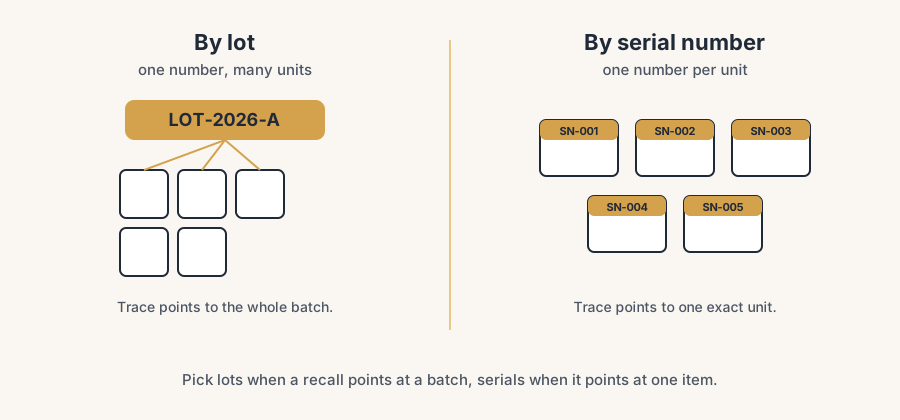
That is the gap lot and serial tracking closes. The two are easy to confuse and easy to over-apply. A lot is one number that covers many units made or received together (a batch, a production run, a delivery). A serial number is a unique number for one single unit. Pick the wrong one and you either lose the trace you needed or you bury your team in scanning they never use. Here is the difference, when each makes sense, how to switch it on per product, and what it costs you at the counter.
Lot versus serial: the actual difference
A lot number identifies a group of identical units that share an origin: the same production batch, the same supplier delivery, the same expiry date. One lot number, many units. You scan or pick the lot, and the quantity moves. Use this when units are interchangeable but the batch matters, for example food with a best-before date, cosmetics, paint mixed in a run, pharmaceuticals, or bulk components.
A serial number identifies one physical unit and nothing else. One serial, one unit, always. You record a unique number for every single item that comes in and goes out. Use this when each unit needs to be tracked on its own, for example machines, laptops, phones, vehicles, anything with a warranty per unit, or anything where you need to know exactly which customer holds which specific item.
The test is plain: if a recall or a question would point you at a batch, use lots. If it would point you at one specific item, use serials. Most companies need lots far more often than serials. Serial tracking is heavier and only pays off when the per-unit trace is real, not nice to have.
When each one makes sense
Reach for lots when:
- Products have an expiry or best-before date and you ship oldest first.
- A quality issue would affect a whole batch, not a single unit.
- You buy or make in runs and want to trace back to a supplier delivery or a production order.
- Units inside a batch are interchangeable to the customer.
Reach for serial numbers when:
- Each unit carries its own warranty, service history, or registration.
- You must prove which exact unit a specific customer received.
- The item is high value and individually identifiable (electronics, equipment, vehicles).
- Regulation or contract requires per-unit traceability.
If neither is true, do not track. Quantity-only is faster and cheaper, and adding tracking you never query is pure overhead.
How to set it up, in order
Turn on the feature once.
Go to Inventory > Configuration > Settings, scroll to the Traceability section, tick Lots & Serial Numbers, and Save. This is a global switch. It does not start tracking anything on its own. It only makes per-product tracking available. Nothing changes for products you do not configure.
Set tracking on the product.
Open the product, go to the Inventory tab, and find the Traceability section (the Track Inventory field). Choose By Lots or By Unique Serial Number. By Lots asks for a lot number on each move. By Unique Serial Number asks for one number per unit. Leave it on No Tracking for everything that does not need it. Save.
Decide where the numbers are created.
A lot or serial can be entered at receipt (you record the supplier's number or your own when goods arrive) or at delivery (you assign it as it ships). For bought goods you almost always capture at receipt, so the trace exists the moment stock lands. For manufactured goods the number is usually assigned on the production order. Set this expectation with your team before go-live, not after. There is a lighter variant we use at clients more and more: when the only question you ever need answered is which unit went to which customer, capture the serial at the outgoing delivery only. Every internal transfer between warehouses and locations then moves the product as plain quantity, with no numbers to scan and no mismatches to resolve, and the trace you actually care about still exists on the delivery order.
Capture the number on the operation.
From now on, every receipt and every delivery of a tracked product asks for the lot or serial. On a receipt of 100 units of one lot, you enter one lot number for the line. On a receipt of 100 serial-tracked units, you enter 100 numbers, one per unit. This is the operational cost, and it is the whole reason to choose carefully between lots and serials.
Read the trace when you need it.
Open the product and use the Traceability report (the Lot/Serial Numbers view, reachable from the product or from Inventory > Products > Lots/Serial Numbers). It shows where each number came from and where it went. This is the payoff: one click to answer "which orders got this batch" instead of calling 400 customers.
The part that trips people up
A few things catch almost everyone
You cannot switch tracking on a product that already has stock on hand. Odoo blocks the change because the existing quantity has no lot or serial assigned, so the history would be inconsistent. The fix: set the on-hand to zero first (an inventory adjustment), change the tracking setting, then bring the stock back in with the lots or serials assigned. Plan this for a quiet moment, not mid-day.
Serial tracking multiplies the work at the counter. With lots, receiving 500 units is one number. With serials, it is 500 numbers, every time, in and out. If you turn on serial tracking for a fast-moving, low-value product "to be safe", you have just added a scan-per-unit tax that nobody will keep up with, and within a week people will be inventing fake serials to get the delivery out. Match the method to the real need.
Lots are not unique across products by default. The same lot number can exist on two different products, and Odoo treats them as separate. If you rely on a barcode that is the same across products, confirm your numbering and your barcode setup actually distinguish them.
Expiry dates are a separate setting. Lot tracking alone does not enforce shelf life. To get expiry handling and removal strategies like FEFO (first expiry, first out), enable the Expiration Dates option as well, and set the date fields on the lot. Many teams turn on lots, expect expiry warnings, and get none.
Removal strategy decides which lot ships. By default Odoo uses FIFO. If you need oldest-batch-first or expiry-first, set the removal strategy (FIFO, LIFO, FEFO) on the product category or location, or Odoo will pick a lot you did not intend.
Quick checklist
- You chose lots for batch-level trace, serials for per-unit trace, and No Tracking when neither is needed.
- You enabled Lots & Serial Numbers once under Inventory > Configuration > Settings.
- You set Track Inventory to By Lots or By Unique Serial Number on each product that needs it.
- The product had zero on-hand before you changed its tracking setting.
- Your team knows whether numbers are captured at receipt or at delivery.
- For shelf-life products, you also enabled Expiration Dates and set a removal strategy (FEFO).
- You tested the Traceability report and can answer "where did this number go" in one click.
FAQ
What is the difference between a lot and a serial number in Odoo?
A lot number identifies a group of units that share an origin, such as a production batch or a supplier delivery, so one number covers many units. A serial number identifies one single unit, so every item gets its own number. Use lots for batch-level traceability and serials when each unit must be tracked individually.
When should I use serial numbers instead of lots in Odoo?
Use serial numbers when each unit needs its own trace: per-unit warranties, service history, high-value or individually identifiable items like machines and electronics, or when a contract or regulation requires per-unit tracking. If a recall or question would point at a batch rather than one specific item, use lots instead, because serial tracking is much heavier to operate.
How do I enable lot or serial tracking in Odoo?
Go to Inventory > Configuration > Settings, enable Lots & Serial Numbers under Traceability, and Save. Then open each product, go to the Inventory tab, and set Track Inventory to By Lots or By Unique Serial Number. The global setting only makes tracking available; the per-product setting is what actually turns it on.
Can I turn on lot tracking for a product that already has stock?
Not directly. Odoo blocks the change while there is on-hand quantity, because the existing stock has no lot or serial assigned. Set the on-hand to zero with an inventory adjustment, change the tracking setting, then bring the stock back in with the lots or serials assigned.
Does lot tracking handle expiry dates in Odoo?
Not on its own. Lot tracking records the batch, but you must also enable Expiration Dates and set a removal strategy like FEFO (first expiry, first out) to get shelf-life handling and have Odoo ship the oldest or soonest-to-expire batch first.