
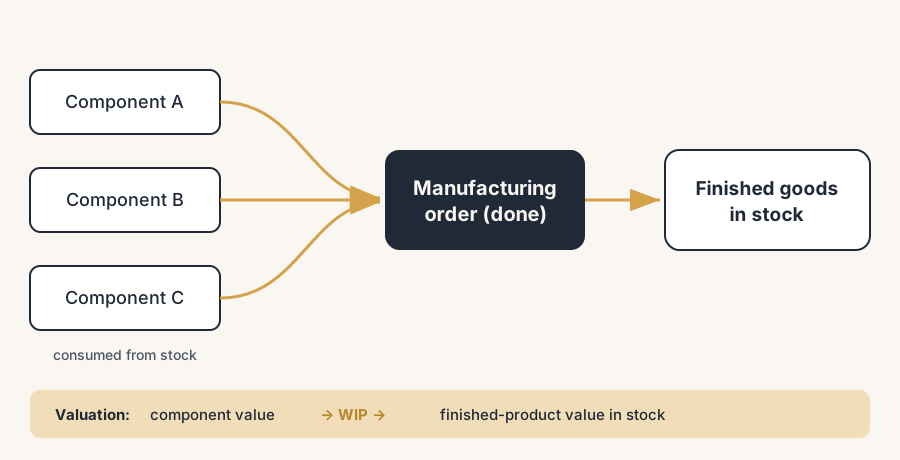
Finished goods land in stock the moment you mark the manufacturing order as done, and not a second earlier. That one action consumes the components, books the product into stock and rolls the component cost into its value.
You finished building 50 units on the floor, but Odoo still shows zero on hand and your purchasing team is about to reorder components you already used. The manufacturing order is sitting in "To Close" or "In Progress", and nobody marked it done. The goods are real; the system does not know yet.
Skip that closing step or do it wrong, and your stock count, your reorder logic and your inventory value all drift apart. Here is how it works, the steps to do it right, and the mistakes that quietly corrupt your valuation.
Why finished goods do not land in stock by themselves
A manufacturing order (MO) in Odoo is a plan, not a fact, until you close it. While the MO is open, the components are still on hand and the finished product is not. Confirming the MO reserves the components; it does not consume them. Only marking the MO as done posts the real stock moves: components leave their location, and the finished product arrives in stock.
The same action drives valuation. With automated inventory valuation on the product category, Odoo handles the money in two steps. When components are consumed, their value moves out of the raw-material stock account into work in progress (WIP). When the finished product is produced, that value moves out of WIP into the finished-goods stock account, and Odoo sets the cost of each finished unit from the components that went into it (plus any operation or work-center cost you configured). So the cost of your components does not vanish. It rolls into the value of the finished product.
This is why the "mark as done" step matters beyond the warehouse. It is the moment the component cost becomes the finished-product cost. Get the quantities or the cost method wrong at that moment and the value is wrong from there on.
The fix is closing the MO so goods and value land together
Confirm the MO and check the components.
Open Manufacturing and confirm the order. Odoo reserves the components from the bill of materials (BoM). Check that the reserved quantities match what the floor actually used. If a worker used more or fewer components than the BoM says, fix the consumed quantity on the MO now, before you close it. The consumed quantity drives both the stock move and the cost that rolls into the finished product.
Set the produced quantity to what you actually made.
In the Quantity field, enter the real number of finished units, not the planned number. If you planned 50 and made 50, leave it. If you made fewer, enter the real figure. This is the number Odoo books into stock and values, so it has to match the floor.
Mark the MO as done.
Click Produce All, or set the quantities and click Mark as Done. Odoo now posts the stock moves in one go: the components leave stock and the finished product arrives in your stock location. The MO state changes to Done. From this point the finished units show as on hand and your reorder rules see them.
Check the valuation entries.
With automated valuation, marking the MO done posts the journal entries: component value out of raw-material stock through WIP, finished value into finished-goods stock. Open the MO and check the cost, or open Inventory > Reporting > Valuation and confirm the finished product now carries the rolled-up component cost. The total value out of components should equal the value into the finished product, plus any added operation cost.
Handle the rest with a backorder if you produced partially.
If you made fewer units than planned and the rest comes later, mark done for what you made and let Odoo create a backorder. It splits the MO: the original gets a "-001" tag and is marked done for the produced quantity, and a new "-002" MO holds the remaining units. The done part books its goods and value now; the backorder books its own when you close it later. Do not edit the planned quantity down to hide the shortfall, because then the remaining demand disappears.
The part that trips people up
A few things catch almost everyone
Confirming is not consuming. A confirmed MO reserves components but has not touched stock or value yet. People see "Confirmed" and assume the goods are booked. They are not. Only "Done" posts the moves. If your on-hand looks wrong, check how many MOs are sitting open.
The produced quantity must match reality, not the plan. Odoo defaults the quantity to the planned number. If the floor made 48 of a planned 50 and you click through without changing it, Odoo books 50 into stock and values 50, and your count is two units too high. Always set the real produced quantity before you mark done.
Component cost has to be set before you produce. The cost that rolls into the finished product is the cost of the components at the moment of consumption. If a component has a zero or stale cost, the finished product inherits a wrong cost and your finished-goods value is understated. Make sure components are valued correctly (received at a real cost, or set on the product) before you close MOs against them.
AVCO updates the finished-product cost as an average. Under average cost, when the MO is done Odoo updates the finished product's cost to the average of its existing cost and the real cost from this MO. So the same product built twice at different component prices lands at a blended cost, not the latest one. That is correct behaviour, but it surprises people who expect the newest run to set the price.
Backorders are not optional cleanup. If you under-produce and just lower the quantity instead of creating the backorder, the remaining demand vanishes and your planning is wrong. Let Odoo create the backorder so the open quantity stays visible.
Quick checklist
- The MO is confirmed and the reserved component quantities match what the floor used.
- The produced quantity on the MO equals the real number of finished units, not the plan.
- The MO is marked done, so components are consumed and the finished product is on hand.
- Automated valuation is on the product category, and the journal entries posted (components through WIP into finished goods).
- Every component has a correct, non-zero cost before the MO closes.
- Partial production created a backorder for the remaining units, not a lowered planned quantity.
FAQ
How do I book finished goods into stock in Odoo?
Confirm the manufacturing order, set the produced quantity to the real number of finished units, and mark the order as Done. That single action consumes the components from stock and books the finished product into your stock location. Until you mark it done, the finished goods are not on hand.
What happens to the cost of my components when I produce in Odoo?
The component cost rolls into the finished product. With automated valuation, Odoo moves the component value out of raw-material stock into work in progress, then out of WIP into finished-goods stock, and it sets the finished unit's cost from the components consumed plus any configured operation cost. The component value is not lost; it becomes the finished-product value.
Why is my finished product showing the wrong cost after manufacturing?
Usually because a component had a zero or stale cost when the MO was closed, or because the produced quantity did not match what was actually made. The finished cost is built from the component cost at consumption, so fix the component costs and the produced quantity, then check the valuation layers. Under AVCO the finished cost is a running average, so it blends across runs.
What is a manufacturing backorder in Odoo and when do I use it?
A backorder is what Odoo creates when you produce fewer units than planned and the rest will follow later. Marking the order done for the produced amount splits it: the original is closed for what you made (tagged -001) and a new order (-002) holds the remaining units. Use it for partial production so the open demand stays visible instead of disappearing.