
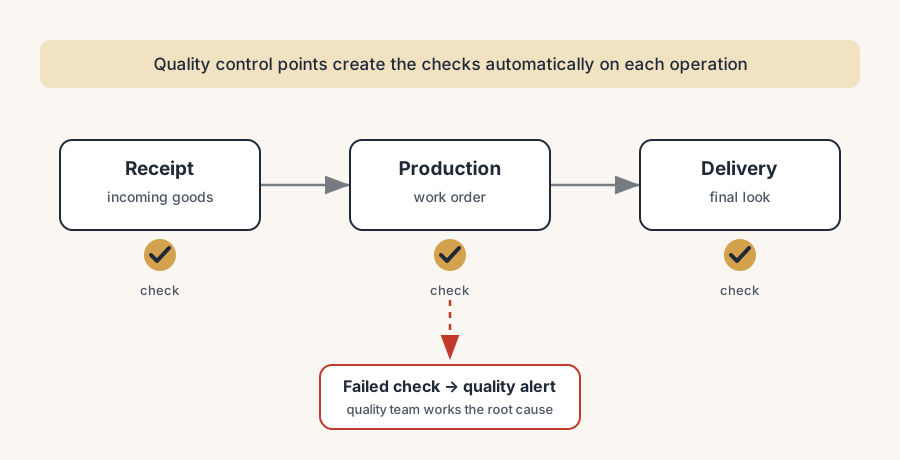
You catch defects before they ship by fixing three control moments in Odoo (at receipt, in production, before delivery) and letting quality control points generate the checks automatically. The check stops living in someone's head and starts living on the operation.
A customer opens the box and the part is the wrong colour, or it rattles, or it fails on day two. You trace it back and the cause was obvious the whole time: a batch of components came in out of spec, went straight into production, got assembled, packed, and shipped, and nobody looked at it until the customer did. By then the defect has travelled through three departments and out your front door, and the cheapest moment to catch it (when the goods arrived) is weeks gone.
This is the quality problem in manufacturing, and it is rarely about people not caring. It is about not having a fixed moment where the check happens and a record that proves it did. When inspection lives in someone's head ("Jan usually eyeballs the incoming steel"), it gets skipped on the busy days, which are exactly the days defects slip through. Odoo's Quality app fixes that by tying the check to the operation itself: the receipt, the work order, the delivery. The check appears when the work happens, the operator clears it before they move on, and you get a record of who checked what and when. Here is where the checks belong, the difference between a check and an alert, and how to set it up without turning your line into a paperwork queue.
Why defects reach the customer
Defects ship for one of a few reasons, and they all come down to the inspection not happening at the right moment or not happening at all.
The check depends on a person remembering. If quality control is "the supervisor looks it over when they get a chance", it is the first thing dropped when an order is late. The defects that escape are not random. They cluster on the busy weeks, when the manual check is the easiest corner to cut.
Bad components go straight into production. A receipt arrives, gets put away, and is pulled into a manufacturing order without anyone confirming it meets spec. Now the defect is built into a finished product. Catching it at receipt costs you one rejected delivery. Catching it after assembly costs you the components, the labour, and the rework.
There is no record that the check was done. Even when someone does inspect, if it is a nod and not a logged result, you cannot prove it later. When a customer complains or an auditor asks, "we always check" is not evidence. You cannot see which batch failed, who signed off, or whether the problem is one bad supplier or a drifting machine.
Finished goods ship without a final look. The last chance to catch a defect is the moment before it leaves. If the delivery operation has no built-in check, the product the customer receives is whatever came off the line, inspected or not.
The check exists but slows everyone down. The opposite failure. Quality control gets bolted on as a separate clipboard step that blocks the operator, so people resent it, batch it up, or fake it to keep the line moving. A check that fights the workflow gets defeated by the workflow.
What it costs you
A defect that ships is the most expensive kind of defect, and the cost is not just the one returned unit.
You pay for the defect more than once. A bad component caught at receipt costs you a rejected delivery. The same component caught after it is assembled into a finished product costs you the part, the labour to build it, the labour to take it apart or scrap it, and the slot on the line you used to make something you cannot sell. The later you catch it, the more value you have already poured into it.
You lose the customer's trust on the most visible thing you do. The product is the promise. A customer who gets a working product reorders without thinking. A customer who gets a defect inspects every delivery after that, escalates faster, and tells other buyers in the same trade. In a small market that reputation travels.
You cannot improve what you cannot see. Without logged check results you are guessing at the cause. Is it one supplier, one machine, one shift, one product? A pile of complaints with no data behind them turns root-cause analysis into an argument instead of a query.
Quality checks vs quality alerts
Before the setup, get the two core ideas straight, because people mix them up and then wire Odoo wrong.
A quality check is the inspection itself. It is the question the operator answers at the operation: does this pass or fail, what is the measurement, attach a photo, follow these instructions. A check is tied to a specific moment in a flow (this receipt, this work order, this delivery) and the operator completes it before moving on. Checks are the routine, expected gate on every relevant order.
A quality alert is the exception you raise when something is wrong. It is a flagged issue sent to the quality team: this batch failed, here is what we found, here is the corrective action. An alert is not part of every order; it is what you create when a check fails or when someone spots a problem off-process. Alerts collect on a board the quality team works through, so a recurring fault becomes visible instead of being fixed quietly and forgotten.
The division of labour is short: checks are the routine gate, alerts are the exception trail. You set up checks so problems get caught, and alerts so the right people see the pattern and fix the cause. In Odoo, when a check fails on a manufacturing or inventory order, the operator can raise a quality alert straight from that order, so the link between the failed check and the flagged issue is kept.
The fix, in numbered steps
You set up quality control in Odoo by deciding where the checks belong, then letting the system create them automatically at those moments. The mechanism is the quality control point (QCP): a rule that says "for these products, on this operation, create this check". The steps build on each other.
Install Quality and map the three control moments.
Turn on the Quality app, then decide where a defect is cheapest to catch: at receipt (incoming goods, before bad stock enters production), in production (on a manufacturing order or a specific work order, before you build the next stage on top of a fault), and before delivery (the final look before it leaves). You do not need a check at every step on day one. Start with the one moment that hurts most and add the others once it sticks.
Create a quality control point for each moment.
A QCP is the rule that generates checks automatically. For each one, set the products (or product category) it applies to, the operation type it fires on (receipts, manufacturing, delivery), and the check type. Now you are not relying on anyone remembering. When a receipt for those products comes in, the check appears on it on its own. You can take that one step further and make the check itself product-dependent: have the instruction or the measure reference fields on the product, so one control point reads the spec (a tolerance, a target weight, a colour code) from the product record instead of hard-coding it per check. One point covers many products, and each is checked against its own values.
Pick the right check type so the check is fast and unambiguous.
Odoo gives you a handful of types, and the right one keeps the check quick. Pass - Fail for a simple criterion the operator confirms. Measure when a dimension has to fall inside a norm and tolerance, so the system flags an out-of-spec value instead of leaving it to judgement. Take a Picture when you want photographic proof attached to the order. Instructions for a step-by-step the operator follows. Worksheet for a structured form. Match the type to the question so the operator answers in seconds, not minutes.
Set the frequency so you control without choking the line.
This is the step that decides whether quality control speeds you up or bogs you down. A QCP can fire on every operation, periodically (every Nth one), or randomly at a set percentage. For a critical safety dimension, check every unit. For a stable, low-risk part, a periodic or random sample catches drift without inspecting every single piece. Tune the frequency to the risk, and the check stays proportional to the problem.
Wire the failure path to a quality alert.
Decide what happens when a check fails. The operator raises a quality alert from the order, which lands on the quality team's board with the product, the order, and what was found. From there the team logs the corrective action and, over time, sees whether the failures cluster on one supplier, one machine, or one product. The check catches the unit; the alert catches the cause.
The part that trips people up
A few things catch almost everyone
A few things catch almost everyone who sets up quality control for the first time.
The check belongs on the operation, not in a separate app people have to remember to open. The whole point of a QCP is that the check comes to the operator inside the receipt, the work order, or the delivery they are already processing. If your team has to leave their flow to "go and do the quality bit", they will skip it, and you are back to inspection-by-goodwill. Set the QCP so the check is part of the order in front of them.
Frequency is where good intentions kill throughput. The instinct is to check everything, everywhere, to be safe. Do that across all your products and you bury the line in checks, the operators rush them, and the quality of the checking drops even as the quantity rises. Start with every-unit checks only where a defect is dangerous or expensive, sample the rest, and add checks where the alert data later proves you need them.
A failed check is not the same as a logged cause. Catching the defect on the order is half the job. If nobody works the quality alerts, you keep catching the same fault over and over without ever fixing why it happens. Assign someone to own the alert board, because a pile of unworked alerts is just a record of problems you knew about and did not solve.
Work order checks need the right setup. If you want a check on a specific work order step (not the manufacturing order in general), the QCP has to target that work order operation, and that means your manufacturing routing has to define those operations in the first place. A check on "the manufacturing order" and a check on "the third work order step" are configured differently, and people expect the granular one to appear without setting it up.
Edition and apps matter. The Quality app and QCPs are standard Odoo, but they only work together when Quality is installed and the operation types you want to check (receipts, manufacturing, delivery) are actually used in your flow. A half-configured setup gives you checks that never fire and a false sense that quality control is on.
Quick checklist
- The Quality app is installed and the three control moments (receipt, production, delivery) are mapped to where a defect is cheapest to catch.
- A quality control point exists for each moment, scoped to the right products and operation type, so checks appear automatically.
- Each QCP uses the check type that makes the inspection fastest and least ambiguous (pass-fail, measure with tolerance, picture, instructions, worksheet).
- Frequency is tuned to risk: every unit where a defect is dangerous, a sample where it is not.
- The check appears inside the operation the operator is already doing, not in a separate step they have to remember.
- A failed check raises a quality alert that lands on a board someone owns and works for root cause.
FAQ
What is the difference between a quality check and a quality alert in Odoo?
A quality check is the routine inspection an operator completes at an operation (a receipt, a work order, a delivery): pass or fail, a measurement, a photo, or a set of instructions. A quality alert is the exception you raise when something is wrong, flagged to the quality team with the product, the order and what was found. Checks are the expected gate on every relevant order; alerts are what you create when a check fails or someone spots a problem off-process. When a check fails on an order, the operator can raise an alert straight from that order, so the failed check and the flagged issue stay linked.
Where should I put quality checks in a manufacturing flow?
At the three moments where a defect is cheapest to catch: at receipt, so bad components do not enter production; in production, on a manufacturing order or a specific work order, so you do not build the next stage on top of a fault; and before delivery, as the final look before the product leaves. You do not need all three on day one. Start with the moment that costs you most and add the others as the habit sticks.
How do quality checks get created automatically in Odoo?
Through a quality control point (QCP). A QCP is a rule that says "for these products, on this operation type, create this kind of check". Once a QCP exists for, say, receipts of a given product, every receipt for that product gets the check on it automatically. The operator completes it before moving on, so the inspection no longer depends on anyone remembering.
How do I add quality control without slowing down the line?
Tune the frequency to the risk and keep the check inside the operation. A QCP can fire on every operation, periodically (every Nth one), or randomly at a set percentage. Check every unit only where a defect is dangerous or expensive; sample the stable, low-risk parts. And put the check on the order the operator is already processing rather than in a separate step they have to open, so it costs seconds, not a detour.
What check types does Odoo Quality offer?
Pass - Fail for a simple criterion the operator confirms; Measure for a dimension that must fall inside a norm and tolerance, so the system flags an out-of-spec value; Take a Picture when you want photographic proof attached to the order; Instructions for a step the operator follows; and Worksheet for a structured form to fill in. Match the type to the question so the check is fast and leaves no room for interpretation.