
Outsourcing a production step without losing stock control takes one specific setup in Odoo: a Subcontracting bill of materials, the subcontractor as vendor, and resupply routes on the components. The purchase order then drives everything, from sending material to consuming it on receipt.
You send raw material to a partner who does the plating, the sewing or the assembly, and they ship the finished part back. You want Odoo to handle it like any other product: order it, send the components, receive the finished goods, and keep the stock count and the value right. Instead you confirm a purchase order to the subcontractor and nothing else moves. No transfer of components, no manufacturing order, no sign that the partner is supposed to build anything. The finished goods arrive and your stock has been wrong the whole time.
Subcontracting in Odoo is a real route, not a workaround. Set up properly, confirming the purchase order to your subcontractor pulls the components out to send them, and receiving the finished product consumes those components and books the finished good into stock, with the value rolling through correctly. The trick is that almost all of the setup lives on the products and the bill of materials, not on the purchase order. Get one route wrong and the whole flow goes quiet. Here is how the route works, how to set it up, and the two mistakes that make people think subcontracting is broken.
Why a purchase order alone does nothing
A subcontractor is, to Odoo, a vendor you buy a finished product from. So your instinct is to make a purchase order and be done. The problem is that a plain purchase order treats the finished product as something you buy ready-made. Odoo has no reason to consume your components or to track what the subcontractor builds, because nothing told it this product is manufactured externally.
Two pieces of configuration turn that purchase into a subcontracting flow. First, the finished product needs a bill of materials of type Subcontracting, with the subcontractor listed on it. That tells Odoo the product is built from components by that partner, not bought ready-made. Second, the components need the Resupply Subcontractor on Order route, which tells Odoo to send them to the subcontractor when there is demand. With both in place, confirming the purchase order creates the resupply transfer for the components and links the receipt of the finished product to the consumption of those components.
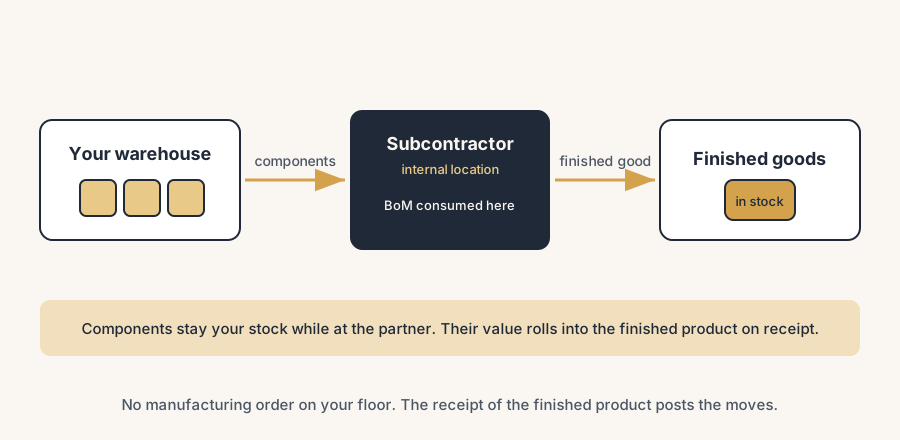
Stock value stays under control because the subcontractor's location is an internal location in your Odoo. The components you send are still your stock and still your value while they sit at the partner. They are not written off when they leave your warehouse; they move to the subcontracting location and stay on your books. When the finished product comes back, the component value rolls into the value of the finished product, the same way an in-house manufacturing order would roll it. So you never lose sight of the value, even though the work happened somewhere else.
The fix is setting up the subcontracting route step by step
Turn on subcontracting.
Go to Manufacturing > Configuration > Settings and tick Subcontracting under Operations. This unlocks the subcontracting bill-of-materials type and the subcontracting routes. Without it, the options below do not appear.
Create a Subcontracting bill of materials for the finished product.
Open the finished product, go to its Bill of Materials, and set the BoM Type to Subcontracting. Add the components the partner needs, in the right quantities, and add the subcontractor in the Subcontractors field. This is the line that tells Odoo the product is built externally, by whom, and from what.
Add the subcontractor as a vendor with a price.
On the finished product, under Purchase, add the subcontractor in the vendor pricelist with the price you pay them for the work. That price is what your purchase order to them is based on, and it is what becomes the manufacturing cost that adds to the finished-product value.
Set the routes. This is the step people skip.
On every component you send, open the Inventory tab and tick Resupply Subcontractor on Order. On the finished product, make sure the Buy route is on so you can raise a purchase order to the subcontractor. If the finished product should be ordered automatically when a sale comes in, also add Replenish on Order (MTO). The component route is the one that drives the transfer of material to the partner; miss it and nothing gets sent.
Order, send, receive.
Raise a purchase order to the subcontractor for the finished product and confirm it. Odoo creates a resupply transfer (a delivery) for the components going to the subcontractor; validate it to send them. When the finished goods come back, open the receipt on the purchase order and validate it. That receipt is the moment Odoo consumes the components at the subcontracting location and books the finished product into your stock, with the value rolled in.
Check the stock and the value.
After the receipt, the finished product is on hand and the components are gone from the subcontracting location. Open Inventory > Reporting > Valuation and confirm the finished product carries the component cost plus the price you paid the subcontractor. The component value moved into the finished product; it did not vanish and it was never double counted.
The part that trips people up
A few things catch almost everyone
No resupply moves, because the component route is missing. This is the number one mistake. If a component does not have the Resupply Subcontractor on Order route, Odoo has no instruction to send it, so confirming the purchase order creates no transfer for that component. The finished product still gets received, but the components never officially leave your warehouse, so your stock and value drift. Check every component on the BoM, not just one.
No subcontracting flow, because the BoM is the wrong type. If the bill of materials is a normal Manufacture BoM instead of Subcontracting, or the subcontractor is not listed on it, Odoo treats the purchase as a plain buy. No resupply, no consumption, finished goods land as if bought ready-made and the components sit untouched. If confirming the purchase order does nothing, check the BoM type first.
Expecting a manufacturing order in your own Manufacturing app. Subcontracting does not create an MO you manage. The build happens at the subcontractor, so there is no work order on your shop floor. People look in Manufacturing > Manufacturing Orders, see nothing, and assume the setup failed. The consumption and the production are posted through the receipt of the finished product, not through an MO you click. The exception is a multi-level BoM where some components are made in-house first; those do generate their own internal MOs to feed the subcontracted product.
Sending components by hand and breaking the link. Because the resupply transfer can feel invisible, people sometimes ship material to the partner with an ad-hoc delivery instead of validating the resupply move Odoo made. That breaks the link between what was sent and what comes back, and the valuation no longer balances. Use the transfer Odoo generates from the purchase order, not a manual one.
Tracked components need their lots recorded. If a component or the finished product uses lots or serial numbers, you still record them on the resupply transfer and the receipt. Skipping it leaves the traceability chain broken across the subcontractor, which defeats the point if you outsource a regulated step.
The full route is not always worth it. For clients with only a handful of outsourced jobs we often set up something lighter: a separate purchasable product that represents the outsourced operation, bought from the partner like any other item. That skips the subcontracting locations and most of the stock moves. It only stays clean under three conditions. The number of outsourced jobs is small, the turnaround is short, and the material for each job goes one-to-one to the partner and comes back as that job. The moment jobs overlap or material starts pooling at the partner, switch to the real route, because the light version has no way to tell you what is lying where.
Quick checklist
- Subcontracting is enabled in Manufacturing > Configuration > Settings.
- The finished product has a Subcontracting BoM with the subcontractor listed and the right components.
- The subcontractor is on the finished product as a vendor, with the price you pay for the work.
- Every component to send has the Resupply Subcontractor on Order route (check all of them).
- The finished product has the Buy route, plus MTO if it should reorder on a sale.
- Confirming the purchase order created a resupply transfer; you validated it to send the components.
- Validating the receipt consumed the components and booked the finished product with the rolled-up value.
- Lots or serial numbers were recorded on both the resupply transfer and the receipt where products are tracked.
FAQ
How does subcontracting work in Odoo?
You enable subcontracting, give the finished product a Subcontracting bill of materials with the subcontractor on it, add that partner as a vendor with the price you pay, and put the Resupply Subcontractor on Order route on the components. Then you raise a purchase order to the subcontractor. Confirming it sends the components to the partner, and receiving the finished product consumes those components and books the finished good into stock with the value rolled in.
Why are no components being sent to my subcontractor in Odoo?
Almost always because the components are missing the Resupply Subcontractor on Order route, or because the finished product has a normal Manufacture bill of materials instead of a Subcontracting one. Without the route there is no instruction to send the material, and without a Subcontracting BoM Odoo treats the order as a plain purchase. Check the route on every component and the BoM type on the finished product.
Does Odoo create a manufacturing order for subcontracted products?
No, not one that you manage. The work happens at the subcontractor, so there is no manufacturing order on your shop floor. Odoo posts the component consumption and the finished production through the receipt of the finished product instead. The exception is a multi-level BoM where some components are made in-house first; those steps create their own internal manufacturing orders.
Do I lose stock value when I send components to a subcontractor in Odoo?
No. The subcontractor's location is an internal location in your Odoo, so the components you send stay part of your stock and your inventory value while they sit at the partner. When the finished product comes back, the component value rolls into the value of the finished product, along with the price you paid the subcontractor for the work. The value moves, it is not lost.