
AI writing in Odoo earns its keep on the routine drafts (descriptions, replies, summaries) as long as you feed it the facts, check what comes back, and edit it into your own voice. The draft is the time-saver; the discipline is what keeps it accurate and on-brand.
You have written the same kind of thing a hundred times. A product description for the new item in the catalogue. A polite reply to a customer asking where their order is. A short summary of a long chatter thread so a colleague does not have to read forty messages. None of it is hard. All of it eats your afternoon, and by the fifth product description the words start to blur. So the new products go live with a one-line description, the customer email sits in drafts, and the summary never gets written.
Odoo now has AI writing built straight into its text fields, so the first draft can be on the screen in seconds. Used well, it clears the blank-page tax on routine writing and gives you something to edit instead of something to invent. Used badly, it pastes confident, generic, occasionally wrong text into your live system. The difference is not the tool. It is the editing discipline around it. Here is where the built-in AI actually helps, how to trigger it across the apps, and the few rules that keep the output accurate and sounding like you, not like a chatbot.
Where the AI writing lives in Odoo
There is no separate "AI app" you write in. The AI writing tools sit inside the rich-text editor, which is the same editor Odoo uses almost everywhere you type more than a single line. So the feature shows up in the places you already work.
You will find it in Description and Notes fields on records: product descriptions, the internal notes on a task or a lead, the description on a quotation. In the email composer and email templates, so you can draft a reply or a template body without leaving the record. In Knowledge articles, for internal documentation and process notes. And in the chatter, the message thread on the right of most records, where it can draft a message or summarise the thread above it.
That is the mental model worth keeping: it is not a chatbot you visit, it is a draft button inside the box you were already typing in. The text it produces lands in that field, and you edit it there like any other text.
How to trigger it (two ways)
The mechanics are the same wherever the editor appears, so learn them once.
Click the AI icon, or type a slash. In any rich-text field you can click the AI icon, or type / to open the powerbox (Odoo's quick-command menu) and choose AI from the list. Either one opens a small conversation window.
Write a short prompt, send it. Type what you want in plain language ("a 3-sentence product description for a stainless steel water bottle, friendly tone") and click the paper-plane icon. The AI returns a draft in the window.
Insert it, or do not. Hover over the response and click "Use this" to drop the text into the field, or click the copy icon to copy it. Nothing is committed until you choose to insert it, so a bad draft costs you nothing.
If you select existing text first, the menu changes from "generate" to "improve": you get options to rephrase, adjust the tone, translate, make it shorter or make it longer. You can also type your own instruction into the prompt instead of using the preset buttons, for example "rewrite this in a more formal tone for a B2B customer".
The three jobs it actually saves time on
AI writing is not equally useful everywhere. It earns its place on three kinds of routine text.
Drafts from a blank field. Product descriptions, a first cut of an email, a task description, boilerplate for a quotation. Anywhere the hard part is starting, not deciding what is true. You give it the facts and the tone, it gives you a draft, you fix it. This is where the biggest time saving sits, because editing a draft is faster than writing from zero.
Summaries of long threads. A chatter thread with forty messages, a long Knowledge article, a wall of notes on a lead. Ask it to summarise and you get the gist in a few lines, so a colleague picking up the record does not have to read everything. Useful, with one caveat covered below: a summary can quietly drop the one detail that mattered.
Replies and rewrites. A short, polite answer to a routine customer question. A tone change on something you wrote too bluntly. A translation of a reply into the customer's language. These are fast wins because you already know the content; you are just asking the tool to shape it.
There is also a list it is not good at: anything where being wrong is expensive and you cannot easily check it. Prices, stock figures, payment terms, legal or tax wording, commitments to a customer about dates. The AI will write those just as confidently as everything else, and that confidence is the trap.
The editing discipline: how to keep it accurate and on-brand
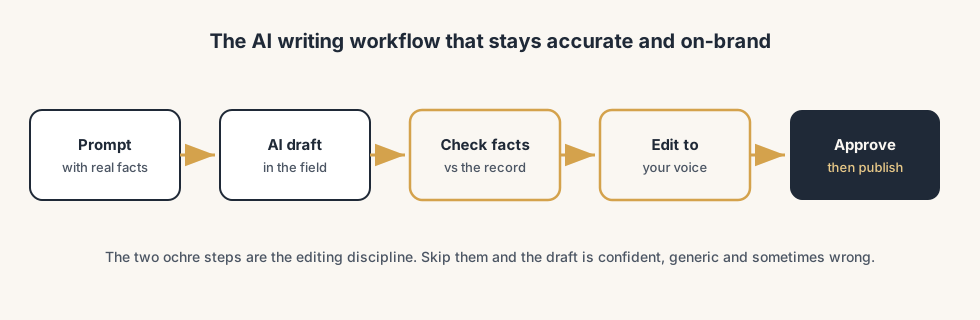
This is the part that separates a useful tool from a liability. Treat every AI draft as a first draft from a fast junior who has never met your customer and does not know your numbers. Four habits make it safe.
Give it the facts, do not let it invent them.
The more concrete your prompt, the less the AI fills gaps with plausible-sounding fiction. For a product description, give it the real specs. For a reply, give it the actual order status. A vague prompt produces vague, generic, sometimes invented text. A prompt with the real facts produces a draft you only have to polish.
Check every fact before it goes live.
Read the draft as if a stranger wrote it, because one did. Numbers, names, dates, prices, commitments: verify each against the record, not against how confident the sentence sounds. AI text is fluent whether or not it is true, so fluency is not your signal. This is non-negotiable on anything a customer or your accounts will rely on.
Edit it into your voice.
A raw AI draft reads like every other AI draft: smooth, padded, full of "seamless" and "elevate" and tidy three-item lists. Cut the filler, shorten the sentences, drop in the one specific detail only your company would know. The goal is text that sounds like your business, not like the internet's average. If a customer can tell it was AI, you have not finished editing.
Keep a human on anything sensitive.
Drafting is fine; sending on autopilot is not. A person reads and approves before an AI-drafted customer email, contract clause or public product page goes out. The tool drafts, you decide. That single rule prevents almost every way this goes wrong.
The part that trips people up
A few things catch almost everyone
A few things catch teams turning this on for the first time.
It needs to be switched on, and that depends on your hosting. The AI provider (OpenAI or Google Gemini) is set in the AI app under Configuration > Settings. On Odoo Online the AI features are available without you adding your own key. On Odoo.sh and on-premise databases you have to supply your own OpenAI or Gemini API key before anything works. If the AI icon does nothing, this is usually why.
Your data goes to a third-party model. When you generate or improve text, the relevant content is sent to the AI provider to produce the response. For most product descriptions and routine emails that is fine. For anything confidential or personal, think before you paste it into a prompt, and check it against your own privacy policy and your customers' expectations. This is a process decision, not a technical one.
A summary can drop the one line that mattered. Summaries compress, and compression loses detail. The single message in a forty-message thread that says "customer threatened to cancel" can vanish into a tidy paragraph. Use summaries to orient yourself, then read the source when the stakes are real.
It writes the wrong tone by default. Out of the box the drafts tend to be over-polished and a bit salesy. That is the average of how the internet writes, not how your business talks. Expect to edit tone every time, or build the tone instruction into your prompt ("plain, direct, no marketing words").
Generic output ranks and converts worse. If you paste unedited AI product descriptions across a whole catalogue, you get pages that read like everyone else's and say nothing specific. Search engines and customers both reward the concrete detail the AI did not know. The edit is what makes the page yours.
Quick checklist
- You trigger AI writing inside the field you are already in (AI icon or
/then AI), not in a separate tool. - You feed it the real facts in the prompt instead of letting it guess.
- You verify every number, name, date and commitment against the record before it goes live.
- You edit out the AI filler so the text sounds like your business.
- A person approves anything customer-facing or sensitive before it is sent or published.
- You use summaries to orient, then read the source when it matters.
- The provider and API key are configured correctly for your hosting (Online, Odoo.sh or on-premise).
FAQ
Does Odoo have built-in AI for writing text?
Yes. Odoo's AI writing tools are built into the rich-text editor, which appears in most places you type more than a line: Description and Notes fields on records, the email composer and email templates, Knowledge articles, and the chatter. You trigger it by clicking the AI icon or typing / to open the powerbox and choosing AI, then writing a short prompt. It can generate new text, or rephrase, shorten, lengthen, translate and adjust the tone of text you select. The draft only enters the field when you click "Use this", so you stay in control.
Do I need an OpenAI or Gemini API key to use Odoo AI?
It depends on your hosting. On Odoo Online (SaaS) the AI features are available without adding your own key. On Odoo.sh and on-premise databases you must supply your own OpenAI or Google Gemini API key before the AI features work. The provider and key are configured in the AI app under Configuration > Settings, where you can also choose which provider to use.
Is it safe to use Odoo AI for customer emails and product pages?
It is safe for drafting, not for sending unchecked. Treat every AI draft as a first draft: verify every fact (numbers, dates, prices, commitments) against the record, edit it into your own voice, and have a person approve anything customer-facing before it goes out. Also note that the text you generate or improve is sent to a third-party AI provider, so avoid pasting confidential or personal data into prompts unless that fits your privacy policy.
Will AI-written product descriptions hurt my SEO?
Unedited, generic AI descriptions tend to perform worse, because they read like everyone else's and lack the specific detail search engines and buyers reward. The fix is editing: feed the AI the real specifications, then cut the filler and add the concrete details only you know. Used as a first draft you sharpen, AI speeds up the writing without producing the bland, duplicate-feeling pages that hurt rankings.
How do I keep AI text sounding like my brand and not like a chatbot?
Build the tone into the prompt ("plain, direct, no marketing words") and then edit every draft. Cut padding and buzzwords, shorten sentences, and add a specific detail only your company would know. The raw output is the internet's average voice; the edit is what makes it yours. For consistency across a team, agree on prompt and tone guidance so everyone starts from the same place.