
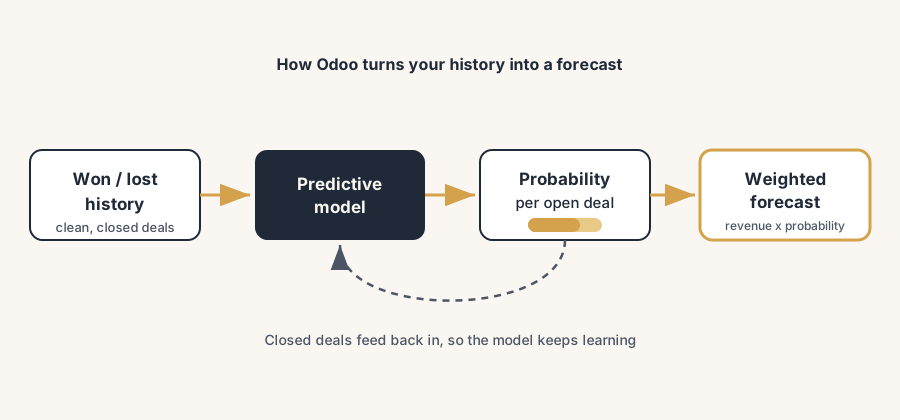
Odoo's predictive lead scoring ranks your open deals from your own won and lost history, and the forecast follows from those probabilities. The numbers are usable on two conditions: enough clean history to learn from, and reps who record the facts the model needs.
Your sales team has forty open opportunities and one afternoon to chase them. Which ones get the call? Right now the answer is whoever shouted last, whoever the rep happens to like, or whoever sits at the top of the list. The big logo gets attention because it is a big logo, while a quiet lead that looks exactly like your last three closed deals waits in the pipeline until it goes cold. At the end of the quarter the forecast is a number someone made up in a meeting, and the gap between that number and reality is anyone's guess.
Odoo CRM already has a way to rank those forty opportunities and to turn the pipeline into a forecast: predictive lead scoring. It is a model that learns from your own won and lost deals and gives every open opportunity a probability of closing, which then feeds a revenue forecast. The catch is in two places. It only works if your CRM history is clean, and the number it gives you is a probability, not a promise. This post covers how the scoring learns, how to switch it on and tune it, how the forecast is built from those scores, the things that quietly break it, and how to act on the numbers without handing your judgement to a machine.
How the scoring actually learns
Odoo's predictive lead scoring is a machine-learning model that reads your closed opportunities and predicts the probability that each open one will be won. It uses a naive Bayes model, which is a simple, well-understood statistical method, not a black box you cannot reason about. In plain terms: it looks at every deal you have already won or lost, finds the patterns, and asks of each open opportunity "how often did deals that look like this one end in a win?".
Two variables are always part of the calculation: the Stage the opportunity sits in, and the Sales Team it belongs to. On top of those you can switch on optional variables such as the assigned Salesperson, the lead source, the language, the country, and a few more. The model weighs each of these against history. If deals from a certain source in a certain stage have closed 60% of the time, an open deal that matches gets a probability in that range. As the opportunity moves to a later stage, its probability updates on its own, because deals in later stages have historically closed more often.
The important part is what "learns from history" really means. The model is only as good as the won and lost deals you feed it. With a handful of closed deals it is guessing. As a rule of thumb you want at least 100 to 200 closed opportunities, a real mix of won and lost, before the scores mean much. And it can only learn from fields that are actually filled in. If half your opportunities have no source, the source variable teaches the model very little. Clean, complete CRM history is not a nice-to-have here. It is the fuel.
The fix, in steps
Switch on the scoring, choose the variables, read the probability, and build the forecast on top of it. In that order.
Check that you have enough clean history to learn from
Before you trust a single score, look at what the model has to learn from. Predictive lead scoring is always running in Odoo CRM, but with thin or messy data it produces thin, messy scores. Open your won and lost opportunities and ask three things: do you have enough of them (aim for 100 to 200 closed, won and lost both), are deals actually being marked lost rather than left open forever, and are the fields you want to score on (source, salesperson, country) actually filled in. If the answer to any of these is no, fix that first. Set lost reasons, mark dead deals lost, and make the key fields required on the lead form. The cleanup is the work; the scoring is the easy part. History alone is not enough; the model can only weigh what the reps actually write down. We hold our own pipeline to a qualification list we took from James Summers' sales training: are we talking to the right people, is there a real business opportunity, is it urgent, is there budget and a decision path. When those answers live on the opportunity as fields instead of in a rep's head, the scoring has signal to learn from and the probability starts meaning something. Without them it is guessing from email counts and dates.
Turn on and tune the variables
Go to CRM > Configuration > Settings and find Predictive Lead Scoring. Click Update Probabilities to open the variable list. Stage and Team are locked on. Tick the optional variables that you genuinely capture well and that plausibly affect whether you win: Salesperson, Source, Medium, Country, Language, and so on. Do not tick everything by reflex. A variable that is half-empty or has nothing to do with winning just adds noise. There is also a date field, Consider leads created as of, which tells the model how far back to look. Set it to a period that reflects how you sell today, not five years of deals from a different market. Click Update to save, and Odoo recomputes the probabilities.
Read the probability on the opportunity, and sort by it
Each opportunity shows a Probability percentage on its form, and it updates as the deal moves through stages. The practical move is to surface it in the pipeline: add Probability as a column or sort your list view by it, so the deals most likely to close (or the high-value ones with a decent chance) rise to the top of the call list. This is the whole point. Instead of working the pipeline by gut or by who emailed last, the rep works it by where the time is most likely to pay off. You can still override a score by hand on any opportunity by clicking the number and typing your own, but know that doing so switches off the automatic updates for that one deal.
Build the forecast from the scored pipeline
The forecast is the scores turned into money. Odoo multiplies each opportunity's Expected Revenue by its Probability to get a prorated, probability-weighted value. A 10,000 deal at 70% counts as 7,000 toward the forecast. The Forecast report (under CRM > Reporting > Forecast) groups your open opportunities by their expected closing month, so you see a weighted revenue projection per month rather than one fat pipeline number. This is the difference between "we have 500,000 in the pipeline" and "the weighted forecast is closer to 215,000". The second number is the one you can plan hiring and cash around. For it to work, two fields have to be filled: a realistic Expected Revenue and an Expected Closing date on every open deal. No closing date, no place on the forecast.
Use the number as a prompt, not a verdict
A probability is a statement about the past, applied to the present. It is right on average, across many deals, and it can be quite wrong about any single one. Treat a score as a prompt for a human decision, not the decision itself. A high score on a deal you know is stalled is a flag to check why the model disagrees with you, not a reason to forecast it as good as done. A low score on a strategic account is not permission to ignore it. Use the scores to decide where attention goes first and to sanity-check a rep's optimistic forecast, then let people apply what the model cannot see: the budget that just got frozen, the champion who left, the competitor in the room. The model handles the average. You handle the exceptions.
The part that trips people up
A few things catch almost everyone
A few things quietly wreck the numbers.
Thin or skewed history gives confident nonsense. With too few closed deals, or a pipeline where nobody marks deals lost, the model still produces a probability, and it looks just as authoritative as a good one. Garbage history, garbage scores, presented with the same clean percentage. Before you act on scores, confirm you have a real mix of won and lost deals to learn from.
Empty fields teach the model nothing. If you score on Source but Source is blank on most leads, that variable adds noise instead of signal. Either fill the fields properly (make the important ones required) or untick the variables you do not capture well. Scoring on a field you do not fill is worse than not scoring on it.
Manual probability edits silently stop the auto-updates. The moment a rep types a probability by hand on a deal, Odoo stops updating that deal automatically as it moves through stages. That is fine if it is deliberate, and a quiet problem if reps do it out of habit, because part of the pipeline then stops responding to reality. Agree as a team when a manual override is allowed.
No closing date means no forecast. An opportunity with no Expected Closing date does not appear in the Forecast report. A pipeline full of deals without closing dates produces a forecast that is missing most of the money. Make the closing date a habit, or the forecast will quietly understate the quarter.
Expected Revenue that nobody maintains drifts from reality. The forecast is only as honest as the deal values behind it. If reps enter a hopeful number at the start and never update it, the weighted forecast inherits that hope. Review Expected Revenue at the same moments you review the stage.
Quick checklist
- You have a real mix of won and lost closed opportunities to learn from (aim for 100 to 200, the more the better).
- Dead deals are actually marked lost with a reason, not left open in the pipeline.
- The optional scoring variables you switched on are fields you actually fill; the rest are off.
- The "consider leads created as of" date reflects how you sell today, not an old market.
- Probability is visible in the pipeline view so reps can sort and prioritise by it.
- Every open opportunity has a realistic Expected Revenue and an Expected Closing date.
- Manual probability overrides are a deliberate team decision, not a habit.
- The forecast number is used as a planning input and a sanity check, with human judgement on top for the exceptions.
FAQ
How does predictive lead scoring work in Odoo CRM?
Odoo uses a machine-learning model (naive Bayes) that learns from your own won and lost opportunities and gives every open opportunity a probability of closing. It always considers the Stage and the Sales Team, and you can add optional variables such as Salesperson, lead Source, Country and Language. The probability shows on the opportunity and updates automatically as the deal moves through the pipeline stages. Because it learns from history, it needs a good amount of clean, closed deals (a mix of won and lost) before the scores are reliable.
How much data does Odoo need for lead scoring to be accurate?
As a rule of thumb, aim for at least 100 to 200 closed opportunities, a genuine mix of won and lost, before you rely on the scores. With fewer than that the model is mostly guessing. Just as important as the count is the quality: deals must actually be marked lost rather than left open, and the fields you score on (such as Source or Country) must be filled in, because the model can only learn from data that is there.
How does Odoo forecast sales revenue?
Odoo multiplies each opportunity's Expected Revenue by its Probability to get a prorated, probability-weighted value, then the Forecast report (CRM > Reporting > Forecast) groups open opportunities by their expected closing month. So instead of one large pipeline figure, you get a weighted revenue projection per month. For an opportunity to appear in the forecast it needs both an Expected Revenue and an Expected Closing date.
Should I trust the lead score completely?
No. A score is a probability based on past patterns, so it is reliable on average across many deals but can be wrong about any single one. Use it to decide where to spend attention first and to sanity-check optimistic forecasts, then apply human judgement for what the model cannot see, such as a frozen budget, a champion who left, or a competitor in the deal. Treat the number as a prompt, not a verdict.
Can I change a lead's probability by hand in Odoo?
Yes. Click the probability number on the opportunity and type your own value. Be aware that a manual edit switches off the automatic probability updates for that opportunity, so it will no longer rise as the deal moves through stages. Use manual overrides deliberately, as a team decision, not as a habit, or part of your pipeline stops reflecting reality.