
Odoo's document digitization reads the PDF or photo and fills the draft vendor bill for you; your job shrinks to a glance, a correction where needed, and the post. Turn it on, route the bills in by email, and reserve fully automatic posting for vendors that have earned it.
It is the end of the month and there is a stack of supplier invoices. PDFs in your inbox, a few paper ones on the desk, some that arrived as photos from a phone. Someone opens each one, reads off the vendor, the date, the invoice number, the amount and the VAT, and types it into a new vendor bill. Two hundred lines of someone's afternoon, every month, and the most interesting decision in the whole job is which tax to pick. Then a digit gets transposed, the total does not match, and the afternoon gets longer.
Odoo can read those documents for you. The feature is called document digitization: you upload a bill or forward it to an email address, Odoo's AI reads the PDF or image, and it creates a draft vendor bill with the fields already filled in. You are no longer the typist. You are the person who glances at the draft, confirms it looks right, and posts it. Here is how it works, how accurate it is, what it costs, and the two places it still needs a human: tax and matching a bill to its purchase order.
Why typing bills by hand is the wrong job for a person
Reading a number off a PDF and typing it into a field is exactly the kind of work a machine does better than a tired human at month-end. It is repetitive, it is dull, and dull is where mistakes hide. The cost is not just the hours. It is the transposed digit nobody catches, the bill that sat in a mailbox for a week because the one person who enters them was on holiday, and the supplier total that has to be reconciled twice because someone keyed the net instead of the gross.
The deeper problem is that a person typing is a person not checking. When your accounts team spends its time on data entry, it has no time left for the part that actually needs a brain: does this bill match what we ordered, is the VAT treatment right, should this even be paid. OCR flips that. The machine does the typing, the person does the judging. That is the whole point, and it is why the human check below is a feature, not a fallback.
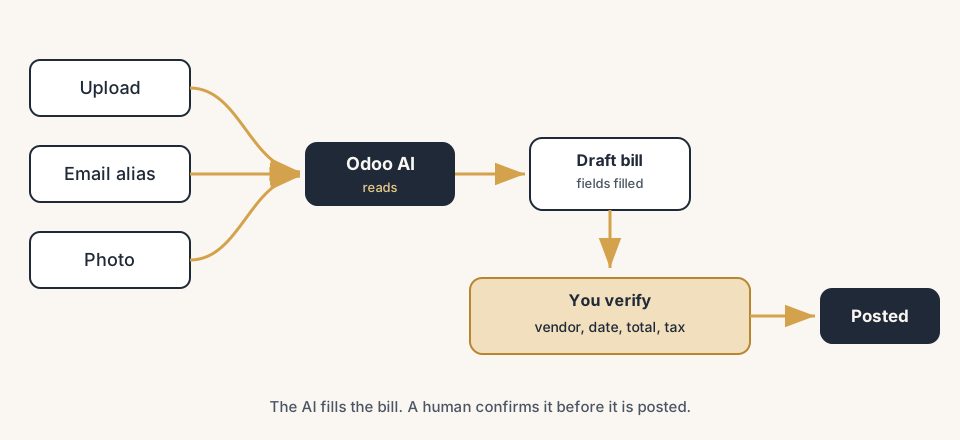
How Odoo's document digitization works, in steps
Get the documents into Odoo, let the AI read them, then verify before you post. Each step builds on the one before.
Turn on digitization and pick automatic or manual
In Accounting > Configuration > Settings, scroll to the Digitization section and switch it on. You get one choice that matters: process documents automatically, or send each one for digitization by hand. Automatic means the moment a document lands, Odoo reads it without you clicking. Manual means the draft bill is created but you press Send for digitization when you are ready. Start manual while you build trust in the results, then switch to automatic once you see it reading your suppliers well. Both modes are the same engine, the only difference is who pulls the trigger.
Get the bill into Odoo: upload or email
There are two ways in. Upload the file directly on the vendor bills screen (PDF, or an image like a JPG or PNG photo of a paper invoice). Or forward it to an email alias tied to your purchases journal. Each PDF attached to that email becomes a new draft vendor bill on its own. The email route is the one that changes the habit: tell your suppliers to send invoices to that address, or forward them yourself, and the bills arrive in Odoo as drafts without anyone opening an attachment. This is also what makes a shared "invoices@" mailbox finally useful instead of a place bills go to be forgotten.
Let the AI read it and fill the fields
Once the document is sent for digitization, Odoo's AI reads it and populates the draft: the vendor, the bill date, the due date, the invoice reference, the line amounts, the totals and the taxes it recognises. On the bill form you see the original document on one side and the extracted fields on the other, so you are never guessing what came from where. If a supplier's layout is unusual the first time, the result improves as you correct it: the more documents you scan, the better Odoo gets at reading that supplier's format.
Verify, correct, and post
This is the step that matters, so do not skip it. The AI gives you a draft, not a posted entry. Read the extracted fields against the document beside them: vendor, date, total, tax. Where Odoo guessed, you confirm or correct. Correcting is not a failure of the tool, it is how the tool learns your suppliers and it is your control point before money moves. When the draft is right, you post it like any other vendor bill. The rule is simple: a human confirms every bill before it is posted, the AI just removes the typing.
(Optional) let trusted vendors post automatically
Once you trust a specific supplier's results, Odoo can stop asking. If you confirm a few of a vendor's bills with no edits, Odoo offers to auto-post future bills from that vendor: enable it, ask again later, or never for that vendor. Use this only for clean, predictable suppliers (a recurring software subscription, a utility) where the bill is the same shape every month. For anything with line items that vary or a PO to match, keep the human check. Auto-post is a reward you grant per vendor, not a default you flip for everyone.
Accuracy and the human check
The honest version is this: OCR is good, not perfect, and that is fine because a person confirms every bill anyway. Modern document AI reads clean PDFs from regular suppliers very well, and it gets better at your specific vendors the more you scan, because every correction teaches it that supplier's layout. Where it struggles is the same place a human does: a blurry phone photo, a scan at an angle, a handwritten note, an unusual layout, or a low-quality fax-style document. It will still produce a draft, the draft will just need more of your attention.
So treat the AI as a fast junior who fills in the form and never as the final signoff. The fields to check first every time are the ones that cost real money or break the books: the total, the tax, and the vendor. Get those three right and the rest is detail. The win is not that the machine is always right. The win is that you read a filled-in draft in ten seconds instead of typing an empty one in two minutes.
What it costs
Document digitization is an In-App Purchase (IAP) service that runs on prepaid credits, and one document costs one credit. You buy credits from Accounting > Configuration > Settings, in the Digitization section, with Buy credits. Odoo Enterprise databases with a valid subscription get a batch of free credits to try the feature before you buy more, so you can test it on real invoices at no cost first.
The exact price per credit is not a single flat number we will quote here, because it depends on the credit pack and can change. Check the live price in your own database before you commit. The practical math is simple though: compare the cost of one credit against the minutes a person spends typing one bill. For most companies past a handful of bills a week, the credit is cheaper than the labour, and far cheaper than the errors. Two warnings: credits are consumed when a document is sent for digitization (so a bad scan you re-send burns a second credit), and if you turn on automatic processing your credit balance can run down quietly. Top up before it hits zero, or digitization silently stops and bills pile up as empty drafts again.
The part that trips people up
A few things catch almost everyone
A few things catch almost everyone.
Quick checklist
- Digitization switched on in Accounting > Configuration > Settings
- Decided automatic vs manual to start (manual while building trust)
- Email alias set on the purchases journal, suppliers pointed to it
- A human verifies vendor, date, total and tax on every draft before posting
- Purchase order matching done on bills that have a PO
- Auto-post enabled only for clean, predictable vendors
- Credit balance has a buffer, especially in automatic mode
FAQ
How does invoice OCR work in Odoo?
You upload a vendor bill or forward it to an email alias, and Odoo's AI reads the PDF or image and creates a draft vendor bill with the vendor, dates, invoice number, amounts and taxes filled in. You then check the draft against the original document, correct anything the AI misread, and post it. Document digitization can run automatically the moment a file arrives, or manually when you click Send for digitization. A human confirms every bill before it is posted; the AI removes the typing, not the control.
How much does Odoo invoice digitization cost?
It is an In-App Purchase service paid in prepaid credits, and one document uses one credit. You buy credits in Accounting > Configuration > Settings under Digitization. Odoo Enterprise databases with a valid subscription get free credits to test it first. The exact price per credit depends on the credit pack and can change, so check it live in your database. Credits are spent when a document is sent for digitization, so re-sending a bad scan costs another credit.
Is Odoo's invoice OCR accurate?
It is accurate on clean PDFs from regular suppliers and gets better at your specific vendors the more you scan, because each correction teaches it that layout. It struggles with blurry photos, crooked scans, handwriting and unusual layouts, where the draft needs more checking. Because a person verifies every bill before posting, OCR errors are caught at the verification step rather than reaching your books. Always check the total, the tax and the vendor first.
Does Odoo match the bill to the purchase order automatically?
No, that is a separate step. OCR reads the bill and creates the draft, but it does not reconcile the bill against your purchase order on its own. After digitization you use the Purchase matching smart button on the bill, select the right open purchase order lines, and click Match. Skipping this is how bills get paid twice or paid for goods never received, so always match bills that have a PO.
Can Odoo post vendor bills fully automatically?
For trusted vendors, yes. If you confirm several of a supplier's bills with no edits, Odoo offers to auto-post future bills from that vendor. Enable it only for clean, predictable suppliers like a recurring subscription or a utility, and keep the human check for anything with varying line items or a PO to match.