
Getting Odoo data AI-ready is five jobs: deduplicate contacts and products, make categories and units consistent, fill the key fields, settle one source of truth per fact, and retire the dead records. Why this comes before any AI feature is the argument of first the standard, then AI; this post is the how.
You switch on an AI feature in Odoo, ask it to draft a quote or score your leads, and the answer is confidently wrong. It quotes the wrong product because there are three near-identical copies in the catalogue. It pulls the wrong contact because the same customer exists four times with three different spellings. It compares apples to pears because half your products are priced per box and half per piece, with nothing telling them apart. The feature is not broken. It is reading the same messy data your people have been working around for years.
AI does not fix bad data, it amplifies it. A human looking at three duplicate contacts knows which one is real and quietly picks the right one. A model does not. It treats every record as fact, so duplicates, blank fields and mixed units turn into wrong answers at speed. Before you turn on a single AI feature, the work is unglamorous and worth every hour: deduplicate your contacts and products, make categories and units consistent, fill the few fields that matter, settle one source of truth per fact, and retire the data nobody uses. This is the same standard-first idea behind a healthy Odoo, just aimed at the cleanup actions. Here is how to do it, what trips people up, and when the cleanup is big enough to call a partner.
Why AI gets it wrong on dirty data
The model trusts what is in the database. It has no instinct for "that customer record looks abandoned" or "those two products are obviously the same thing". Every duplicate is a separate customer to the model, every blank field is a fact that does not exist, and every inconsistent unit is a real difference. So it averages, sums and ranks across records that a person would have merged or ignored, and the output looks plausible while being wrong.
The damage is worse because it is invisible. A wrong total in a report gets caught because someone knows roughly what the number should be. An AI suggestion that is 15 percent off because it double-counted a duplicate customer does not announce itself. It just nudges a forecast, a reorder or a lead score in the wrong direction, quietly, every time. Clean data is not a nice-to-have before AI. It is the difference between a feature that helps and a feature that misleads.
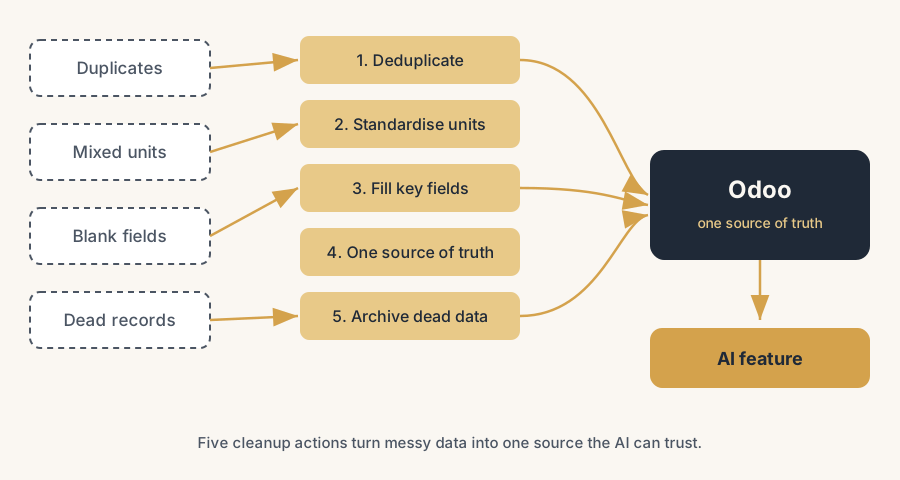
The fix, in steps
Do these in order. Each one removes a class of error the next step would otherwise inherit.
Deduplicate your contacts and products
Duplicates are the single biggest source of wrong AI answers, so start here. In Odoo you have two routes. For contacts, select the duplicate records in the Contacts list, open the Actions menu and choose Merge, then pick which record survives as the master. For a database-wide pass, Odoo Enterprise includes the Data Cleaning app: it runs deduplication rules per model (contacts, products, product categories and more), groups likely duplicates by a similarity threshold you set, and lets you merge them after a manual check or, once you trust a rule, automatically. Set the rules, review the first batches by hand, and merge into one master record per real entity. The point is one customer, one product, one record, so the model counts each thing once.
Make categories and units consistent
A model cannot group what you have labelled inconsistently. Walk your product categories and collapse the accidental variants: "Furniture", "furniture" and "Office furniture" that all mean the same shelf become one category. Do the same for units of measure. Decide, per product, whether it lives in pieces, boxes or kilograms, and use that consistently, because Odoo's unit-of-measure conversion only protects you when the units are set correctly in the first place. Mixed or missing units are how an AI summary ends up adding 200 boxes to 200 pieces and calling it 400. Consistent categories and units give the model clean groups to reason over.
Fill the key fields, not every field
You do not need a perfect record, you need the few fields the AI and your reports actually read. Decide which those are: customer country and currency for any geographic or financial suggestion, product category and cost for margin and reorder logic, the email and phone that any outreach feature needs. Then fill those, in priority order, and leave the rest. A blank country field makes a model guess or skip; a blank cost makes a margin suggestion meaningless. You can find the gaps fast with list view filters ("Country is not set") and fill them in bulk. Aim for the fields that change an answer, not a 100 percent-complete form nobody reads.
Settle one source of truth per fact
Decide where each fact officially lives, and stop keeping a second copy somewhere else. A customer's credit limit lives on the contact, not in a sales rep's spreadsheet. The real stock figure lives in Inventory, not in a separate planning sheet. A product's price lives on the price list, not in three product descriptions. When the same fact exists in two places, they drift, and the model has no way to know which one is current, so it picks wrong. One fact, one home, everything else reads from it. This is the standard-first principle in practice: let Odoo hold the truth and let every feature, AI included, read from the same place.
Retire the dead data
Old, unused records do not just sit there quietly, they pollute every average and every match. The supplier you stopped using in 2019, the product you discontinued, the lead that went nowhere three years ago: to a model these look as real as today's records, so they drag down forecasts and surface in suggestions. Do not delete blindly, because records are linked to historical orders and invoices you must keep. Instead archive what you no longer use (Odoo's Archive action hides a record from active lists while keeping its history intact) and tighten your active lists with filters. The goal is that the data the AI reads is the data you actually work with today.
The part that trips people up
A few things catch almost everyone
A few things catch almost everyone.
Merging is not reversible, so check before you confirm. When you merge two contacts or products, Odoo moves the links from the losers onto the master and the others are gone. If you picked the wrong master, or two records were not actually the same thing, you have just mixed two real entities. Review each group, pick the master deliberately, and on the Data Cleaning app keep the first runs on manual check until you trust the rule. Do not switch a rule to fully automatic on day one.
A high similarity threshold misses duplicates, a low one merges things that are not duplicates. The Data Cleaning app groups records by how similar they are, and that threshold is a trade-off. Set it too strict and "Jansen B.V." and "Jansen BV" stay separate; set it too loose and two genuinely different companies with similar names get merged. Tune it per model, review the suggested groups, and accept that you will run a few passes before it is right.
Archived is not deleted, and that is the point. People worry that retiring old data loses history. It does not. An archived record keeps every order, invoice and message attached to it; it just drops out of the active lists and the pickers. So you can clean up your working data without breaking last year's accounts. The mistake is the opposite: deleting a record that is still linked to invoices, which Odoo will usually block, or worse, leaving everything active out of fear.
Cleaning once is not cleaning. Data goes dirty again. New duplicates creep in through imports and the website form, units drift as people add products in a hurry, blanks reappear. The deduplication rules in the Data Cleaning app can run on a daily schedule, and you should pair that with a simple habit: a quick monthly look at new-record quality. A one-off cleanup before an AI launch helps for a month. A standing rule keeps it clean.
Clean data and the right access are not the same thing. Cleaning your records does not decide who and what the AI may read. That is a separate question of access rights and which fields a feature is allowed to see. Get the data clean first, but do not assume clean equals safe to expose; check what the AI feature actually reads before you switch it on.
Quick checklist
- Contacts and products are deduplicated into one master record per real entity, merged after a manual check.
- Product categories are collapsed to one label per real category, no accidental variants.
- Units of measure are set consistently per product, so totals and conversions are reliable.
- The key fields that the AI and your reports read (country, currency, category, cost, email) are filled in priority order.
- Each fact has one official home in Odoo, and second copies in spreadsheets are retired.
- Unused suppliers, products and leads are archived, not deleted, so history stays intact.
- The Data Cleaning deduplication rules run on a schedule, with a monthly check on new-record quality.
- You have confirmed what each AI feature actually reads before switching it on.
FAQ
How do I clean up my data in Odoo before using AI?
Work in order: deduplicate contacts and products into one master record each, make product categories and units of measure consistent, fill the key fields your reports and AI read (such as country, currency, category and cost), settle one source of truth per fact, and archive data you no longer use. Use the Merge action in Contacts for one-off duplicates and the Data Cleaning app in Odoo Enterprise for a database-wide pass with deduplication rules. Clean data first, because AI amplifies whatever is in the database rather than correcting it.
How does Odoo merge duplicate contacts and products?
For contacts, select the duplicates in the list, open the Actions menu and choose Merge, then pick the master record that survives; the others are merged into it and their links move across. For a wider cleanup, the Data Cleaning app in Odoo Enterprise detects duplicate records per model using rules and a similarity threshold, groups likely duplicates, and merges them after a manual check or automatically once you trust the rule. Merging is not reversible, so review each group before you confirm.
Why does my AI feature give wrong answers in Odoo?
Usually because the data underneath is dirty. Duplicate customers get counted more than once, blank fields make the model guess or skip, inconsistent units make it add unlike things, and dead records drag down averages. A model treats every record as fact, so it cannot tell a real entity from a duplicate the way a person would. Cleaning the data (deduplicate, standardise units and categories, fill key fields, retire dead records) is what makes the feature reliable.
Should I delete old data in Odoo or archive it?
Archive it, do not delete it. The Archive action hides a record from active lists and pickers while keeping its orders, invoices and history intact, so your accounts stay correct and the AI stops reading data you no longer use. Deleting a record that is linked to invoices is usually blocked by Odoo for good reason. Archive is the safe way to retire dead suppliers, discontinued products and stale leads.