
Email marketing scales in Odoo because the list, the customers and the sending live in one database: segments are live filters on real data, and follow-ups are automation rules that fire on behaviour instead of someone's calendar.
Every month someone exports a contact list to a spreadsheet, pastes it into a separate email tool, writes a newsletter, and sends the same message to everyone. The customers who bought last week get the same "come back" mail as the ones who have never bought. A few people reply to ask why they got it, a few unsubscribe, and nobody follows up on the ones who clicked but did not buy, because that would mean checking a report and writing more emails by hand. The tool works. The process does not, because every send is a manual job and every follow-up depends on someone remembering to do it.
This is email marketing that does not scale. The list lives in one place, the customers live in another, and the work grows with every campaign. Odoo puts the list, the customers and the sending in the same database, so a segment is a live filter on real data and a follow-up is a rule that fires on its own. Here is how to set up mailing lists and segments, build a campaign, turn one-off sends into automation workflows, and get the deliverability basics right so your mail actually lands. Plus where it gets complex enough to call a partner.
Why manual email marketing breaks down
The list is a copy, so it is wrong the moment you export it. A spreadsheet of contacts is a snapshot. The minute someone buys, unsubscribes or changes email, the copy and the truth drift apart. You end up mailing people who left and missing people who just signed up, because the list does not know what happened in your business this week.
Everyone gets the same message, so the message is weak. Without segments you cannot say "this offer to customers who bought in the last 90 days" or "this reminder to people who abandoned a cart". One generic blast to the whole list gets generic results, and the people most likely to act never get the email written for them.
The deeper issue is that every step is manual. Pick the audience, write the mail, send it, read the report, decide who to follow up, write the next mail. When that work lives outside your business data, it cannot trigger itself. The fix is to keep the audience, the sending and the rules in one system, so a campaign can react to what a contact actually does.
The fix, in steps
Build it in this order: the audience first, then a single campaign, then the automation, then the deliverability check. Each step rests on the one before.
Set up mailing lists for intent, not for everything
In Odoo a mailing list groups contacts by why they want to hear from you: a newsletter, a product launch, an event, a promotion. Go to Email Marketing > Mailing Lists and create one list per real intent, not one giant list for the whole database. Add contacts by importing them (paste addresses, one per line, or upload a CSV with extra fields like country and company), or by linking existing contacts. A mailing list can be public, so people can subscribe and unsubscribe themselves from a managed page, which keeps the list clean without you touching it. Keep lists few and meaningful. A list per intent is something a reader chose; a list of "everyone" is something they will leave.
Use segments to mail the right slice, not the whole list
A segment is a filter on your contacts, not a separate copy. Instead of maintaining a "customers who bought recently" list by hand, you let Odoo build the audience live from the data: a domain filter on the contact's country, company, tags, or any field you can reach. When you create a mailing you choose the recipients by model and add filters, so the audience is recalculated every time, from the current state of the database. The pivot view on your contacts helps here: slice by country, company or creation date and you will spot segments you did not know you had. A segment is the difference between "send to the list" and "send to the people this email is actually for".
Build one campaign and read what it tells you
A mailing is a single email to a chosen audience. Create one in Email Marketing, pick the recipients (a list or a filtered model), design the body with the drag-and-drop blocks, and send or schedule it. Two things make a campaign more than a blast. First, A/B testing: send variants of the subject line or content to a percentage of the audience, let Odoo measure, and send the winning version to the rest automatically. Second, the statistics: every mailing tracks opened, clicked, replied, bounced and unsubscribed. Read those numbers before you write the next one. A campaign that does not change based on its own results is just a louder blast.
Turn follow-ups into an automation workflow
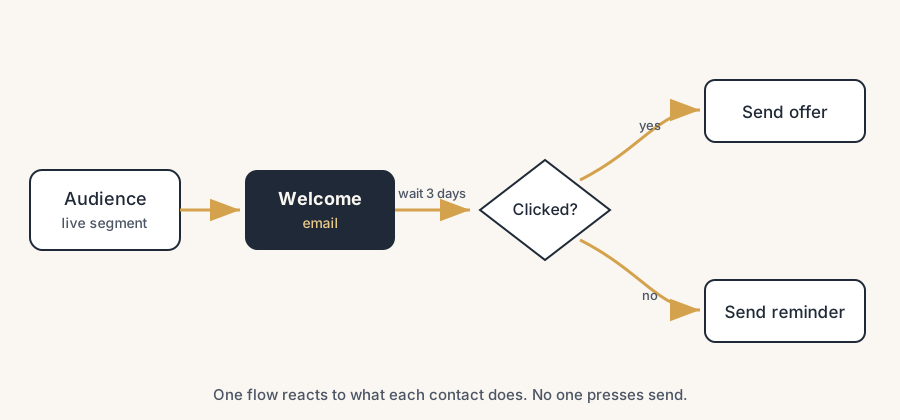
This is where it starts running itself. The Marketing Automation app lets you build a campaign as a flow of activities on a target audience instead of one send. You pick a target model and filter (the audience), then add activities. An activity is one of three things: an Email sent to the audience, an SMS, or a Server action that does something inside the database. The power is in the child activities and their triggers. A follow-up activity fires based on what the contact did with the previous one: Opened, Not Opened, Replied, Not Replied, Clicked, Not Clicked, or Bounced, each after a delay you set. So you build a real flow: send a welcome email, wait three days, and if they did not click, send a reminder; if they clicked, send the offer instead. Once it is on, the workflow runs on every contact who enters the audience, with no one pressing send. Triggers on a future date need one trick. Automation reacts comfortably to things that happened (a signup, a purchase), but sometimes the moment you want sits before a planned date, say a wedding date you want to mail ahead of. The filter does not handle "X days before a date field" well, so we work around it: add a simple true/false field (a Studio field is fine here) and let a scheduled action flip it once the date minus your lead time arrives. The marketing automation then triggers on that field. Plain and reliable, and both halves are standard mechanisms, so nothing breaks at an upgrade.
Get deliverability right so the mail actually lands
A perfect campaign that lands in spam is a wasted campaign. Three things decide whether your mail arrives. SPF lets your domain owner say which servers are allowed to send mail for your domain, so receiving servers can check the sending IP against that list. DKIM adds a digital signature to each message that the recipient's server verifies against a DNS record, proving the mail is really from you and was not altered in transit. DMARC ties SPF and DKIM together and tells receiving servers what to do when a message fails the check. You set these as DNS records on your domain. Get them right once and your sender reputation holds; skip them and even legitimate campaigns get filtered. (See our separate guide on configuring SPF, DKIM and DMARC for Odoo.) On top of that, Odoo keeps a blacklist: anyone who unsubscribes or hard-bounces is excluded from future marketing mail automatically, which protects your reputation. Blacklisted contacts still get transactional mail like order confirmations, so you are not breaking real communication.
The part that trips people up
A few things catch almost everyone
A few things catch almost everyone.
A static list goes stale, a segment does not. If you build an audience as a hand-maintained list, you are back to the spreadsheet problem: it is right the day you make it and wrong a week later. Build audiences as filters on the live model wherever you can, so the system recalculates who qualifies at send time instead of trusting an old copy.
Marketing Automation and a single mailing are not the same thing. A mailing in Email Marketing is one send. A campaign in Marketing Automation is a flow that reacts over time. People build a one-off mailing, expect follow-ups to happen, and nothing fires because there is no workflow behind it. Decide up front which one you need: a single newsletter is a mailing, a nurture sequence is an automation.
The blacklist is exclusion, not deletion. Unsubscribed and bounced addresses stay in your database, flagged so marketing mail skips them. People panic that contacts "disappeared" or try to re-mail them to "check". Do not. Re-mailing blacklisted addresses is exactly how you damage your sender reputation. Leave the blacklist doing its job.
Most "email not sending" problems are SPF or DKIM. When a campaign fails to send with no clear error, the cause is usually a missing or wrong SPF or DKIM record, not Odoo. Check the DNS records before you blame the app. The same misconfiguration that blocks one transactional email will quietly hurt every campaign you send.
Sending from a fresh domain at full volume burns it. A brand-new domain with no sending history that suddenly blasts ten thousand emails looks exactly like spam to receiving servers. Warm up: start with smaller, engaged segments and grow the volume, so your reputation builds before the big sends.
Quick checklist
- You have a few mailing lists by real intent (newsletter, launch, event), not one list of everyone.
- Public lists let contacts subscribe and unsubscribe themselves, so the list stays clean on its own.
- Audiences are built as live segments/filters where possible, not hand-maintained copies.
- Each campaign uses A/B testing on subject or content where it matters, and you read the open, click and bounce stats before the next send.
- Multi-step follow-ups live in Marketing Automation as a workflow with triggers (opened, clicked, not clicked, bounced), not as manual sends.
- SPF, DKIM and DMARC records are set on your sending domain and verified.
- You leave the blacklist alone: unsubscribed and bounced addresses stay excluded from marketing mail.
- New domains are warmed up gradually instead of blasted at full volume on day one.
FAQ
What is the difference between Email Marketing and Marketing Automation in Odoo?
Email Marketing sends mailings: a single email to a chosen audience, with A/B testing and statistics on opens, clicks and bounces. Marketing Automation builds campaigns as a flow of activities on a target audience over time. In automation, follow-up activities fire based on what each contact did with the previous one (opened, not opened, clicked, not clicked, replied, bounced), each after a delay you set. Use a mailing for a one-off newsletter; use automation for a multi-step nurture sequence that runs itself.
How do mailing lists and segments work in Odoo Email Marketing?
A mailing list groups contacts by intent (newsletter, launch, event), and you fill it by importing addresses, uploading a CSV, or linking existing contacts. Public lists let people subscribe and unsubscribe themselves. A segment is different: it is a live filter on your contacts (by country, company, tags, or any field), recalculated each time you send, so you mail the right slice without maintaining a separate copy. Lists are for intent the reader chose; segments are for targeting the people an email is actually for.
How do I make sure my Odoo marketing emails do not land in spam?
Set up SPF, DKIM and DMARC as DNS records on your sending domain. SPF lists which servers may send for your domain, DKIM signs each message so the recipient can verify it is genuine, and DMARC ties the two together and tells receiving servers what to do on a failed check. Beyond DNS, keep your list clean by leaving Odoo's blacklist to exclude unsubscribed and bounced addresses, and warm up a new domain with smaller engaged sends before scaling volume. Most "email not sending" issues in Odoo trace back to a missing or wrong SPF or DKIM record.
What happens to contacts who unsubscribe or bounce in Odoo?
They go on the blacklist and are automatically excluded from future marketing mailings. The address stays in your database, flagged, rather than being deleted. Blacklisted contacts still receive transactional emails such as order confirmations and shipping notifications, so essential communication keeps working. You should not re-mail blacklisted addresses; doing so is one of the fastest ways to damage your sender reputation.