
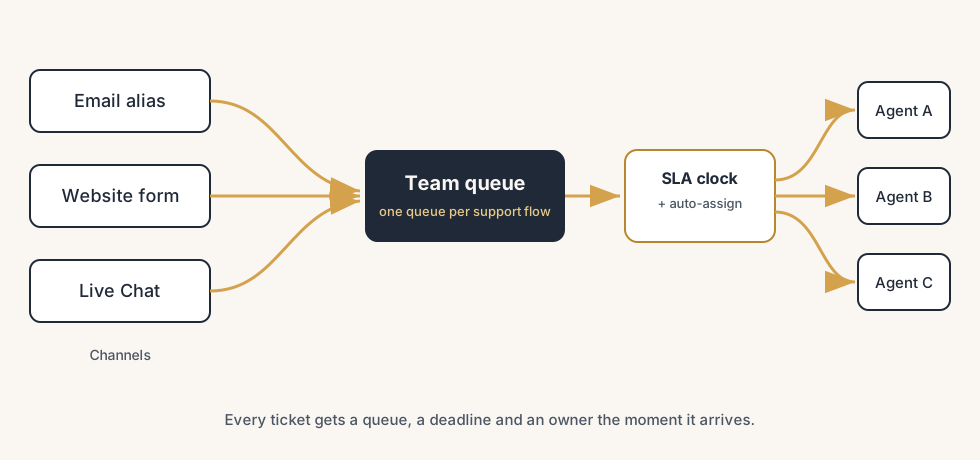
Tickets stop falling through the cracks when three things work together in Odoo Helpdesk: a team that owns each queue, an SLA policy that puts a clock on every ticket, and automatic assignment that gives each one a name on arrival.
A customer emails about a broken order on Monday morning. The mail lands in a shared inbox that four people half-watch. Each one assumes someone else will pick it up. On Thursday the customer calls, angry, and now you discover the email has been sitting there for three days with nobody's name on it. Meanwhile a low-priority question got answered in ten minutes because it happened to land in front of the right person. The work is not the problem. The problem is that nothing decides who owns a ticket and by when, so the urgent ones slip and the easy ones get attention.
This is what a support process without routing and SLAs looks like. Tickets arrive through different channels, pile up in one place, and wait for a human to notice them. Odoo Helpdesk fixes this with three things working together: teams that own a queue, an SLA policy that sets the clock, and assignment rules that put a name on every ticket the moment it arrives. Here is how to set all three up, what trips people up, and when the routing gets complicated enough to call a partner.
Why tickets fall through the cracks
Nobody decides who owns a ticket, so nobody does. A shared inbox or a single unfiltered queue spreads responsibility across everyone, which means it lands on no one. The ticket that needs a specialist sits next to the ticket that needs a one-line reply, and both wait for the same person to triage them by hand.
There is no clock, so nothing is late. Without an SLA, "we will get to it" has no deadline. A ticket can sit for a day or a week and nothing in the system says it is overdue, because nothing was promised in the first place. The only signal you get is an angry customer, and by then the damage is done.
The deeper issue is that triage, assignment and prioritising are all manual. Someone has to read each ticket, decide which team it belongs to, decide who handles it, and decide how urgent it is. When that someone is busy or out, the whole queue stalls. The fix is to let Odoo do the routing and the timing automatically, so the human spends time solving tickets, not sorting them.
The fix, in steps
Set up the queue, the channels, the clock and the routing in that order. Each step builds on the one before.
Create a team for each queue you actually run
In Helpdesk, a team is a queue with its own members, channels and rules. Go to Helpdesk > Configuration > Helpdesk Teams and create one team per distinct support flow: for example "Customer Support", "Technical", "Returns". Do not make one team per person, and do not make twenty teams on day one. A team should map to a real group of people who handle a real category of work. The team is where you switch on channels, attach SLA policies and set the assignment method, so getting the teams right first makes everything after it simpler.
Turn on the channels customers actually use
Each team can receive tickets from several channels, and you switch them on per team. Open the team and enable what fits:
- Email alias. Messages sent to the team's address (for example support@yourcompany.com) become tickets automatically. This is the workhorse channel for most companies.
- Website form. Adds a submission page so customers can raise a ticket with the fields you choose. Good for structured intake where you want a category or an order number up front.
- Live Chat. Lets a visitor talk to an agent, and an agent can turn that conversation into a ticket on the spot with the
/ticketcommand in the chat window.
Switch on only the channels you will actually staff. An email alias nobody reads is the same shared inbox you started with, just inside Odoo.
Set up SLA policies so every ticket has a clock
An SLA policy says: tickets that match these criteria must reach this stage within this much time. Open a team and use the SLA Policies button to create one. A policy has two halves.
The criteria decide which tickets the policy applies to: the team (required), and optionally the priority, the tags, the customer, or the type. So you can say "high-priority tickets for this team" get a tighter target than normal ones.
The target is the stage the ticket must reach and the time allowed to reach it. For example: a high-priority ticket must reach "In Progress" within 2 working hours, and "Solved" within 8. The clock counts in the team's working hours, not wall-clock time, so an SLA does not tick overnight if your team does not work overnight. Make a few tiers: a fast target for urgent tickets, a looser one for normal questions. When a ticket misses its target, its SLA tag turns red and stays red, so an overdue ticket is impossible to miss in the list.
Route tickets automatically so each one gets a name
A ticket with no one assigned is a ticket waiting to be forgotten. On the team, switch on Automatic Assignment and pick how Odoo spreads the work:
- Each user is assigned an equal number of tickets, based on the total count. Simple round-robin: everyone gets roughly the same number over time.
- Each user has an equal number of open tickets, based on current workload. Odoo gives the next ticket to whoever has the fewest open ones right now, which balances load when some tickets take much longer than others.
Pick the workload-balanced option if your tickets vary a lot in effort, the equal-count option if they are roughly similar. You also choose which team members are in the assignment pool, so you can keep a senior person out of the rotation and pull them in by hand. For the rest, the moment a ticket arrives it gets a name, an SLA clock, and a place in someone's queue, with no human triage in between.
Watch the queue and the SLA performance in reporting
Routing and SLAs only help if you look at them. Helpdesk reporting shows you SLA success rate, average time to close, and tickets per team and per agent. Check it weekly: a falling SLA success rate means the targets are too tight or the team is understaffed, and a queue that keeps growing for one team means the routing or the staffing is off. The report turns "it feels busy" into "this team missed 18% of its SLAs last week", which is something you can act on.
The part that trips people up
A few things catch almost everyone
A few things catch almost everyone.
The SLA clock uses working hours, and you have to set them. An SLA target of "4 hours" means four working hours, counted against the working schedule on the team. If you never set the working hours, or set them wrong, the deadlines will not match what customers experience. Check the schedule before you trust the targets.
Priority drives the SLA, but priority is often never set. A policy that applies only to high-priority tickets does nothing if no ticket is ever marked high priority. Decide who sets priority and when. Either train agents to set it, or set it automatically from the channel or the customer, or your tight SLA tier will sit unused while everything counts as normal.
Automatic assignment ignores who is actually available. Round-robin and workload balancing spread tickets across the pool, but they do not know who is on holiday or off sick unless you take that person out of the assignment pool. A ticket assigned to someone who is away is back to falling through the cracks. Keep the pool current.
A failed SLA tag stays red forever. Once a ticket misses its target, the red tag stays even after you solve the ticket. That is by design, so the miss is visible in reporting, but it means a red tag is not always "act now". Read it as "this one was late", and use the live deadline, not the tag colour, to decide what is urgent right now.
One team per person is a trap. It feels organised, but it means every routing decision is still a human deciding which person, which is the manual triage you were trying to remove. Teams should be queues of work, with people inside them, so the assignment rules have something to balance across.
Quick checklist
- You have one Helpdesk team per real support queue, not one per person.
- Each team has the channels switched on that you actually staff (email alias, website form, live chat).
- Every team has at least one SLA policy with a clear stage target and time.
- The SLA targets count against working hours that are set correctly for the team.
- Priority gets set on tickets, so the priority-based SLA tiers actually apply.
- Automatic Assignment is on, with the right method and an up-to-date pool of available agents.
- You check SLA success rate and queue size in reporting at least weekly.
FAQ
How do SLAs work in Odoo Helpdesk?
An SLA policy in Odoo Helpdesk sets a target: tickets matching certain criteria (team, priority, tags, customer) must reach a chosen stage within a set amount of time. The time counts in the team's working hours, not around the clock. If a ticket misses its target, its SLA tag turns red and stays red, so overdue tickets are easy to spot in the list and in reporting. You create policies per team using the SLA Policies button on the team.
How does Odoo automatically assign helpdesk tickets?
Switch on Automatic Assignment on a Helpdesk team and pick a method. Odoo can assign so that each member gets an equal number of tickets over time (round-robin by total count), or so that each member has an equal number of open tickets right now (balanced by current workload). You choose which team members are in the assignment pool, and every new ticket is assigned the moment it arrives, so nothing waits to be triaged by hand.
What channels can Odoo Helpdesk receive tickets from?
Per team you can switch on an email alias (messages to a team address become tickets automatically), a website form (a submission page with the fields you choose), and Live Chat (an agent turns a chat into a ticket with the /ticket command). You enable only the channels you actually staff, on each team, so tickets from every source land in one queue with the same routing and SLA rules.
Why do support tickets get missed in Odoo?
Usually because no team owns the queue, no SLA sets a deadline, and assignment is manual. A shared inbox spreads responsibility across everyone, so it lands on no one, and without an SLA nothing is ever "late". The fix is a team per queue, an SLA policy that puts a clock on every ticket, and Automatic Assignment that puts a name on each one the moment it arrives, so triage stops depending on a human noticing.