
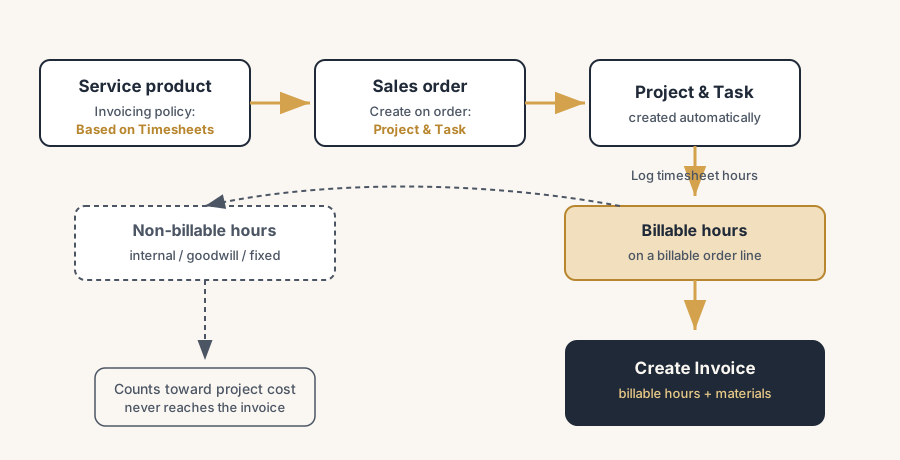
You bill every hour you work by closing the gap between the work and the invoice: a service product set to invoice on timesheets, hours logged on the task as they happen, and the invoice drawn from delivered hours on the order. Nothing relies on Friday-afternoon memory anymore.
You finish a client project, open the numbers, and the margin is thinner than the quote said it should be. The work got delivered, the client is happy, but somewhere between the kickoff and the invoice a chunk of hours went missing. The extra call on Tuesday that ran long. The "quick" change someone did on Thursday and never wrote down. The two days a senior spent unblocking a junior. None of it made the invoice, because none of it made a timesheet, or it did and nobody connected it to anything you could bill. The project was profitable on paper and break-even in the bank.
This is the single most common way service firms leak money, and it is rarely about people slacking. It is about a gap between where the work gets done and where the invoice gets made. Hours live in heads, in calendars, in a spreadsheet that gets filled in on Friday from memory. The invoice gets built separately, by someone guessing what was probably done. Odoo closes the gap by making the timesheet the source of the invoice: people log hours against a task, the task hangs off a sales order line, and the invoice bills exactly the hours that were logged as billable. Here is how to set that up, how to keep billable and non-billable apart, how to invoice time and material straight from timesheets, and the leaks that cost you the most.
Why the hours and the invoice drift apart
The gap between work done and money billed is structural, not a discipline problem. A few things pull them apart.
Hours get logged late, or from memory. When the timesheet is a Friday-afternoon chore filled in from a calendar, the small things vanish. The fifteen minutes here, the call that ran over there, the rework nobody wants to admit to. People round down, forget, or skip it entirely on a busy week. By the time the invoice goes out, the record is already short of what really happened.
The invoice is built by a different person from a different source. In a lot of firms the people doing the work and the person doing the billing are not the same, and they are not looking at the same data. The biller reconstructs the month from notes and gut feel. So the invoice reflects what the biller could piece together, not what the team actually spent, and the difference is always in the client's favour.
Nobody decides upfront what is billable. If the call about scope, the bug fix, the "while you are in there" favour are not flagged billable or non-billable as they happen, the decision gets made at invoicing time under pressure, and the safe move is to drop anything that might cause an argument. So the grey hours quietly become free hours, every month.
There is no link between the hours and an order. When timesheets sit in one place and quotes sit in another with nothing connecting them, you cannot see at a glance what is billable but not yet billed. The hours pile up, the invoice goes out on a round number, and the leftover hours never get reconciled because nothing was tracking them against an order in the first place.
What it costs you
Unbilled hours are pure margin, so the leak hits the bottom line directly, not the top line.
You give away your most expensive time for free. The hours that slip are rarely the cheap ones. They are the senior who jumped in, the extra cycle of revisions, the scope that crept. Every one of those is time you paid salary for and collected nothing for, and it comes straight off the project margin with nothing to soften it.
You cannot tell a profitable client from a loss-making one. If logged hours and billed hours never get compared, you do not actually know which projects make money. The client who feels easy might be the one quietly eating ten unbilled hours a month. Without the comparison you keep that client, repeat the quote, and lose the same money again.
You quote the next job on the wrong numbers. If this project looks like it took 80 hours because that is what got billed, but it really took 110, your next quote for similar work is built on a lie. You underprice, win the job, and lose money again, in a loop that only the real logged hours can break.
Billable vs non-billable, and why it matters from day one
Before any setup, get one decision straight: every hour is either billable or it is not, and that gets decided when the hour is logged, not when the invoice is made.
A billable hour is time you will charge the client for: the work that is in scope, the agreed revisions, the meetings you bill for. In Odoo a timesheet line is billable when it sits on a task that is linked to a sales order line set up to invoice on timesheets. Log it there, and it flows to the invoice automatically.
A non-billable hour is real work you choose not to charge: internal coordination, a goodwill fix, time on a fixed-price part that is already covered, training a colleague. It is still worth logging, because it tells you the true cost of the project even though the client never sees it. In Odoo you keep it non-billable by logging it against a task or project that is not tied to a billable order line, so it counts toward cost and effort but never lands on an invoice.
The reason this matters from day one is simple. If you do not decide as the work happens, you decide at invoicing time, and the path of least resistance at invoicing time is to leave the grey hours off. Deciding upfront turns "should we charge for this?" from a monthly argument into a field you fill in once.
The fix, in numbered steps
You wire timesheets to invoicing by setting the service product to bill on timesheets, letting the order create the project and task, logging hours against that task, and invoicing what was logged. The steps build on each other.
Create a service product set to invoice "Based on Timesheets".
Make a product, set its Product Type to Service, and set the Invoicing Policy to Based on Timesheets. This is the switch that ties hours to money. With this policy, Odoo invoices the quantity that was actually delivered as timesheets, not the quantity ordered. Set the unit of measure to Hours and the sales price to your hourly rate, so one logged hour equals one billable line at your rate.
Let the order create the project and task automatically.
On the same service product, set Create on Order to Project & Task (or Task in an existing project). Now when you confirm a sales order with this product on it, Odoo creates the project and the task for you and links them to that order line. This link is the whole mechanism: every hour logged on that task knows which order line it belongs to and at what rate it gets billed.
Log timesheets against the task as the work happens.
People working the job open the task and add timesheet lines in the Timesheets tab: who, how long, on what. The closer this is to real time, the less leaks. Logged hours roll up onto the task, show on the sales order as Delivered quantity, and appear on the order's recorded-hours smart button, so you can see billable-but-not-yet-billed hours building up against the order in real time.
Keep non-billable work off the billable order line.
For the hours you are not charging, log them somewhere that does not flow to the invoice: a non-billable task, a separate internal project, or a task with no billable order line behind it. They still count toward the project's cost and the hours report, so you see the true effort, but they never reach the customer invoice. This is how billable and non-billable stay apart without anyone scrubbing the invoice by hand later.
Invoice the delivered hours straight from the order.
When it is time to bill, open the sales order and click Create Invoice, then choose a regular invoice. Odoo bills the delivered timesheet hours at the rate on the order line. If you also added materials or expenses to the project, they come through on the same invoice, so a time-and-material job bills labour and parts together. Invoice as often as you like: the next invoice only picks up the hours logged since the last one, so nothing gets billed twice and nothing gets forgotten. A variant we recommend for new or slow-paying clients is the prepaid block of hours. Sell the pack upfront on a policy of ordered quantities, invoice it before the work starts, and log the hours against the order until the block runs dry; the next block gets sold before work continues. You never finance a customer's project with your own hours, and the budget conversation happens at its natural moment, when the block is empty.
The part that trips people up
A few things catch almost everyone
A few things catch almost everyone wiring timesheets to invoicing for the first time.
The invoicing policy is the thing that actually decides what gets billed. If the service product is left on the default "Ordered quantities", Odoo bills the hours you quoted, not the hours you worked, and your timesheets become decoration. The whole point is Based on Timesheets, so the delivered hours drive the invoice. Get this one field wrong and everything downstream is built on the wrong number.
Hours logged on a task with no order line behind it are invisible to billing. People assume that any logged hour will somehow turn up on an invoice. It will not. Only hours on a task tied to a billable order line flow through. If someone logs against a loose internal task by accident, that time silently becomes non-billable. Decide where each task sits before the hours go on it.
Late timesheets are the leak, not the billing. The cleanest Odoo setup in the world cannot bill an hour nobody logged. If the team fills in the week on Friday from memory, you are still losing the small stuff, just more tidily. The setup pays off only when logging happens close to the work, ideally the same day, on the phone or in the task.
Time and material is not the same as a fixed price, and mixing them quietly hurts. If part of the job is fixed-price and part is time and material, keep them on separate order lines with the right invoicing policy each. A fixed-price line bills the agreed amount regardless of hours; a time-and-material line bills the logged hours. Put fixed-price work on a timesheet line and you either over-bill or give hours away, depending on which way the estimate went.
This is standard Odoo, and the payoff is in the discipline around it. Project, Timesheets and Sales with the timesheet invoicing policy are all standard. They earn their keep when every billable job runs through an order-linked task, non-billable work has a clear home, and people log close to real time. A half-wired setup, where some jobs are linked and some are not, gives you a false sense that hours are covered while the leaks carry on.
Quick checklist
- The service products you bill by the hour have Product Type Service and Invoicing Policy set to Based on Timesheets, with the unit in Hours and the rate as the sales price.
- Those products have Create on Order set to Project & Task, so confirming the order creates the linked project and task automatically.
- Every billable hour is logged against a task that hangs off a billable sales order line, so it shows as Delivered on the order.
- Non-billable work has a clear home (a non-billable task or internal project) so it counts toward cost but never reaches the invoice.
- Timesheets are logged close to the work, not reconstructed on Friday, so the small hours do not vanish.
- Invoices are created from the sales order with Create Invoice, so each invoice bills only the hours logged since the last one, with materials on the same bill.
FAQ
How do I invoice timesheets in Odoo?
Create a service product, set its Invoicing Policy to "Based on Timesheets", and put it on a sales order. Set the product's "Create on Order" to Project & Task so confirming the order creates a linked project and task. Your team logs hours against that task in the Timesheets tab; those hours show as the Delivered quantity on the order line. When you want to bill, open the sales order, click Create Invoice and choose a regular invoice, and Odoo bills the logged hours at the rate on the order line.
What is the difference between "Based on Timesheets" and "Ordered quantities" for a service?
"Ordered quantities" bills the quantity you put on the quotation, regardless of how many hours actually got worked, which suits a fixed scope. "Based on Timesheets" bills the hours your team actually logged against the linked task, which suits time-and-material work where the final amount depends on real effort. For billing the hours you worked, the service product must be set to Based on Timesheets, or your timesheets will not drive the invoice.
How do I track billable versus non-billable hours in Odoo?
An hour is billable when it is logged on a task linked to a sales order line that invoices on timesheets; it then flows to the invoice automatically. An hour is non-billable when it is logged on a task or project that is not tied to a billable order line; it counts toward the project's cost and the hours report but never reaches the customer invoice. Decide where each task sits before logging time on it, so the split is made as the work happens rather than at invoicing time.
Can I invoice time and materials on the same invoice in Odoo?
Yes. Keep the labour on a service line set to invoice on timesheets and add the materials or expenses to the same project or order. When you click Create Invoice on the sales order, Odoo bills the logged hours and the materials together on one invoice, so a time-and-material job goes out as a single bill covering both labour and parts.
Why are my logged hours not showing up on the invoice?
The most common cause is the service product still being on the default "Ordered quantities" invoicing policy instead of "Based on Timesheets", so Odoo bills the quoted quantity and ignores the hours. The second most common cause is hours logged on a task that is not linked to a billable sales order line, which makes them non-billable by default. Check the product's invoicing policy first, then check that the task hangs off the right order line.