
Studio stops where real logic begins. Use it for fields, view tweaks and one-sentence rules, and move to a custom module the moment a change branches, talks to another system, processes volume or has to be tested.
You needed one extra field on the sales order, so you opened Studio, dragged it on, and you were done in two minutes. It felt great. So you kept going. A few automation rules here, a rebuilt view there, a computed field that pulls from three places. Six months later something does not add up, a report shows the wrong total, and nobody can explain why, because the logic is scattered across a dozen Studio tweaks that no one wrote down.
Studio is genuinely useful, and most teams underuse it. But it has a clear ceiling. Cross it and you are building software inside a tool that was never meant for it, and you pay for that at every upgrade and every bug. Here is what Studio is good at, where it stops, and how to tell which side of the line your next change sits on.
What Studio is, and where it is the right tool
Odoo Studio is a low-code editor in the Enterprise edition. It lets you change Odoo through a drag-and-drop interface instead of code: add fields, adjust forms and lists, build simple reports, and set up basic automation rules. The changes you make are stored as data in your database, layered on top of standard Odoo.
That last point matters. Studio is not a separate, isolated layer. It writes into the same views and models that standard Odoo and custom modules use. So the question is never "Studio or code", it is "is this change simple and contained enough to live as a Studio tweak, or does it need the discipline of real code".
For a large share of everyday changes, Studio is exactly right and reaching for a developer would be a waste.
Adding fields. A custom field on a contact, a product, a sales order. Studio handles this cleanly and you can do it yourself.
Simple view changes. Show a field, hide one, reorder them, add a tab, tweak a list or a kanban. Visual layout work is what Studio is built for.
Basic automation. Set a value when a record reaches a stage, create an activity when a field changes, send a reminder after a number of days. The kind of rule you can describe in one sentence.
Simple reports and small apps. A basic PDF layout, or a small custom model to track something Odoo does not, like a register of equipment checks.
If the change is one field, one screen, or one "when X then Y" rule, Studio is the answer. It is fast, it needs no developer, and a configuration change is far easier to live with than a custom module.
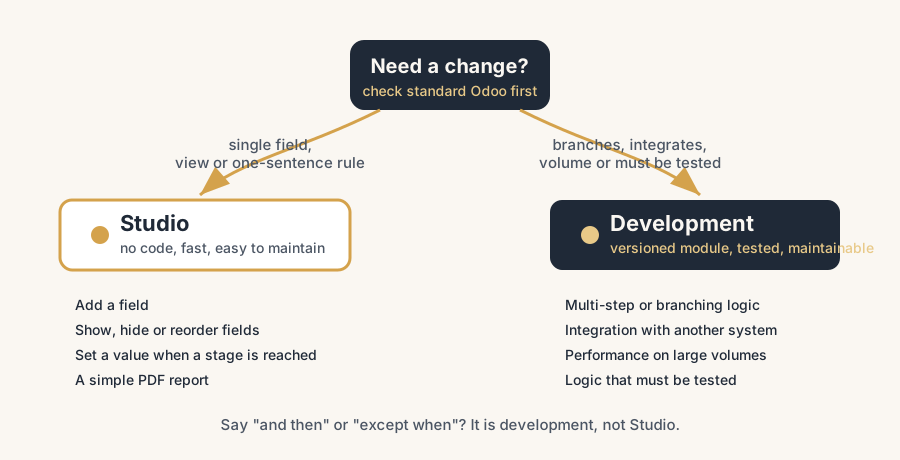
Where Studio stops and code begins
Studio runs out of road in four places. When you hit one of these, you are no longer configuring, you are programming, and you should be programming in a proper module instead.
Complex logic and multi-step workflows.
Studio automation is built for one trigger and a short action. The moment the rule needs to branch ("if this and that, but not when the other"), loop over related records, calculate across several models, or run a sequence of dependent steps, you are past what the no-code layer does well. You can sometimes force it with an "Execute Code" action, but at that point you are writing Python inside a Studio field with none of the structure, version control or testing that real code gets. Put that logic in a module.
Integrations with other systems.
Talking to a webshop, a marketplace, a payment provider, a WMS or any external API is development work. It needs error handling, retries, logging, and a way to recover when the other side is down. Studio has no place to put that. Wiring an integration through Studio tricks leaves you with something fragile that nobody can debug.
Performance.
When you process large volumes, a naive automation that fires on every record one at a time will crawl. Real performance work means batching, smart database queries, and indexes. That lives in code, not in a Studio rule that was written for convenience, not for scale.
Heavy data work and anything that must be tested.
Bulk transformations, intricate computed fields that feed financial reports, logic where a mistake costs money: this needs to be written once, reviewed, and tested so it keeps working. Studio gives you none of that safety net. If being wrong is expensive, it belongs in a module a developer can test.
How to decide
Run every change through three questions, in order
Can standard Odoo already do this, or nearly? A setting, a different way of working, accepting Odoo's flow. If yes, change nothing. The cheapest customization is the one you do not build.
If not, is the change a single field, a view tweak, or a one-sentence rule? Then use Studio, and keep it tidy. Name it clearly so the next person knows it is there. One exception we enforce in our own projects: a field that will need programming later should be created in code from day one. Every Studio field gets an x_studio prefix, and once real logic starts reading it you either drag that prefix through your codebase forever or migrate the field and every reference to it. Starting it in a module costs minutes; moving it later costs an afternoon and a data migration.
If it branches, integrates, processes volume, or has to be tested, build it as a module. Accept the developer cost now, because the alternative is paying it back with interest at every upgrade.
The rule of thumb is simple: if you can describe the change as "one field" or "when X, do Y", Studio is fine. If you find yourself saying "and then", "except when", or "talk to system Z", it is development. The mistake is not using Studio; it is using Studio for the heavy category because it is faster today.
The upgrade and maintenance difference
The bigger reason to respect the line is what happens later, not today. A handful of clean Studio fields are easy to live with. The problem is sprawl. Scattered Studio tweaks and one-off automation rules across a database are undocumented by nature: nobody wrote down why the rule exists or what it touches. When you upgrade, Studio changes sit on top of standard views that the new version may move or rebuild, so they can silently break, and you have no code to read to understand what was supposed to happen.
Custom code is more work up front, but it is honest about being a customization. It lives in a versioned module, a developer can read it, test it on a staging copy, and adapt it to the new version. The logic is in one place with a history. So the trade-off is not "easy Studio vs hard code". It is "cheap now, fragile later" against "more effort now, maintainable later". Light Studio use is cheap and stays cheap. Heavy Studio use that should have been code is cheap today and expensive at every upgrade after.
Quick checklist
- You use Studio for fields, view changes and simple "when X then Y" rules, and nothing heavier.
- Complex workflows, integrations, performance work and testable logic go into proper modules.
- You check standard Odoo first, before either Studio or code.
- Studio tweaks are named clearly and documented, not scattered and forgotten.
- You treat heavy Studio automation as the customization it really is, with the same upgrade risk as code.
- You know which side of the line each change sits on before you start building.
FAQ
What is the difference between Odoo Studio and custom development?
Studio is a low-code, drag-and-drop editor in Odoo Enterprise for fields, view changes, simple reports and basic automation, with no programming. Custom development means writing Python in proper modules for complex logic, integrations, performance work and anything that must be tested. Studio is faster for simple changes; development is needed once logic branches, talks to other systems, or has to handle volume.
What can Odoo Studio not do?
Studio cannot handle complex multi-step workflows, branching logic, integrations with external systems, performance optimisation for large volumes, or logic that needs proper testing. You can sometimes force these with an "Execute Code" action, but that is writing code inside Studio without version control or testing, which is fragile. For those cases you build a module instead.
Does Studio survive an Odoo upgrade?
Sometimes, and not reliably. Studio changes sit on top of standard views and models, so when an upgrade moves or rebuilds those, a Studio tweak can silently break or disappear. A few clean Studio fields are low risk. A sprawl of undocumented Studio automation is one of the first things to fail at an upgrade, and there is no code to read to understand what it was meant to do.
When should I use Studio and when should I hire a developer?
Use Studio when the change is a single field, a view tweak, or a rule you can describe in one sentence. Hire a developer when the change branches, integrates with another system, processes large volumes, or has to be tested because a mistake is costly. The test: if you say "and then" or "except when", it is development, not Studio.