
A slow Odoo is almost always one of four things: a worker count left at the default, too little RAM for those workers, a missing database index, or custom code doing expensive work on every load. All four are diagnosable, and most are fixable without buying a bigger server.
It is 9 a.m., everyone logs in, and Odoo crawls. A sales order list takes ten seconds to open. Saving an invoice spins. By afternoon it is fine again, so nobody can reproduce it, and the standard answer becomes "the server is busy". Slowness that comes and goes is the worst kind, because it never feels urgent enough to fix and never quite goes away.
Odoo being slow is almost never one big thing. It is usually a sizing setting that was left at the default, a query with no index behind it, or custom code doing something expensive on every page load. The good news is that the common causes are a short list, they are diagnosable, and most of them are fixable without buying a bigger server. Here is what actually makes Odoo slow, how to find which one is hitting you, and what a healthy setup looks like.
Why Odoo gets slow
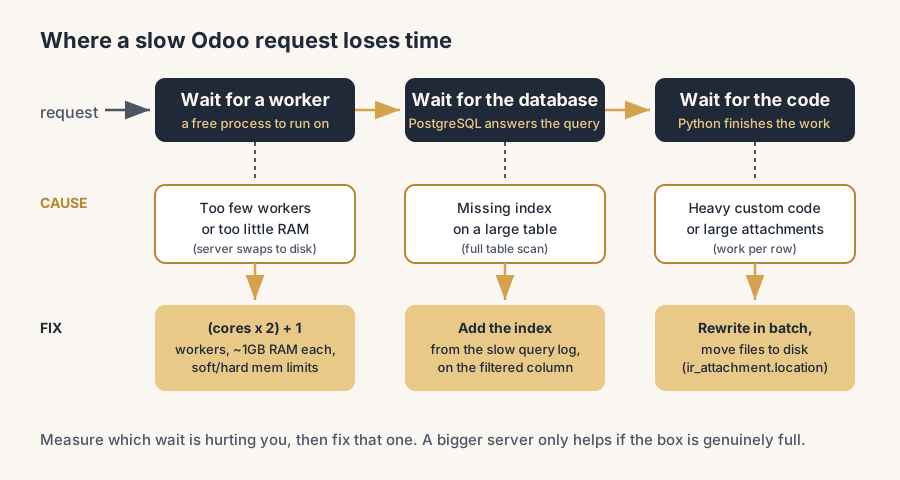
Odoo is a Python application that talks to a PostgreSQL database. When a page is slow, the time goes into one of three places: waiting for a free worker, waiting for the database to answer a query, or waiting for Python code to finish. Almost every slowness story is one of those three, and the usual culprits are these.
Too few workers, or the wrong count. Odoo handles concurrent requests with worker processes. Set too few and requests queue behind each other, which is exactly why it dies at 9 a.m. when everyone arrives. Many installs run the default of zero or one worker (single-process mode) without realising it, so the whole company shares one lane.
Undersized RAM, or the wrong memory limits. Each worker needs memory, and PostgreSQL needs its own. Starve either and the server swaps to disk, which is hundreds of times slower than RAM. Odoo also restarts a worker that crosses its memory limit, so limits set too low cause constant restarts, and limits set too high let one runaway request take the box down.
Missing database indexes. PostgreSQL is fast when it can jump straight to the rows it needs and slow when it has to scan a whole table. A filter or a sort on a large table with no index behind it gets slower as the table grows. This is the classic "it was fine last year, it's slow now" cause.
Heavy custom code. A computed field that runs a query for every row in a list, an automation that fires on every save, a report that loads thousands of records into memory. Custom logic written without performance in mind is the most common reason one specific screen is slow while the rest of Odoo is fine.
Large attachments in the database. By default Odoo can store uploaded files in the database. Thousands of PDFs and images in there bloat the database, slow backups, and make every query touch a heavier table. The fix is to keep file contents on the filesystem, not in PostgreSQL.
No caching in front, or a slow network path. Static files (CSS, JavaScript, images) served by Odoo directly, no reverse proxy, no compression, and a database sitting far from the application server all add delay that has nothing to do with Odoo's own speed.
How to diagnose which one it is
Do not guess and do not buy a bigger server first. Find the cause, then fix that. Work through it in this order.
1. Watch the server while it is slow. Open a terminal during the slow window and look at CPU, RAM and swap. If RAM is full and the server is swapping, that is your answer: add RAM or fix the memory limits. If one CPU core is pinned at 100% and the rest are idle, you are likely single-process or short on workers. If everything looks idle but pages are still slow, the time is going into the database or into code, not into the server being full.
2. Check the worker configuration. Look at the workers value in your Odoo config. If it is 0 you are in single-process mode and every request is serialised. This alone explains most "slow when the team logs in" complaints.
3. Turn on slow query logging in PostgreSQL. Set log_min_duration_statement to log any query over a threshold (say 1000 ms). Within a day you will have a list of the exact queries that are slow, and that points you straight at the missing index or the expensive code path. This is the single most useful diagnostic step and almost nobody does it.
4. Find the slow screen, then read its code. If one specific page is slow, turn on Odoo's developer mode and watch the query count and timing it reports. A list view firing thousands of queries to render one page is a computed field or a related field doing work per row. Now you know where to look.
5. Check where attachments live. A database that has grown to tens of gigabytes for a company that does not have that much real data usually has its files stored inside it. Confirm where attachments are stored before you blame the queries.
The fixes, in order of payback
Set the worker count correctly.
The starting formula is (CPU cores × 2) + 1, plus one extra for the cron (scheduled jobs). So a 4-core server runs about 9 HTTP workers and 1 cron worker. This gives each request a free lane instead of a queue. If you are on workers = 0, this single change is often the biggest jump in speed you will get.
Size RAM and the memory limits to match.
Plan for roughly 1 GB or more of RAM per worker, plus memory for PostgreSQL and the operating system. Set limit_memory_soft so a worker that crosses it finishes its current request and then restarts cleanly, and set limit_memory_hard a bit higher as the hard ceiling, commonly the soft limit at about 70 to 80 percent of the hard one. Sized right, a leaky request gets recycled without taking the server down, and you never swap.
Add the missing indexes.
Take the slow queries from your PostgreSQL log and add an index on the columns being filtered or sorted. On a large table this can turn a ten-second query into a few milliseconds. In Odoo you can also mark a field as indexed on the model, which is the clean way to do it for fields you filter on constantly.
Fix the heavy custom code.
Rewrite the computed field so it works in batch instead of one query per row, move work out of "on every save" automations, and stop reports from loading everything into memory at once. This is developer work, but it targets the exact screen your diagnosis pointed at, so the effort is small and the payoff is direct.
Move attachments to the filesystem.
Configure Odoo to store attachment contents on disk instead of in the database (the ir_attachment.location setting). The database shrinks, backups speed up, and every query stops dragging the weight of your files along.
Put a reverse proxy and caching in front.
Serve static files through Nginx, enable gzip compression, and keep the database close to the application server (same data centre, low latency). None of this changes Odoo, it just stops adding delay around it.
The part that trips people up
A few things catch almost everyone
A bigger server does not fix a missing index. If the slowness is one unindexed query, doubling the CPU buys you a slightly faster scan of the whole table, and next year it is slow again. Diagnose first, scale only if the diagnosis says the box is genuinely full.
More workers is not always better. Each worker eats RAM, so adding workers on a server that is already tight on memory makes it swap, which makes everything slower. Workers and RAM have to be sized together, not one at a time.
The 9 a.m. slowdown and the "one screen is slow" problem are different bugs. The first is sizing (workers and RAM). The second is almost always code or a missing index. Treating them as the same thing is why people throw hardware at a software problem and see no improvement.
"It's slow" with no measurement is not a diagnosis. The slow query log and the developer-mode query count turn "Odoo is slow" into "this specific query on this table takes nine seconds". You cannot fix the first sentence. You can fix the second one in an afternoon.
Odoo Online (the SaaS) hides most of this from you: Odoo manages the workers, RAM and database. These fixes apply when you run Odoo yourself or with a partner, on Odoo.sh or your own server, where the configuration is yours to get right. One cost note from practice: on Odoo.sh you scale by adding workers, and that gets expensive fast, especially for an ecommerce site where heavy visitor traffic means a constant stream of requests, and more traffic keeps asking for more workers. Past a certain traffic level, managed hosting through an Odoo partner who tunes the whole stack is often the better deal; many of our members offer exactly that.
Quick checklist
- You know whether you are running multi-process (workers set) or single-process (
workers = 0). - Worker count follows
(CPU cores × 2) + 1, with a separate cron worker. - RAM covers roughly 1 GB or more per worker plus PostgreSQL and the OS, and the server never swaps under load.
limit_memory_softandlimit_memory_hardare set so workers recycle cleanly instead of crashing or running unbounded.- PostgreSQL slow query logging is on, and the slow queries that show up have indexes.
- Attachments are stored on the filesystem, not in the database.
- Static files go through a reverse proxy with compression, and the database is close to the app server.
FAQ
Why is my Odoo slow in the morning but fine in the afternoon?
Almost always too few workers. Odoo handles concurrent requests with worker processes, and if you run single-process mode (workers = 0) or too few workers, everyone who logs in at 9 a.m. queues behind each other. By the afternoon the load drops and it feels fine. Set the worker count to (CPU cores x 2) + 1 plus a cron worker, and make sure RAM covers them.
How many workers should Odoo have?
The starting formula is (CPU cores x 2) + 1 HTTP workers, plus one extra worker for scheduled jobs (cron). A 4-core server runs about 9 HTTP workers and 1 cron worker. Then size RAM to match: plan for roughly 1 GB or more per worker, plus memory for PostgreSQL and the operating system, so the server never has to swap to disk.
Why does one screen in Odoo load slowly while the rest is fast?
That points at a missing database index or heavy custom code on that screen, not at server sizing. A list or report that fires thousands of queries to render one page usually has a computed or related field doing work per row. Turn on developer mode to see the query count, turn on PostgreSQL slow query logging to find the exact query, then add the index or rewrite the code in batch.
Will a bigger server make Odoo faster?
Only if the real cause is that the server is genuinely full (RAM swapping, all CPU cores pinned). If the slowness is a missing index or expensive custom code, a bigger server barely helps and the problem returns as your data grows. Diagnose first: watch the server during the slow window, check the worker count, and read the slow query log. Scale the hardware only when the diagnosis says the box is the limit.
Should attachments be stored in the Odoo database?
No. Store attachment contents on the filesystem, not in PostgreSQL (the ir_attachment.location setting). Files in the database bloat it, slow down every backup, and make queries drag extra weight. Keeping files on disk keeps the database lean and fast.