
These errors mean the same thing: your import points at a record that does not exist in the database yet. Add an id column to every file, reference parents with the /id suffix, import parents before children, and the errors disappear.
You export a clean CSV, map the columns, hit Import, and Odoo throws it back at you: "No matching record found for external id" on one column, or "No such external ID currently defined" on a whole batch of rows. You change a value, re-run, and now you have duplicate contacts or duplicate products because the second import did not recognise the first.
This is the single most common wall people hit when they move data into Odoo. It is not a bug and it is not your CSV being broken. It is Odoo telling you that a link points at a record it cannot find yet. Once you understand what an external ID is and in what order Odoo reads your files, the errors become predictable and the fix is mechanical.
And because the fix is mechanical, it is also work you no longer have to do by hand. These days I build my import files with an AI assistant (Claude Cowork, in my case) and let it match the columns and external IDs against Odoo before anything touches the database. That only works if you understand the rules below well enough to check what it built, so read on.
Why it happens
Every record in Odoo has two identifiers. There is the internal database id (a number like 4271) and there is the External ID, also called the external identifier or XML ID, a text label like __import__.customer_acme or base.nl. The external ID is the stable, human-readable handle that survives exports, re-imports, and moves between databases. The internal number does not survive a move, the external ID does.
The errors come from three causes, and almost every failed import is one of them.
1. Import order. A many2one field is a link to another record. A sales order links to a customer, a product links to a category, a contact links to a country. When you import the order before the customer exists, Odoo looks up the external ID in the link column, finds nothing, and reports "No matching record found for external id". The referenced record has to exist before the record that points at it.
2. Wrong reference for a many2one field. To fill a link by external ID, the column header must end in /id. So you import customer_id/id, not customer_id. The plain column expects a display name and tries a name search, the /id column expects an external ID and does an exact match. Mix these up and Odoo either fails to match or silently creates the wrong link.
3. Reusing an external ID that was never written. "No such external ID currently defined" means a row points at an external ID that is not in the database at all. Usually the referenced file failed halfway, or the external ID in the link column has a typo, or it was defined in a different file you have not imported yet.
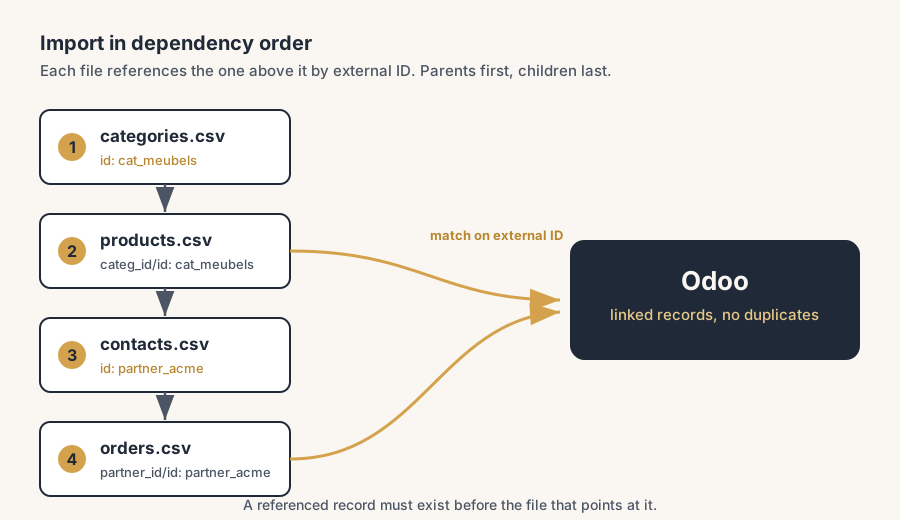
The fix, in numbered steps
Give every record its own External ID column
In each file, add a column named id (literally id, the leftmost column). Put a unique text label in it for every row, for example prod_chair_oak for a product or partner_acme_nl for a contact. This is the external ID Odoo will store. Pick a clear, consistent naming scheme and never reuse a label for two different records. This one column is what makes the whole import safe to repeat.
Reference parents by their External ID, with /id
In a child file, point at the parent through the parent's external ID. Name the link column with the /id suffix and fill it with the label you used in the parent file. A product line that belongs to category cat_furniture gets a column categ_id/id with the value cat_furniture. A contact in the Netherlands gets country_id/id with base.nl (a country external ID that already ships with Odoo). The /id suffix tells Odoo "this is an external ID, match it exactly", not "search for a record with this name".
Import in dependency order, parents first
Sort your files so that anything referenced is imported before the file that references it. A typical retail or wholesale order is:
- Countries and currencies (usually already in Odoo, skip if so)
- Product categories
- Products
- Contacts and companies
- Sales orders and order lines
Each step can safely use /id references to everything above it, because those records now carry their external IDs. Import top to bottom and the "No matching record" errors disappear.
Re-import the same file to update, not duplicate
Because every row carries its own external ID in the id column, a second import of the same file does not create new records. Odoo matches on the external ID and updates the existing record in place. This is an upsert: insert if new, update if the external ID already exists. Fix a price, correct a typo, add a column, re-import the exact same file, and your data is corrected with zero duplicates. This only works if the id column is present and the labels are identical to the first run.
Read the error row number, fix, re-run
When an import fails, Odoo names the row and the column. Open that row, check whether the referenced external ID actually exists (search it under Settings, with developer mode on, in External Identifiers), fix the label or import the missing parent file first, then re-run. Because the import is idempotent, re-running is free.
The part that trips people up
A few things catch almost everyone
The id column is not the name column. People put the product name in the id column. Names contain spaces, accents and duplicates, so they make terrible external IDs. Use a short slug with no spaces, like prod_chair_oak, and keep the human name in the name column where it belongs.
/id versus .id are different things. customer_id/id matches on the external ID (the text label). customer_id.id matches on the raw database id (the number). The number does not survive moving between databases, so prefer /id with external IDs for anything you plan to re-import or move.
Built-in records already have external IDs. Countries, currencies, the main company, default taxes: these ship with Odoo and have stable external IDs like base.nl or base.main_company. You do not import them, you reference them. Turn on developer mode and look them up under Settings > Technical > External Identifiers so you use the real label instead of guessing.
A half-finished import leaves orphans. If a parent file errors at row 300 of 1000, the first 299 records exist and the rest do not. A child file referencing the missing 701 then fails with "No such external ID". Always confirm the parent import finished cleanly before starting the child.
One mechanism per field. Odoo offers three ways to fill a relational field: by name, by external ID (/id), or by database id (.id). Use one per column. Two columns aiming at the same field fight each other.
Quick checklist
- Every file has a leftmost
idcolumn with a unique, space-free label per row. - Many2one links use the
/idsuffix and point at a parent's external ID. - Files are imported parents first, children last.
- Built-in records (countries, currencies, company) are referenced, not imported.
- Re-importing the same file updates instead of duplicating.
- After a failure, you checked the named row and confirmed the referenced external ID exists.
FAQ
What does "No matching record found for external id" mean in Odoo?
It means a column in your import points at an external ID that does not exist in the database yet. The referenced record (the customer, the category, the country) has not been imported, so Odoo cannot link to it. Import the referenced records first, then re-run the file that points at them.
What is the difference between the external ID and the database id in Odoo?
The database id is an internal number that changes when you move data between databases. The external ID is a stable text label (like base.nl or __import__.prod_chair_oak) that stays the same across exports and re-imports. Use external IDs as the matching key for anything you import or migrate.
How do I import a many2one field by external ID?
Name the column with a /id suffix, for example category_id/id, and put the parent's external ID as the value. The /id tells Odoo to match on the external ID exactly instead of searching by name.
How do I update existing records in Odoo without creating duplicates?
Include an id column with each record's external ID and re-import the same file. Odoo matches on the external ID and updates the existing record instead of creating a new one. This makes the import an idempotent upsert: safe to run again and again.
In what order should I import related files into Odoo?
Parents before children. Import countries and currencies (or reference the built-in ones), then categories, then products, then contacts, then orders. Anything referenced by a /id column must exist before the file that references it runs.