
An AI agent around Odoo is safe in the order read, draft, write: reads can be broad, drafts need an editor, and writes need a least-privilege user, a log, a kill switch and a human on everything irreversible or money-related. Skip that order and the cleanup costs more than the automation saved.
You connected an AI assistant to Odoo last week. It can answer "how many open quotations does sales have" in two seconds, and the team loves it. Then someone asks it to "clean up the duplicate contacts", it merges two partners that were not duplicates, and the invoices on one of them point at the wrong company. Now you are unwinding a change nobody reviewed.
This is the real question with AI agents and Odoo. Not "can it", but "what should it be allowed to do on its own". A read is cheap to get wrong. A write is not. This post covers what an agent can realistically do against Odoo, where automation is safe and where it is risky, and the guardrails that let you use it without handing over the keys.
What an "AI agent" against Odoo actually is
Strip away the marketing and an AI agent is a language model that can call tools. Against Odoo, those tools reach your data through one of a few doors:
- The external API (XML-RPC or JSON-RPC). The classic way to read and write Odoo records from outside. Note: Odoo has announced that XML-RPC and JSON-RPC at
/xmlrpc,/xmlrpc/2and/jsonrpcwill be removed in Odoo 22 (fall 2028) and on Odoo Online in 21.1 (winter 2027). The replacement is the new External JSON-2 API. If you are building something new, build on JSON-2. - An MCP server. Model Context Protocol is the standard that lets assistants like Claude or ChatGPT talk to a system through one connector. For Odoo there is no official MCP server from Odoo S.A. as of mid-2026. What exists is community projects and third-party modules (some free, some paid in the App Store) that wrap the same RPC API behind an MCP layer.
- Odoo's own automation. Automation rules and server actions live inside Odoo. An agent does not strictly need to "be" the automation; it can create or trigger one.
The part that matters most: every one of these doors runs through Odoo's own security. A read, write or delete is checked against the access rights, record rules and field access of the user the agent logs in as. The agent is not above Odoo's permission system. It is a user, and it inherits exactly what that user can do. That single fact is your strongest guardrail, and the rest of this post is about using it well.
The three things an agent does, ranked by risk
Think of agent actions in three buckets. Treat them differently.
Read (low risk, start here)
Asking Odoo questions. "List overdue invoices for this customer." "How much of product X is forecasted next month." "Summarise the chatter on this ticket." A read cannot corrupt your data. The worst case is a wrong answer, and a wrong answer is visible and recoverable. This is where almost every team should start, and for many it is enough.
Draft (low to medium risk)
The agent prepares something a human ships. A draft quotation. A reply to a customer that lands in your outbox, not their inbox. A proposed product description. The agent does the typing; a person does the sending. The risk is contained because nothing reaches a customer or a ledger until someone clicks. This is the sweet spot for most real work: fast, and still reviewed.
Trigger / write (medium to high risk)
The agent changes a record or fires an action: confirming an order, posting an invoice, merging contacts, updating a price, changing a stock quantity. This is where things break, and where you need real guardrails. Not because the agent is reckless, but because it acts on its reading of an ambiguous instruction, and "clean up the duplicates" is ambiguous.
One line draws the boundary well: reads and drafts can be broadly enabled; writes should be narrow, specific and reviewed. An agent that posts journal entries on its own is a different category of risk from one that drafts an email.
Where automation is safe, and where it is not
Safe to let an agent do with little supervision:
- Read and report on data it has permission to see.
- Draft documents and messages for human review.
- Trigger a narrow, well-defined action with a clear "undo", for example moving a task to a stage or adding an internal note.
These are risky, so keep a human in the loop:
- Anything that touches money: posting invoices, registering payments, applying discounts.
- Anything irreversible or hard to reverse: merging records, deleting, archiving in bulk, mass field updates.
- Anything that leaves the building: sending email to customers, confirming orders that trigger fulfilment, placing purchase orders.
- Anything against stock or accounting where a wrong value propagates: changing on-hand quantities, editing tax settings, changing payment terms.
The pattern is consistent: the more an action is reversible, internal and narrow, the safer it is to automate. The more it is irreversible, external or money-related, the more it needs a human. Our own sequence at clients follows from that: run the job outside Odoo first, as an assistant in a chat where a person approves every action, before you bake it into the organisation as a standing automation. The chat phase shows you the error rate, the edge cases and the instructions you forgot to write, at a moment when every mistake still passes through a human. Only what survives weeks of that supervision earns a place as an embedded agent.
Human-in-the-loop, done properly
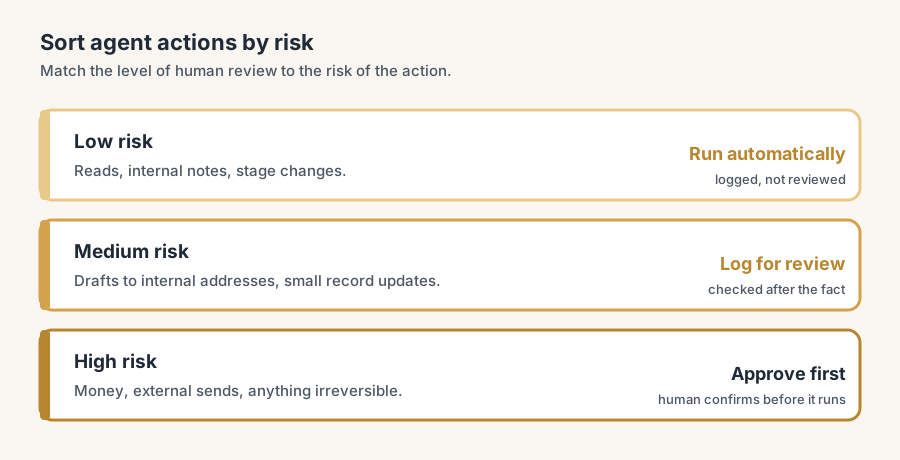
Human-in-the-loop does not mean a person watches every action. That defeats the point. It means you sort actions by risk and apply the right level of review to each. A tiered model works well:
1. Low risk: run automatically. Reads, internal notes, stage changes. Logged, not reviewed. 2. Medium risk: log for review after the fact. The action happens, but it is recorded so a person can check the batch later and catch patterns. Good for drafts that auto-send to internal addresses, or low-value record updates. 3. High risk: approve before it runs. The agent prepares the action and waits. A person approves or rejects. Use this for money, for external sends, and for anything irreversible.
In Odoo terms, "approve before it runs" often means the agent creates a draft record (a draft invoice, a quotation in draft) and a human confirms it in the normal Odoo screen. You are not building a new approval system. You are using the draft-then-confirm flow Odoo already has.
The guardrails that actually matter
Five things, most important first.
A dedicated, least-privilege Odoo user for the agent.
Never point an agent at an admin account. Create a separate user, give it API key authentication (available since Odoo 14, and the right choice for any integration: you can revoke or rotate the key without touching a login), and grant only the access rights and record rules the job needs. If the agent only reads sales data, it gets read on sales and nothing else. This is the guardrail Odoo enforces for you, so use it to the full.
Read-only by default, write by exception.
Start every agent as read-only. Add write permission to one model at a time, deliberately, when there is a clear reason and a clear review step. Do not grant broad write "to be safe" and tighten later. Tightening later rarely happens.
Drafts over direct actions.
Wherever Odoo supports a draft state, have the agent produce the draft, not the final. Draft quotation, not confirmed order. Draft email, not sent email. The cost is one human click. The benefit is a checkpoint on everything that matters.
A log you can read, and a kill switch.
Two things from a sobering 2026 industry survey: a majority of organisations could not enforce limits on what their agents were allowed to do, and a majority could not stop a misbehaving agent. Avoid both. Log what the agent does in a place a human reads, and make sure you can disable its API key in one step if it goes wrong. With API key auth in Odoo, revoking is exactly that one step.
Scope the instruction, not just the permission.
Permissions stop an agent from touching what it should not. They do not stop it from doing the wrong thing inside what it can. "Update the price" is dangerous; "set the list price on product X to 49.00 and show me before saving" is safe. Narrow instructions, with a confirmation on writes, close the gap that permissions alone leave open.
The part that trips people up
A few things catch almost everyone
A few non-obvious things bite teams here.
The agent inherits the user's record rules, including the ones you forgot about. If your integration user is in a group with a broad record rule, the agent sees more than you expect. Test what the agent can actually read by logging in as that user and looking, not by assuming.
"Read-only" via the API is not always read-only in effect. Some server actions and computed fields trigger writes as a side effect of a read in edge cases, and some endpoints let you call methods, not just read fields. If you give method-call access, you have given more than "read". Restrict to the specific models and operations you mean.
Multi-company makes scope harder, not easier. In a multi-company database, the agent's company context decides which records it sees and edits. An agent set to the wrong company can read or write the wrong entity's data. Pin the company explicitly.
Drafts still consume sequence numbers and can notify people. A draft invoice can take an invoice number; an action on a record can fire the chatter and email subscribers. "It is only a draft" does not always mean "nobody noticed". Check what fires before you let an agent create records in bulk.
The deprecation clock is real. If a vendor or an internal build sits on plain XML-RPC or JSON-RPC, it has a removal date (Odoo 22, fall 2028; Odoo Online 21.1, winter 2027). Plan the move to the JSON-2 API rather than discovering it during an upgrade.
Quick checklist
- The agent logs in as a dedicated user, never admin.
- Authentication is an API key you can revoke in one step, not a password.
- The user has least-privilege access rights and record rules, tested by logging in as that user.
- The agent starts read-only; write is added per model, with a reason and a review step.
- Writes that touch money, leave the building, or are irreversible require human approval first.
- The agent produces drafts where Odoo supports a draft state.
- Actions are logged somewhere a human reads them.
- You have tested disabling the agent and confirmed it stops.
- Instructions on write actions are specific, with a confirmation before saving.
- Any plain XML-RPC or JSON-RPC integration has a plan to move to JSON-2.
FAQ
Can an AI agent change data in Odoo?
Yes, if the user it logs in as has write permission. Every read, write and delete is checked against that user's access rights, record rules and field access. The safe default is to start the agent read-only and grant write access narrowly, one model at a time, with human review on anything that touches money or leaves the company.
Is there an official Odoo MCP server?
No. As of mid-2026 there is no MCP server maintained by Odoo S.A. There are community projects and third-party modules, some free and some paid in the App Store, that wrap Odoo's RPC API behind a Model Context Protocol layer so assistants like Claude or ChatGPT can connect. They still run through Odoo's own permission system.
How do I stop an AI agent from doing damage in Odoo?
Give it a dedicated, least-privilege user with API key authentication rather than admin access, keep it read-only by default, require human approval for high-risk writes, log its actions where a person reads them, and confirm you can revoke its API key in one step to stop it.
Should the agent confirm orders and post invoices automatically?
Not without human approval. Confirming orders triggers fulfilment and posting invoices touches your ledger, both hard to reverse. Have the agent prepare a draft quotation or draft invoice and let a person confirm it in the normal Odoo screen.
Is XML-RPC still safe to build an agent on?
It works today but it is on the way out. Odoo has scheduled removal of XML-RPC and JSON-RPC in Odoo 22 (fall 2028) and on Odoo Online in 21.1 (winter 2027), with the External JSON-2 API as the replacement. Build anything new on JSON-2.