
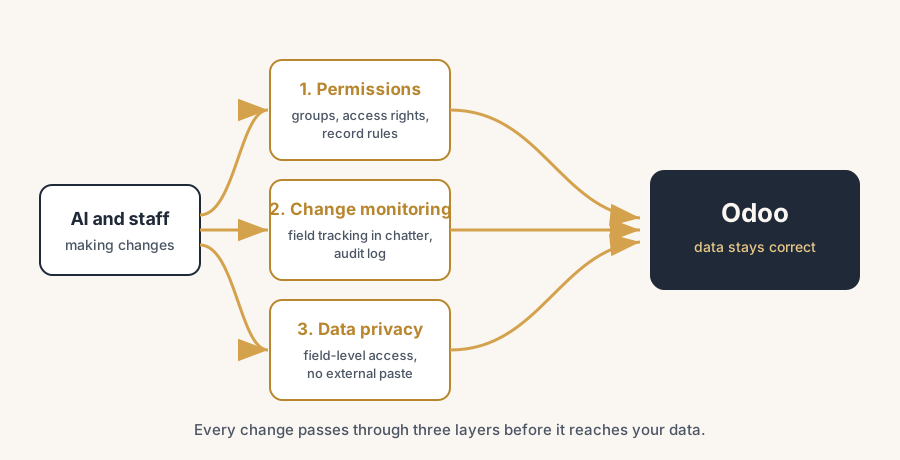
AI changes stay safe in Odoo with the same three controls that govern any powerful user: decide upfront who may change what, track every change with field tracking and an audit log, and keep personal data inside a perimeter you chose. Test on a copy first and a vague prompt stops being a risk to production.
Someone on your team asks the AI assistant to "clean up the sales pipeline" and 400 leads get reassigned. Or a colleague pastes a customer list into an external chatbot to draft a mailing, and now personal data sits on a server you do not control. Or an AI automation rule, set up in a hurry, starts changing the delivery status on orders that were not supposed to move yet. Nobody did anything malicious. The workflow still broke, and you only found out when a customer called.
This is the new reality in Odoo 19. The system can now act on plain-language instructions: update records, launch workflows, generate field content, run automations. That is genuinely useful. It also means a single vague prompt or one over-eager automation can touch hundreds of records at once, and the person giving the instruction may not understand what it triggers downstream.
Why it happens
Three things changed at the same time.
First, Odoo 19 (released October 2025) added AI that operates on natural language. You can tell Odoo to update records or start a flow by describing what you want, custom fields can auto-generate content, and there are AI agents and AI commands across modules. The barrier to making a change dropped to one sentence.
Second, the line between "configuration" and "development" moved. Odoo Studio lets more people change views, fields and automated actions with no code. That is good for speed and bad for control if everyone has Studio access.
Third, staff bring their own AI. Even if you lock down Odoo, people will paste data into ChatGPT or a browser assistant to get a task done faster. That is where the data privacy risk lives, outside Odoo entirely.
Odoo gives you the tools to govern all three. They are not switched on for you by default. You have to set them up.
The fix, in steps
Decide who may change what, before anyone uses AI
Map your roles to Odoo groups first. Access rights (the ir.model.access layer) decide whether a user can read, create, edit or delete records in a model at all. Record rules (the ir.rule layer) decide which specific records inside that model they can touch. Set both per role, not per person, so the rules stay manageable as the team grows.
The point is this: AI acts with the permissions of the user who triggers it. If a sales rep cannot delete orders by hand, the AI assistant cannot delete orders on their behalf either. Tight permissions are your first and strongest guardrail. Get them right and most of the "AI changed something it should not have" risk disappears.
Lock down Studio and developer mode
Studio and developer mode are where structural changes happen: new fields, changed views, automated actions, server actions. These should sit with a small group, not the whole company. Remove Studio and developer access from regular users. Keep the "Settings / Administration" group to the few people who own your Odoo configuration.
Superuser mode bypasses all access rights and record rules. Treat it as a break-glass tool: used rarely, by named people, never as a daily login.
Turn on change monitoring with field tracking
Odoo records changes in the chatter when a field has tracking enabled. Each tracked change is stored as a mail.message on the record and shows the old value, the new value, the date and the user who made it. Most standard business models already support this because they inherit mail.thread.
Turn tracking on for the fields that matter: order state, customer payment terms, pricing, delivery dates, partner data. Now any change, whether a human or an AI made it, leaves a readable line in the chatter. When something looks wrong, you open the record and see who changed what and when.
Add a proper audit log for create, read and delete
Field tracking covers edits to tracked fields. It does not cover record creation, deletion or who viewed what. For a full audit trail, add an audit log module that captures CRUD actions (create, read, update, delete) on the models you choose. Several are available on the Odoo Apps Store, and some include automatic log cleanup and role-based access to the logs themselves.
Decide which models need full audit logging. You rarely need it everywhere. Pick the sensitive ones: accounting, HR, customer data, anything regulated. Logging everything slows the database and buries the signal.
Keep personal data inside a perimeter you control
This is the data privacy half of the problem and the part Odoo permissions cannot solve on their own. Two moves:
Use field-level permissions for sensitive data. Odoo 19 supports granular access at the field level, so a manager can see a performance review without seeing the salary unless explicitly granted. Apply this to anything personal or regulated.
Set a clear rule for external AI tools. Staff should not paste customer or employee data into chatbots that run outside your environment. If you want AI on that data, use a setup that keeps the data within a GDPR-compliant boundary rather than sending it to a third party. Where Odoo features touch tracking data (Attendance, Time Off), you can disable GPS and IP tracking where privacy rules require it.
Test AI changes on a copy first
Never let a new AI automation or a bulk prompt run against your live database the first time. Test it on a staging copy. Run the prompt, check what it touched, confirm the audit log shows what you expected, then promote it. This is the same discipline you would apply to any configuration change. AI does not get a pass because it feels easy.
The part that trips people up
A few things catch almost everyone
The risk is rarely the AI itself. It is the permissions around it. A common mistake is to evaluate "is this AI feature safe" when the real question is "what can the people and automations using it actually reach". An AI assistant with admin rights is dangerous. The same assistant with a tightly scoped sales role is not.
The second trap is silent tracking failures. If you build a custom model and forget to make it inherit mail.thread, the tracking attribute is simply ignored and no log appears. You think you have an audit trail, and you do not. Verify tracking actually produces chatter entries before you rely on it.
The third trap is logging everything. A full audit log on every model floods the database and makes real problems impossible to find. Scope it to the models that carry risk.
The fourth is shadow AI. You can govern Odoo perfectly and still leak data through a browser extension nobody approved. The policy for external tools matters as much as the settings inside Odoo.
Quick checklist
- Roles mapped to Odoo groups, access rights and record rules set per role
- Studio and developer mode limited to a small, named group
- Superuser mode treated as break-glass, never a daily login
- Field tracking on for order state, pricing, payment terms, partner data
- Audit log module installed and scoped to sensitive models only
- Field-level permissions on personal and regulated data
- Written rule against pasting company data into external AI tools
- New AI automations and bulk prompts tested on a staging copy first
- Verified that tracking actually writes to the chatter on custom models
FAQ
Can AI in Odoo change records on its own?
Yes. Odoo 19 can update records and launch workflows from natural-language instructions, and AI automations can act without a human clicking each step. They run with the permissions of the user or automation that triggers them, so access rights and record rules are what actually limit the damage.
How do I see who changed a record in Odoo?
Enable field tracking on the fields you care about. Odoo then logs each change in the record's chatter with the old value, the new value, the date and the user. For creation, deletion and read access, add an audit log module that captures full CRUD activity.
Does Odoo have an audit trail by default?
Partly. Standard models that inherit mail.thread log changes to tracked fields in the chatter, but Odoo does not log creates, deletes and reads out of the box. For a complete audit trail you install an audit log module and scope it to the models that carry risk.
Is it safe to use AI with personal data in Odoo?
It can be, if the data stays inside a controlled, GDPR-compliant boundary and field-level permissions restrict who sees what. The real risk is staff pasting personal data into external chatbots, which moves it outside your control. Set a clear policy for external AI tools alongside the settings inside Odoo.
What is the difference between access rights and record rules?
Access rights decide whether a user can read, create, edit or delete a whole model. Record rules narrow that to specific records inside the model, for example only the leads a user owns. Both apply to AI actions, because AI runs with the triggering user's permissions.