
Whether a user can or cannot see something in Odoo is decided in two layers: access rights decide if they may touch a model at all, record rules decide which rows inside it they get. A salesperson who sees every order in the company, and a purchaser who hits "you are not allowed to access this document", are the same problem in different layers. Odoo decides what a user can do in two layers, and they answer different questions. Access rights decide whether a user can touch a model at all (can you read sales orders, yes or no). Record rules decide which rows inside that model the user gets to see (only your own orders, or all of them). When something is hidden or over-exposed, one of these two layers is wrong, and the fix is to know which one. This post explains both layers, where groups fit in, how they combine, and how to debug it in developer mode without guessing.
The problem scenario
You add a new user, put them in the Sales / User group, and they call you. They can see the whole pipeline, every customer's orders, not just their own. You expected Odoo to scope them to their own team. Nothing you click in the user form seems to change it.
A week later it is the reverse. Someone in accounting clicks on a vendor bill and gets a hard error: access denied, you are not allowed to access "Vendor Bill" records. They are in the right department, they did this yesterday, and now they cannot. You stare at the user's groups and they look fine. The truth is that "looks fine" is not enough, because what a user sees is the result of two separate systems stacked on top of each other, and you have to read both.
Why it happens
Odoo never grants access to a user directly. It grants access to groups, and a user inherits everything from the groups they are in. The app pages you see in Settings (Sales: User, Sales: Administrator, Accounting: Billing, and so on) are friendly front ends for those groups. Behind each group sit two different kinds of permission, and they do two different jobs.
Access rights are model level. They are the gate. An access right (technically an ir.model.access record) says: this group may read, write, create or delete records of this model. It is a yes or no per model, per operation. If a group has no access-right line for a model, the users in it cannot touch that model at all. This is the layer that throws the hard "you are not allowed to access this document" error. The gate is shut.
Record rules are row level. They are the filter. A record rule (an ir.rule record) runs only after the gate is open. It says: of the records in this model you are allowed to touch, you may only see the ones that match this condition. "Only orders where the salesperson is you." "Only records in your own company." A record rule never opens a gate that access rights closed. It can only narrow what comes through. This is the layer that decides whether someone sees their own orders or everyone's.
So the two answer different questions. Access rights: *can this user touch this model?* Record rules: *which rows of that model?* Almost every "why can or cannot this person see X" comes down to figuring out which of those two questions has the wrong answer.
There is one more thing that trips people, and it is the most important rule in this whole topic: record rules combine differently depending on whether they are global or tied to a group.
- A group rule is additive. If a user is in two groups that each add a record rule, the user sees rows matching rule A *or* rule B. Adding a group rule can widen what someone sees.
- A global rule (a rule with no group set) is subtractive. It applies to everyone, and every global rule must be satisfied at the same time. Global rules combine with *and*. Adding a global rule always restricts further, and it can never be widened by a group rule.
The summary fits in one line: global rules are *and*, group rules are *or*, and a group rule can never escape a global rule. This is why a multi-company restriction (a global rule) cannot be undone by adding someone to another group, and why giving someone an extra group can suddenly show them far more than you intended.
The fix, in numbered steps
Turn on developer mode first.
You cannot debug security from the normal Settings screens, they are too simplified. Go to Settings, scroll to the bottom of the General Settings page, and click Activate the developer mode. Now the Settings menu shows a Technical section, and that is where the real access rights and record rules live. Everything below needs developer mode on.
Read the user's groups, not just the app checkboxes.
Open Settings > Users & Companies > Users, open the user, and look at the Access Rights tab. The app dropdowns (Sales, Inventory, Accounting) are convenient, but they hide the full list. With developer mode on, you also get a Groups view that shows every technical group the user actually has, including the ones added indirectly by other apps. A user almost always has more groups than the app dropdowns suggest, because selecting one app group silently implies several base groups.
Decide which symptom you have.
If the user gets a hard "you are not allowed to access this document" error, it is an access-rights (model-level) problem: a gate is shut. If the user can open the model fine but sees too many or too few records, it is a record-rule (row-level) problem: the filter is wrong. Name the symptom before you touch anything. The two have different fixes and you do not want to widen access rights when the real issue is a record rule.
For a "denied" error, check access rights on that model.
Go to Settings > Technical > Security > Access Rights. Filter by the model in the error (for example account.move for invoices and bills). You see one line per group, with read, write, create and delete checkboxes. Confirm that one of the user's groups has the access it needs for the operation they were doing. Read access lets them open it; write, create and delete are separate. A user who can read a bill but not post it may simply be missing write on that model through their group.
For a "sees too much or too little" problem, check record rules.
Go to Settings > Technical > Security > Record Rules and filter by the same model. For each rule, look at three things: the domain (the condition, written as an Odoo domain like [('user_id','=',user.id)]), whether it is global or tied to a group, and which operations it applies to (read, write, create, delete can be set independently). A rule that scopes salespeople to their own orders will be a group rule with a user_id = user.id style domain. If it is missing, everyone sees everything. If it is global when it should be a group rule, it locks everyone out too hard.
Test as the user, do not assume.
Developer mode adds an Impersonate / Log in as option on the user form in many editions, and at minimum you can create a test user in exactly those groups and log in. Reproduce the exact click that failed. Security bugs are notoriously hard to reason about on paper because of the and/or combination of rules, so the fastest reliable test is to actually be that user and try.
Change the group, never the user, and re-test.
Once you know whether it is an access right or a record rule, fix it at the group or rule level, not by bolting a one-off permission onto a single user. Then re-test as the user. If you widened access rights, double-check you did not also expose other models that share the same group. If you changed a record rule, remember the and/or rule from above and check who else is in that group.
The part that trips people up
A few things catch almost everyone
Access rights open a model, record rules filter the rows. They are not interchangeable. If someone is denied entirely, do not start editing record rules, the gate is shut at the access-rights layer and no record rule will open it. If someone sees everyone's data, do not start editing access rights, the gate is fine and the filter is missing. Mixing these up is the single most common time-waster in Odoo security.
Global rules win, always. A rule with no group set applies to everyone and combines with every other global rule using *and*. The classic example is multi-company: the "records of your own company" rule is global, so you cannot undo it by adding a user to another group. If a record stubbornly stays hidden no matter which groups you add, suspect a global rule, especially a multi-company one.
Group rules add up, which can over-expose quietly. Because group rules combine with *or*, putting a user in an extra group to fix one screen can silently widen what they see on another model that the same group also touches. Always ask what else a group grants before you add someone to it. "I just gave them one more group" is how data ends up over-exposed.
The app checkboxes hide implied groups. Selecting "Sales: Administrator" does not only add that one group, it implies the user group beneath it and often base groups too. So a user can end up with access you never consciously gave. When in doubt, read the technical groups list in developer mode, not the friendly app dropdown.
Superuser bypasses everything, so it is a bad test. The Administrator / superuser account ignores record rules and most access checks by design. If you test a permission problem as admin it will always work, which tells you nothing. Test as the affected user or a copy of them, never as admin.
Read, write, create and delete are separate, on both layers. A user can be allowed to read invoices but not create them, or see a record under a read rule but be blocked from editing it by a different write rule. When something half-works (I can open it but not save), check the specific operation, not just "access" in general.
Hidden menus stopped being a security boundary the day AI connected. Sometimes a user needs read and write rights on a model purely so their workflow does not crash, while you would rather not hand them the data. The classic workaround is hiding the menu: the rights stay, the screens disappear, and for years that held up fine. AI assistants and MCP integrations broke the assumption underneath it. An assistant acting as that user checks the access rights, not the menus, so it will happily read everything the hidden menu was covering. If AI tools connect to your Odoo, do the real scoping per model, decided as "may see" and "may write" in groups and record rules, and treat a hidden menu as cosmetics.
Quick checklist
- Developer mode is on before you debug anything security related.
- You named the symptom: hard "access denied" error (access rights) versus sees too much or too little (record rules).
- You read the user's full technical groups, not just the app dropdowns.
- For a denied error, you checked Access Rights on the exact model for the exact operation.
- For a visibility problem, you checked Record Rules: domain, global vs group, and which operations.
- You remembered the rule: global rules combine with *and* (restrict), group rules with *or* (widen), and a group rule cannot escape a global rule.
- You tested as the affected user (or a copy), never as admin.
- You fixed it at the group or rule level and re-tested, then checked who else that change affects.
How the two layers actually stack
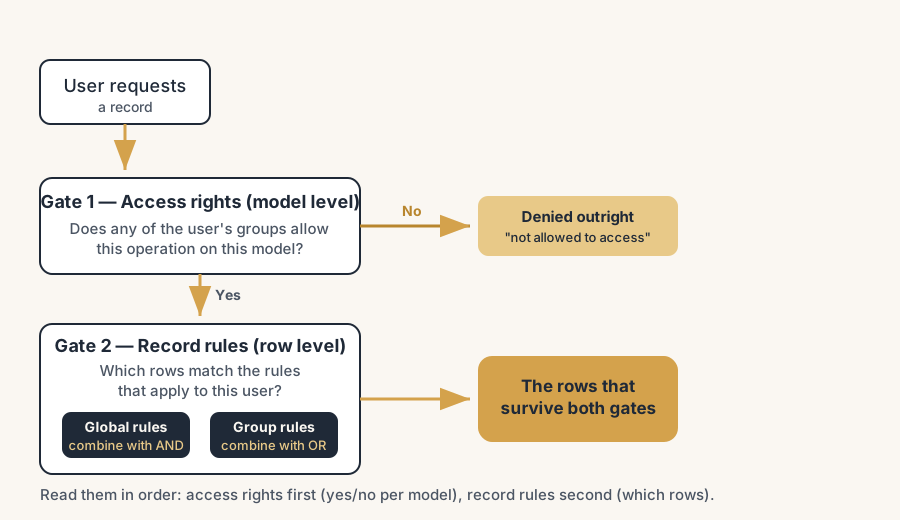
Read it as two gates in a row. First gate, access rights: does any group this user belongs to allow this operation on this model? If no, the user is denied outright, with the hard error, and nothing further runs. If yes, the request passes to the second gate. Second gate, record rules: of the records in this model, which ones match the rules that apply to this user? All global rules must match (they combine with *and*), and at least one group rule must match if any group rules exist (they combine with *or*). Only the rows that survive both gates come back. So a user can have perfect access rights and still see nothing, because a record rule filtered everything out, and a user can have a generous record rule and still be denied, because the access-rights gate was shut. Always read them in that order: gate first, filter second.
FAQ
What is the difference between access rights and record rules in Odoo?
Access rights work at the model level and decide whether a user can read, write, create or delete a whole model at all. Record rules work at the row level and decide which records inside that model the user may see, for example only their own orders. Access rights are the gate; record rules are the filter that runs after the gate is open. A record rule can never grant access that access rights deny.
Why does a user see all records when they should only see their own in Odoo?
Because the record rule that scopes them is missing, disabled, or attached to the wrong group. Access rights opened the model, but no row-level filter is narrowing it. Go to Settings > Technical > Security > Record Rules (developer mode on), filter by the model, and check for a group rule with a domain like [('user_id','=',user.id)]. If it is absent, everyone with model access sees everything.
Why does a user get "you are not allowed to access this document" in Odoo?
Because the access-rights gate is shut for that model and operation. None of the user's groups grant the read, write, create or delete that the action needs. This is a model-level problem, not a record-rule one, so editing record rules will not help. Check Settings > Technical > Security > Access Rights, filter by the model in the error, and confirm one of the user's groups has the right operation ticked.
How do global record rules differ from group record rules in Odoo?
Global rules (no group set) apply to everyone and combine with *and*: every global rule must be satisfied, so they only ever restrict access, and a group rule cannot override them. Group rules combine with *or*: if a user is in several groups with rules, matching any one of them is enough, so adding a group can widen what they see. In short, global rules subtract and group rules add, within the bounds the global rules allow.
How do I debug Odoo permissions in developer mode?
Turn on developer mode in Settings, then open Settings > Technical > Security, which exposes Access Rights and Record Rules. Read the affected user's full technical groups, decide whether the symptom is a hard "access denied" error (access rights) or a visibility problem (record rules), check the matching layer for that exact model and operation, and finally test as that user or a copy of them, never as the admin, because the superuser bypasses these checks.