
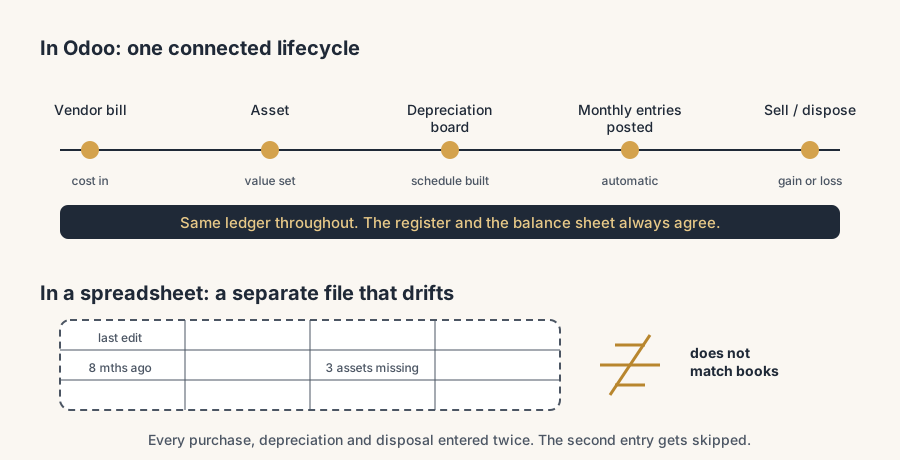
A fixed asset register that always matches the ledger comes from running assets inside Odoo: create the asset from the vendor bill, let Odoo build the depreciation board, and the monthly entries post themselves until disposal.
It is the week before year-end and your accountant asks for the fixed asset register. You open the spreadsheet. The last row was added eight months ago, the depreciation column has a formula that someone changed, and three machines you bought this year are not in it at all. The number it spits out does not match the asset value on the balance sheet, so now you spend an evening reconciling a spreadsheet against your own books, by hand, again.
This is the problem with tracking fixed assets outside your accounting system. The spreadsheet and the ledger drift apart, because every purchase, every monthly depreciation and every disposal has to be entered twice and the second entry gets skipped. Odoo runs the whole thing for you: you create an asset from the vendor bill that paid for it, Odoo builds the depreciation schedule, posts the monthly entries automatically, and when you sell or scrap the asset it writes the disposal entry and the gain or loss for you. The register stops being a separate file. It becomes a view of the same ledger your accountant already trusts.
Why the spreadsheet always drifts
A fixed asset is anything you buy that you use for more than a year and write down over time: machines, vehicles, fit-out, big IT. Accounting wants three things from it. The asset on the balance sheet, the monthly depreciation expense on the profit and loss, and a clean gain or loss when you eventually sell or scrap it. A spreadsheet can hold the first number. It cannot post the other two.
So someone keys the depreciation into the books by hand each month, or more honestly, once a quarter when there is time, from a schedule that lives in a separate file. The moment a depreciation method changes, an asset gets sold mid-life, or a new machine arrives, the two records split. By year-end the spreadsheet total and the ledger balance disagree and nobody knows which one is right. The work is not hard. It is just duplicated, and duplicated work is the work that gets dropped.
The fix, in numbered steps
The idea is to let the asset live in Odoo from the bill that bought it to the day you dispose of it. Odoo holds the value, the schedule and every entry in one place.
Set up the asset accounts and turn on the feature.
In Accounting, enable the Assets feature in the settings. You need a Fixed Asset account on the balance sheet for the asset value, a depreciation expense account on the profit and loss, and a depreciation account that holds the accumulated depreciation. This is the chart-of-accounts work that makes everything below it post to the right place. Get this wrong and the entries are technically created but land in the wrong accounts.
Create an asset model for each type you buy often.
Go to Accounting > Configuration > Asset Models and create one per category: vehicles, machines, laptops, fit-out. The model holds the defaults: the three accounts, the depreciation method, and the number of depreciations. A model means you set the rules once. Every laptop you book afterwards uses the same useful life and the same accounts without anyone deciding again. You can also turn a confirmed asset into a model later with the Save Model button.
Create the asset from the vendor bill, not from scratch.
This is the step that keeps the register honest. When you book the vendor bill for the purchase, make sure the bill line uses an account set up for assets, or open the posted journal item and click Action > Create Asset. Odoo carries the amount straight from the bill into the asset, so the asset value and the cost you actually paid are the same number by construction. There is no re-typing and no rounding drift between the bill and the register.
Let Odoo build the depreciation board.
On the asset, pick the method and the duration, then click Compute Depreciation. Odoo fills the Depreciation Board: every entry it will post, with the date and the amount, down to the residual value. The three methods are Straight Line (the depreciable value divided evenly across the periods, the same amount each time), Declining (the value times a declining factor, so a bigger write-down early), and Declining Then Straight Line (declining at first, then switching to straight line so the asset fully depreciates to zero). Pick the one your accountant uses. Most SMEs use straight line.
Confirm, and let the monthly entries post themselves.
Once you confirm the asset, Odoo creates all the depreciation journal entries in draft and posts them on their dates, automatically, month after month. You stop keying depreciation by hand. The Posted Entries smart button on the asset shows you every entry that has run, so the schedule and the ledger are always the same record, not two files you reconcile at year-end.
Dispose of or sell the asset when its life ends.
When you scrap or sell the asset, open it and click Sell or Dispose. Odoo removes the remaining value from the balance sheet and writes the disposal entry for you. If you sold it, Odoo books the gain or loss as the difference between the asset's book value on that date and what you sold it for. The register, the balance sheet and the gain-or-loss line all move together in one action.
The part that trips people up
A few things catch almost everyone
The mechanics are straightforward. The places people get burned are the details that change the numbers.
The first depreciation is usually a part-month, and the Prorata Date controls it. If you buy a machine on the 18th, you do not depreciate a full month for that first period. Odoo's Prorata Date and First Depreciation Date compute that first, smaller entry based on the time left in the period, and the last entry is correspondingly smaller too. If you leave these on the defaults without thinking, your first and last entries will not match what your accountant expects. Set them deliberately.
Declining alone never reaches zero. The declining method multiplies the remaining value by a factor each period, and a percentage of something is never zero. If you need the asset fully written down by the end of its life, use Declining Then Straight Line, which switches to straight line at the point that gives the higher write-down, so it lands on zero. Pure declining will leave a stub forever.
Asset value is the cost, not the residual value. What you depreciate is the depreciable value: the cost minus what you expect to get for the asset at the end of its life. If you put the full purchase price in and the asset has a real resale value, you will over-depreciate. If your accounting standard ignores residual value, leave it at zero. Decide this with whoever signs off your accounts, not by guessing.
Changing an asset mid-life needs the right action, not an edit. If an asset's value changes, do not just edit the number. Use Modify Depreciation to revalue it, the Gross Increase smart button to record an increase in value, or Pause to stop depreciation for a period. These keep the journal entries correct. Hand-editing the value leaves the ledger and the schedule out of sync, which is exactly the spreadsheet problem you were trying to escape.
Quick checklist
- Are your fixed asset, depreciation expense and depreciation accounts set up before you create any asset?
- Do you have an asset model for each type you buy regularly, so the useful life and accounts are decided once?
- Are you creating assets from the vendor bill, so the asset value matches what you actually paid?
- Did you check the Prorata Date and First Depreciation Date, so the first and last entries are right?
- Does the depreciation method match what your accountant uses, and does it reach zero if it needs to?
- When you sell or scrap an asset, are you using Sell or Dispose so the gain or loss posts automatically?
FAQ
How do I create a fixed asset in Odoo?
Create it from the vendor bill that paid for it. Book the bill, then open the journal item and click Action > Create Asset, or use a bill account that is configured to create assets automatically. Odoo carries the amount from the bill into the asset, so the asset value matches the cost. You then pick a depreciation method and duration and click Compute Depreciation to build the schedule.
What is an asset model in Odoo and do I need one?
An asset model is a template that holds the default accounts, depreciation method and number of depreciations for a type of asset, such as vehicles or laptops. You do not strictly need one, but if you buy the same kind of asset regularly it saves you deciding the useful life and accounts every time and keeps them consistent. You create models under Accounting > Configuration > Asset Models, or save a confirmed asset as a model.
Which depreciation methods does Odoo support?
Three. Straight Line spreads the depreciable value evenly across the periods, so each entry is the same amount. Declining writes down a percentage of the remaining value each period, so it is heavier early and never quite reaches zero. Declining Then Straight Line starts declining and switches to straight line so the asset fully depreciates to zero. Straight line is the most common for SMEs.
How does Odoo handle selling or disposing of a fixed asset?
Open the asset and click Sell or Dispose. Odoo removes the remaining book value from the balance sheet and posts the disposal entry. If you sold it rather than scrapped it, Odoo also books the gain or loss, which is the difference between the asset's book value on that date and the sale amount. You do not write any of those entries by hand.
Why do my Odoo depreciation entries not match my old spreadsheet?
Usually because of the Prorata Date and First Depreciation Date, the residual value, or the depreciation method. Odoo prorates the first period from the purchase date, depreciates only the cost minus the residual value, and the declining methods behave differently from a simple spreadsheet formula. Check those three settings against what your accountant expects, and the numbers line up.