
Your reps spend their day typing orders into the system that customers already know they want. Every new account adds load to the same sales desk, so growth and headcount rise together and your margin per order does not. The way out is not more people, it is a B2B portal where your customers place their own repeat orders at their own agreed prices, and your reps move from typing to selling. Odoo does this out of the box: a login-gated webshop, customer-specific pricelists, and the order landing straight in your system as a real sales order. The rest of this post covers when this pays off, how it works, and where it gets harder than the demo suggests.
A customer calls or emails the same order they place every two weeks. A rep reads it, finds the account, types each line, applies the right discount from memory or a spreadsheet, checks stock, and confirms. Multiply that by a few hundred accounts and the sales desk is a data-entry desk. The people you hired to win business spend their day re-keying business you already won.
So you grow, and the desk grows with you. Another rep, another seat, another person who has to learn which customer gets which price. Holidays and sick days turn into backlogs. Pricing lives in someone's head or a shared sheet, so a wrong line slips through now and then and a customer notices before you do. The ceiling is not demand. The ceiling is how many orders your desk can type in a day.
Why it happens
Wholesale orders are repetitive and predictable, which is exactly the kind of work that should not need a human typing it. The customer knows the products, the quantities, and roughly when they reorder. The only reason a rep is in the middle is that the order arrives as a phone call or an email instead of as data. Every manual step exists to translate an unstructured request into a structured order.
The second reason is price. B2B is not one public price, it is a price per customer or per customer group, often negotiated, sometimes with volume breaks. As long as those prices live outside the system, in heads and spreadsheets, only a person who knows them can place the order correctly. Put the prices in the system, attached to the customer, and the system can do what the rep was doing by hand.
The shift, in steps
Treat this as a business change, not a software toggle. The software is the easy part.
Separate the work reps should keep from the work they should hand to the portal.
Repeat orders, standard catalogue, known prices: that is portal work. New accounts, negotiations, problem-solving, upsell: that is rep work. The goal is not to remove reps, it is to move them off the keyboard so they sell. Name which customers and which order types go self-serve first, usually your steady reorder accounts.
Get your customer prices into the system as pricelists, not as tribal knowledge.
Each customer or customer group gets a pricelist with their agreed prices and any volume breaks. This is the step that makes everything else possible, and it is the step people underestimate. Once the price lives on the customer record, the portal, the rep, and the invoice all read the same number.
Turn on a login-gated B2B shop so the public never sees your prices.
In Odoo you set the shop so prices and ordering are visible only to logged-in customers, and the public sees products without prices (or nothing at all). This is standard: the eCommerce access setting hides the shop from the public, and a zero or public pricelist on the anonymous visitor means no real price leaks. Your negotiated prices stay between you and each customer.
Invite customers to the portal and tie each login to their pricelist.
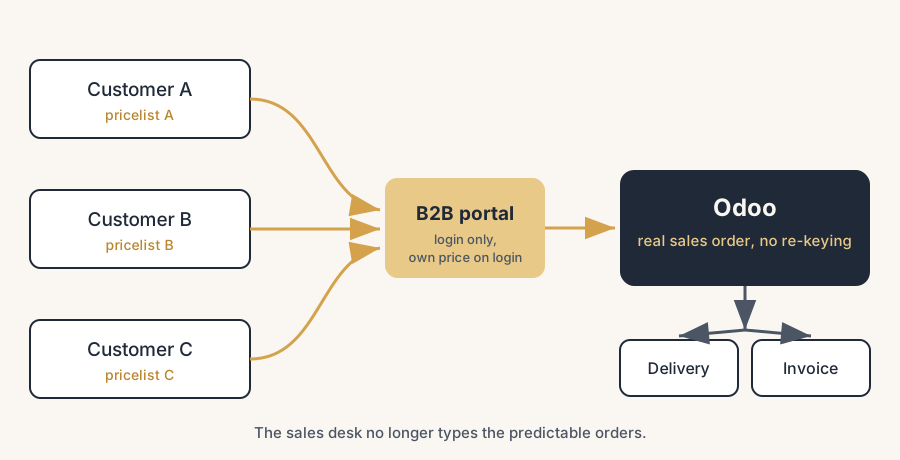
When a customer logs in, Odoo shows them their own prices, because the pricelist is set on their contact. They see their catalogue, their price, their stock availability, and they place the order themselves. No rep types it.
Let the portal order land as a real sales order, not a separate inbox.
This is the whole point. A portal order in Odoo is a normal sales order in the same system your warehouse and finance already use. It flows into picking, delivery and invoicing with no re-keying. There is no second system to reconcile and no copy-paste step that can go wrong.
Move reps to the accounts and moments that actually need a human.
With repeat orders self-serving, a rep can carry more accounts, spend time on the ones with growth potential, and stop being the bottleneck for orders that did not need them. The desk stops scaling one-for-one with the customer base. That is how you grow the wholesaler without growing the sales desk.
The part that trips people up
A few things catch almost everyone
The pricelists are the project, not the portal. Standing up a login-gated shop in Odoo is quick. Getting hundreds of customer-specific prices, volume breaks and exceptions out of spreadsheets and heads and into clean pricelists is the real work. If your pricing is inconsistent today, the portal will expose it. Budget for cleaning the prices, not just switching on the shop.
B2B and B2C on one Odoo need a deliberate design. If you sell both to businesses at negotiated, tax-excluded prices and to consumers at public, tax-included prices, that is not one shop with a switch. Odoo can do both, but cleanly it is usually two websites or a clearly separated B2B section, each with its own tax display and access rules. Decide this before you build, because retrofitting it is painful.
Hiding prices from the public is a real setting, but check it end to end. The mechanism (eCommerce access for logged-in only, a public pricelist that shows no usable price) works, but a misconfigured pricelist or an open product page can still leak a number. Test it as an anonymous visitor before you announce the portal, not after.
Adoption is the risk, not the technology. Customers who have always phoned in orders will keep phoning unless the portal is genuinely easier for them: their prices, their products, their reorder history, fast. If the portal is slower than calling their rep, they will call their rep. Design the portal around the customer's reorder habit, and have reps actively move their steady accounts onto it. Standard Odoo gets you a very usable portal, and a handful of small additions make it genuinely better than phoning for a wholesale buyer. The ones we keep building at clients: a previously-bought filter so reordering starts from their own history, a catalogue trimmed per customer so each account only sees what it may buy, and a wishlist that keeps standing instead of emptying itself the moment items go into the basket. Small work, big difference in whether customers actually switch.
Stock and lead times have to be honest online. Once a customer self-serves, they see availability themselves. If your stock figures or delivery dates are wrong, the portal broadcasts the error instead of a rep quietly managing it. A self-serve channel needs your stock data to be trustworthy first.
Quick checklist
- You have named which customers and order types go self-serve first (steady reorder accounts).
- Customer prices are in the system as pricelists per customer or group, not in spreadsheets or heads.
- The B2B shop is login-gated; the public cannot see your negotiated prices (tested as an anonymous visitor).
- Each customer login is tied to the right pricelist, so they see their own price on login.
- Portal orders land as real sales orders in the same system, flowing into picking, delivery and invoicing.
- B2B and B2C are deliberately separated (own tax display and access) if you serve both.
- Stock levels and lead times shown online are trustworthy.
- Reps have a plan to move their steady accounts onto the portal, not just an option to.
What actually scales here
Read the scaling problem as one equation. Today, orders per day are capped by reps times orders a rep can type. Adding customers adds typing, so you add reps, and cost rises with revenue. A B2B portal breaks the link: repeat orders place themselves, the cap on those orders is your warehouse and finance capacity, not your typing capacity, and reps are freed for the work that grows accounts. You are not buying a webshop. You are moving the predictable half of the work off the desk so the desk can take on the half that needs a person.
This stays manageable as long as the pricing model and the channel design stay close to standard. The more bespoke pricing logic, mixed B2B/B2C rules and custom portal behaviour you stack on, the harder it is to keep predictable and the more likely it breaks on the next upgrade.
FAQ
How do I set up a B2B customer portal in Odoo?
Use the Website/eCommerce app with a login-gated shop and customer-specific pricelists. Set the eCommerce access so only logged-in customers see prices and can order, assign each customer a pricelist on their contact, and invite them to the portal. When they log in, they see their own prices and place their own orders, which arrive as normal sales orders in Odoo.
Can I hide prices from the public and show them only to logged-in B2B customers in Odoo?
Yes. Set the eCommerce access so the shop is only available to logged-in customers, and give anonymous visitors a public or zero pricelist that shows no usable price. The public then sees products without your negotiated prices, while invited customers with an assigned pricelist see their own prices in the portal. Test it as an anonymous visitor before going live.
How do customer-specific pricelists work in Odoo?
A pricelist holds the prices and any volume breaks for a customer or a customer group, and you set that pricelist on the customer's contact. Whenever that customer orders, in the portal, through a rep, or anywhere, Odoo applies their pricelist, so they always get their agreed price without anyone looking it up.
Do portal orders create real sales orders, or a separate to-do list?
They create real sales orders in the same Odoo. A portal order is a normal sales order that flows into picking, delivery and invoicing with no re-keying. There is no second system to reconcile.
Can I run B2B and B2C on the same Odoo with different pricing and tax display?
Yes, but design it deliberately. The clean way is usually two websites or a clearly separated B2B section: the B2C side shows public, tax-included prices and allows guest checkout, the B2B side requires login and shows tax-excluded, customer-specific prices. One shop with a single switch does not cover both well, so decide the model before you build.