
Odoo can win back abandoned carts on its own: it tracks the carts that stall, waits the delay you set, and emails the customer a nudge with their cart in it. Switching it on is an easy win; its reach is capped by one thing, whether you have the visitor's email address at all.
Someone lands on your webshop, adds two items, starts the checkout, fills in their email, and then closes the tab. No payment, no order, nothing. It happens on most of your traffic, every day. These are not window shoppers. They picked products, they started to buy, and something stopped them at the last step: shipping cost they did not expect, a payment method they did not have, a phone call that pulled them away. The intent was real. The order just did not land.
That gap is the cheapest sales you will ever make. The person already wants the product, so you do not need an ad to find them again, you need one nudge at the right moment. Odoo eCommerce can send that nudge for you. It tracks which carts were abandoned, waits a set time, and emails the customer a link straight back to their cart. Here is how Odoo decides a cart is abandoned, how to switch on the automatic recovery email, how to get the timing and the content right, and the mistakes that quietly kill the whole thing.
Why carts get abandoned, and why most stay lost
People abandon carts for ordinary reasons. The total jumped when shipping was added. They wanted to compare one more time. They got interrupted and never came back. Checkout asked for an account they did not want to make. None of these mean the customer changed their mind about the product. They mean the moment passed.
The reason most of those carts stay lost is simpler: nobody follows up. Without a system, an abandoned cart is invisible. The order never existed, so there is nothing in your sales list to chase, and you have no idea who almost bought. The customer forgets within a day. A recovery email closes that gap by reminding them while the intent is still warm and handing them a one-click way back. Odoo does this natively, so you are not buying a separate tool for it.
How Odoo tracks an abandoned cart
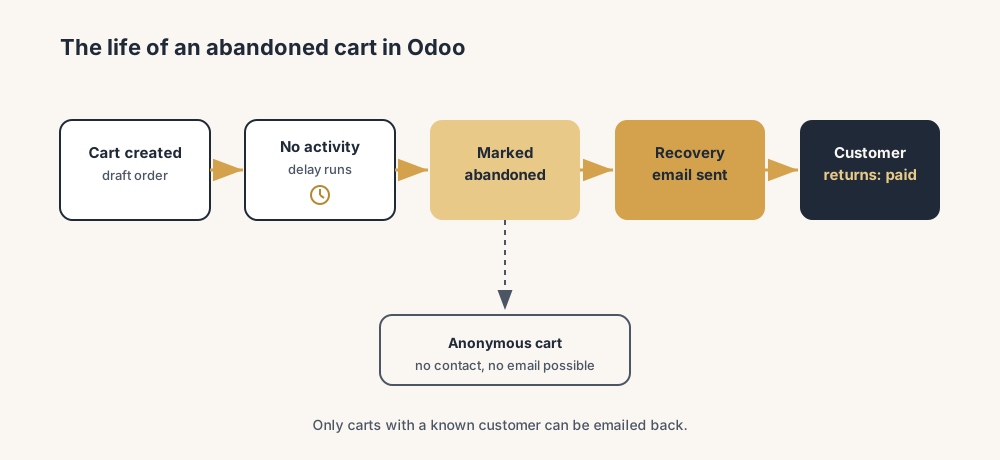
In Odoo, a cart is a draft sales order (a quotation) created the moment a visitor adds a product on the website. As long as it is not confirmed and not paid, it sits there as a draft. Odoo marks that draft as abandoned once two things are true: enough time has passed since the last activity on the cart, and the cart has not been completed into a paid order.
The "enough time" is a delay you set, and the default fallback is one hour. After that delay, the cart shows up under eCommerce > Orders > Abandoned Carts (a filtered view of those draft orders), and it becomes eligible for the recovery email. One thing matters a lot here: Odoo can only follow up if it knows who the visitor is. If the customer logged in, or got far enough in checkout to enter an email, the cart has a contact and can be emailed. If they were fully anonymous, the cart is just a draft with no one to send to. That single fact decides whether a cart is recoverable, and it is the reason your recovery rate is never 100% of abandoned carts.
The fix, in steps
Switch on the feature, set the timing, check the email, then watch the results. It takes one sitting.
Turn on automatic abandoned cart emails
Go to Website > Configuration > Settings and open the Email & Marketing section. Switch on Automatically send abandoned checkout emails. That one toggle is what turns abandoned-cart tracking into an active recovery flow. Without it, Odoo still records abandoned carts, but it never emails anyone. The toggle is the difference between a list you have to work by hand and a follow-up that runs on its own.
Set the delay before the email goes out
Next to the toggle is a Send after field. This is how long Odoo waits, after the cart's last activity, before it counts the cart as abandoned and sends the recovery email. The default behaviour falls back to one hour if you leave it untouched. Set it to a real number that fits how people buy from you. Too short and you email someone who is still deciding in another tab. Too long and the intent has gone cold and they have bought elsewhere. For most shops, somewhere between one hour and a few hours is the sweet spot for the first email. Pick a value, you can adjust it once you see the data.
Check and edit the recovery email itself
Odoo ships with a default abandoned-cart email template, and it works, but the default is generic. Open the template (linked from the same settings area) and make it sound like you. Keep it short. Remind them what is in the cart, give one clear button back to it, and keep the tone helpful, not pushy. The link in the email takes the customer straight to their saved cart so they do not have to rebuild it, which is the whole point. Do not stuff it with a discount by reflex (more on that below). A plain "you left this behind, here it is" email often outperforms a discount because it does not train people to abandon on purpose.
Let the scheduled action do the sending
The emails are sent by a background scheduled action (a cron job) that Odoo runs on a fixed interval. You do not trigger it by hand. It wakes up, finds carts that crossed the abandoned threshold and have a contact, sends the email, and marks the cart so it does not email the same one twice. You normally leave this alone. It is worth knowing it exists, because if recovery emails are not going out, this scheduled action being inactive is one of the first things to check.
Watch the Abandoned Carts list and the recoveries
Open eCommerce > Orders > Abandoned Carts to see the carts that did not convert, who they belong to, and what was in them. Over time you can see which carts came back after the email and which did not. This list is also your manual lever: for a high-value cart from a known customer, a salesperson can reach out personally instead of relying only on the automatic mail. Check it weekly. A growing pile of anonymous carts tells you to fix checkout so more visitors identify themselves earlier; a low recovery rate tells you to revisit the timing or the email.
The part that trips people up
A few things catch almost everyone
A few things catch almost everyone.
Anonymous carts cannot be recovered. This is the big one. If a visitor never logs in and never enters an email, Odoo has no address to send to, so that cart is simply lost. If most of your abandoned carts are anonymous, the recovery email is not the fix; getting people to identify themselves earlier in checkout is. Ask for the email near the start, not the end.
The delay counts from last activity, not from the first add. "Send after one hour" means one hour after the customer last touched the cart, not one hour after they started shopping. Someone who browses for forty minutes and then leaves does not get the email forty minutes sooner. Set the delay with that in mind.
Confirmed quotations are not abandoned carts, and the reverse trap exists too. Odoo distinguishes a real eCommerce cart from a quotation you made by hand in Sales. If you create draft quotations in the back office, you do not want those treated as abandoned webshop carts. The Abandoned Carts view filters for genuine website carts, so trust that filter rather than the raw quotation list.
Reaching for a discount in the first email backfires. If every abandoned cart triggers a discount, frequent buyers learn to abandon on purpose to get money off. Lead with a reminder. Keep any discount for a later, separate nudge or for high-value carts, not as the default first move.
One email is the floor, not the ceiling. Odoo's native flow centres on a single automatic email. That recovers some carts and is the right place to start. If you want a sequence (a reminder, then a second message a day later, then an offer), that is more than the native single email gives you, and it usually means Email Marketing or a dedicated automation. Know where native stops so you are not surprised when the second email never arrives.
Do not stare blindly at the abandoned-cart list. The recovery email can only reach the visitors who already typed in their email address, and most cart abandoners never got that far. So the real lever sits earlier in the funnel: get the email address captured sooner. An account or guest-email step early in checkout, a newsletter or discount prompt that fires before the payment page, anything that turns an anonymous cart into one you can write to. The recovery mail is the easy win; widening the share of carts it can reach is where the volume is.
Quick checklist
- Automatically send abandoned checkout emails is switched on under Website > Configuration > Settings > Email & Marketing.
- The Send after delay is set to a real value that fits your buyers, not left on the default by accident.
- The recovery email template has been edited to sound like you, with one clear button back to the cart.
- Checkout asks for the customer's email early, so more carts are identifiable and therefore recoverable.
- The scheduled action that sends the emails is active.
- You check the Abandoned Carts list weekly and reach out by hand on high-value carts.
- You are not handing out a discount in the very first email by default.
FAQ
How does Odoo track abandoned carts?
A cart in Odoo is a draft sales order created when a visitor adds a product on the website. Odoo marks it as abandoned once a set delay has passed since the cart's last activity and the cart has not been completed into a paid order. Abandoned carts appear under eCommerce > Orders > Abandoned Carts. Odoo can only follow up on a cart where it knows the customer, so the visitor must have logged in or entered an email during checkout.
How do I turn on abandoned cart recovery emails in Odoo?
Go to Website > Configuration > Settings, open the Email & Marketing section, and switch on "Automatically send abandoned checkout emails". Set the "Send after" delay to control how long Odoo waits after the cart's last activity before sending. A background scheduled action then sends the recovery email automatically to carts that have a known customer.
What is a good delay before sending an abandoned cart email in Odoo?
For most shops, between one hour and a few hours after the cart's last activity works best for the first email. Odoo's default falls back to one hour if you leave the field untouched. Too short and you email people who are still deciding, too long and they have already bought elsewhere. Set a value, then adjust it once you can see your recovery rate.
Why are some abandoned carts not getting a recovery email?
The most common reason is that the cart is anonymous: the visitor never logged in and never entered an email, so Odoo has no address to send to. Other causes are the feature toggle being off, the scheduled action being inactive, or the delay not having passed yet. To recover more carts, ask for the customer's email earlier in checkout so more carts are identifiable.