
Your sales team is dropping deals through the cracks, and nobody can say where each one stands. The fix is a CRM pipeline that matches how you actually sell: decide whether you need a lead step before the pipeline, convert leads to opportunities the right way, name your stages after real decisions, and close with a clear won or lost. The rest of this post walks the full path from a fresh lead to a won deal turned into a quotation, plus the one thing Odoo will not let you undo.
A contact form fills in, an email lands in the sales inbox, someone scribbles a name on a sticky note. Three days later nobody knows if it was followed up. Your manager asks for a forecast and you are guessing, because half the deals live in the pipeline and half live in people's heads.
Some teams have the opposite problem: every raw enquiry drops straight into the pipeline as an opportunity, so the pipeline is full of junk that was never qualified. The forecast is inflated, the team wastes time on tyre-kickers, and the real deals are buried. Both problems come from the same root: no clear line between a raw lead and a real opportunity, and no agreed path between them.
Why it happens
Odoo CRM has two record types that look similar but do different jobs. A lead is a raw, unqualified contact: a name, maybe an email, no commitment that this will ever become a deal. An opportunity is a qualified deal that sits in your pipeline with a stage, an expected revenue and a close date. The pipeline (the Kanban board you stare at all day) shows opportunities, not leads.
By default Odoo hides the lead step. Out of the box, every new enquiry becomes an opportunity straight away and lands in the pipeline. That is fine for a simple, low-volume sales process. It becomes a problem when you get a lot of unqualified noise, because there is no holding area to triage before the pipeline. The lead step is the holding area, and it is off until you turn it on.
The fix, in numbered steps
Decide whether you need leads at all.
If most enquiries are already real prospects and your volume is low, skip leads and let everything become an opportunity. Turn leads on when you get a lot of raw, unqualified contacts (web forms, bought lists, event scans) and you want to qualify before anything reaches the pipeline. More volume of low-quality contacts means leads earn their keep. A handful of warm referrals a week usually does not.
Enable the Leads setting if you need it.
Go to CRM > Configuration > Settings, find the CRM section, tick Leads, and save. A Leads menu now appears in the CRM app. New raw contacts land there as leads instead of going straight into the pipeline. Without this setting, there is no separate lead step at all.
Qualify the lead, then convert it.
Open a lead from CRM > Leads. Check it is real and worth pursuing: the right contact, a genuine need, the budget to match. When it qualifies, click Convert to Opportunity. Odoo asks two things: whether to link it to a new or existing customer, and which salesperson and sales team to assign. Confirm, and the record moves into the pipeline as an opportunity.
Set up pipeline stages that match real decisions.
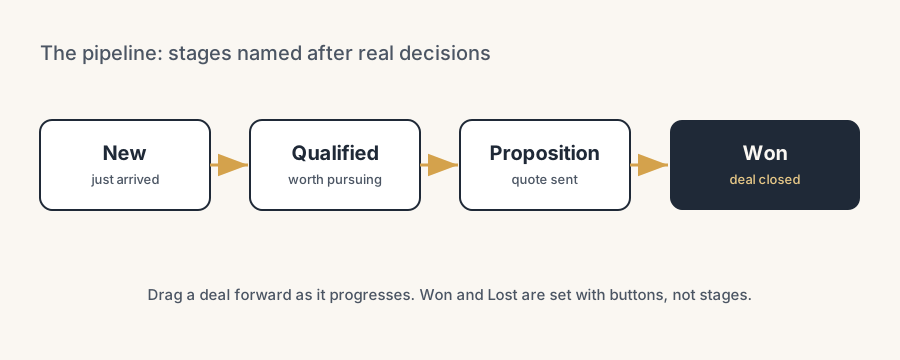
Stages are the columns on the Kanban board. Name them after what has actually happened, not vague labels. A clean default for most teams: New, Qualified, Proposition, Won. Edit them in the pipeline by clicking the gear on a column, or add a stage with the plus next to the last column. Keep the list short. Five or six stages is plenty; more than that and the team stops updating them.
Move deals across the board and keep them current.
Drag an opportunity from one column to the next as it progresses, or open it and change the stage field. Set the expected revenue and expected closing date on each opportunity so the forecast means something. A pipeline is only as good as how honestly the team keeps it up to date.
Close the deal as won or lost.
Open the opportunity and click Won at the top when the deal is closed and signed. When it dies, click Lost and pick a Lost Reason from the dropdown. Losing a deal does not delete it: the record stays, marked lost, so you can report on why deals slip and reactivate later if the customer comes back.
Turn a won opportunity into a quotation.
On the opportunity, click New Quotation at the top. Odoo opens a draft sales order linked to that opportunity, carrying over the customer and the salesperson. You then add the product lines and send it. The New Quotation button only shows if the Sales app is installed, because the quote lives in Sales, not CRM. In practice you usually quote before marking Won, then mark the deal Won once the order is confirmed. If you want one less manual step, an automation rule can do that closing click for you. We often set one up that marks the opportunity Won the moment its linked sales order is confirmed, so the pipeline follows reality without anyone remembering to update it.
The part that trips people up
A few things catch almost everyone
Converting an opportunity back to a lead is not native. This is the big one. Once you click Convert to Opportunity, Odoo does not give you a button to turn it back into a lead. The conversion is a one-way street. If you converted too early and the deal turns out to be junk, your realistic options are to mark it Lost with a reason, archive it, or delete it. There is no clean "send it back to leads" in standard Odoo. So qualify before you convert, not after.
Converting also handles duplicates. When you convert a lead, Odoo checks for similar leads and opportunities (same email or contact) and offers to merge them. Useful, but read what you are merging. A careless merge collapses two genuinely different deals into one and you lose a line in your pipeline.
Stages are shared across sales teams by default. A stage you add for one team can show up for every team unless you tie it to a specific team. If your teams sell very differently, decide up front whether they share one set of stages or each get their own, or the board gets messy fast.
Lost is a state, not a stage. Won and Lost are not columns you drag a card into. They are buttons on the opportunity form that set its status and (for lost) capture a reason. Do not build a "Lost" stage column; use the Lost button so the reporting works.
The first stage is folded for new opportunities. A brand new opportunity sits in the first stage. If your team treats "New" as an inbox they never empty, deals rot there. Make a rule: every New opportunity gets qualified or lost within a set number of days.
Quick checklist
- Decided whether you need the lead step, based on the volume of unqualified contacts.
- Leads enabled in CRM > Configuration > Settings (only if you need them).
- Leads qualified before conversion, because you cannot convert back.
- Convert to Opportunity used, with the right customer and salesperson set.
- Pipeline stages named after real decisions: New, Qualified, Proposition, Won.
- Expected revenue and closing date filled on each opportunity.
- Lost Reasons configured under CRM > Configuration > Lost Reasons.
- Won and Lost set with the buttons, not with stage columns.
- Sales app installed so New Quotation works on the opportunity.
FAQ
What is the difference between a lead and an opportunity in Odoo CRM?
A lead is a raw, unqualified contact with no commitment that it will become a deal. An opportunity is a qualified deal in your pipeline, with a stage, expected revenue and a close date. The pipeline board shows opportunities, not leads. Leads are an optional holding step before the pipeline.
When should I enable leads in Odoo CRM?
Enable leads when you receive a lot of raw, unqualified contacts (web forms, bought lists, event scans) and want to qualify them before they reach the pipeline. If your volume is low and most enquiries are already real prospects, skip leads and let everything become an opportunity. Turn it on under CRM > Configuration > Settings.
How do I convert a lead to an opportunity in Odoo?
Open the lead under CRM > Leads, qualify it, then click Convert to Opportunity. Odoo asks whether to link a new or existing customer and which salesperson and sales team to assign. Confirm, and the record moves into the pipeline as an opportunity. It also offers to merge any duplicate leads or opportunities it finds.
Can I convert an opportunity back to a lead in Odoo?
No. Standard Odoo has no native button to turn an opportunity back into a lead. The conversion is one-way. If you converted too early, your options are to mark it lost with a reason, archive it, or delete it. So qualify the lead before you convert it.
How do I turn a won opportunity into a quotation?
Open the opportunity and click New Quotation at the top. Odoo creates a draft sales order linked to the opportunity, carrying over the customer and salesperson, and you add the product lines. The button only appears if the Sales app is installed, because the quotation lives in the Sales app.
How do lost reasons work in Odoo CRM?
Marking an opportunity lost keeps the record and tags it with a reason you choose from a dropdown. Configure the list under CRM > Configuration > Lost Reasons. Lost is a status set with the Lost button, not a stage column. The record stays for reporting and can be reactivated if the customer returns.