
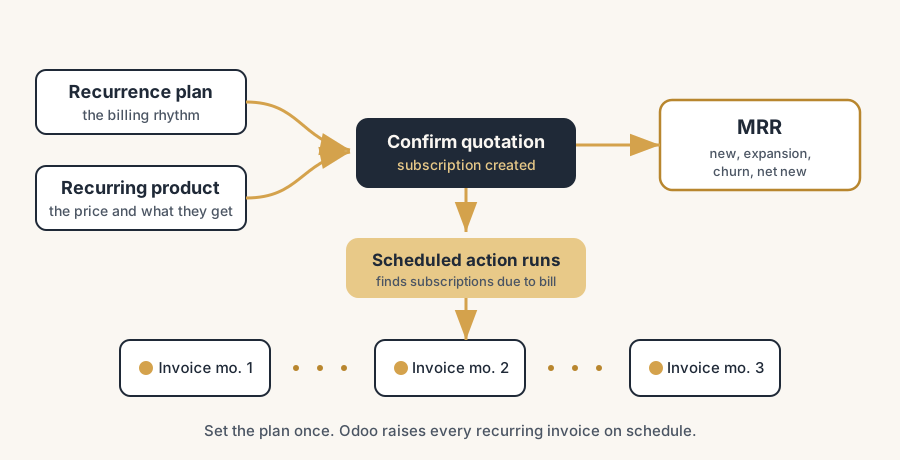
Recurring billing in Odoo takes three pieces: a recurrence plan for the rhythm, a recurring product, and a confirmed subscription quotation. The scheduled actions then raise every invoice on time, and nobody copies last month's invoices again.
It is the first of the month, so someone on your team opens the accounting app and starts copying last month's invoices. Same customers, same lines, same amounts, with a new date. An hour of typing, and by the time it is done two customers have already churned and got billed anyway, one upgraded last week and got billed for the old plan, and the VAT on a cross-border line is wrong because nobody checked. Next month the same hour happens again.
Recurring revenue is supposed to be the easy money. The work is done once, the customer keeps paying, and the cash is predictable. The moment you bill it by hand, none of that is true. The invoices are late, the amounts drift, upgrades and cancellations slip through the cracks, and you have no clean view of what you actually earn per month. Odoo's Subscriptions app exists to take the manual invoice out of the loop entirely: define the plan once, confirm the order, and the invoices raise themselves on schedule. Here is why the manual approach breaks down, how to set it up so it runs without you, and the parts that trip people up.
Why manual recurring invoices fall apart
The problem is not that monthly invoicing is hard. It is that doing it by hand turns a repeatable process into a memory test, and memory loses.
The invoice depends on someone remembering. A recurring invoice only goes out if a person remembers to raise it on the right day. Miss the day and the cash is late. Miss the customer and the cash never comes. The whole point of recurring revenue is that it does not depend on attention, and a manual process makes it depend on exactly that.
Changes mid-contract get billed wrong. A customer upgrades from the small plan to the large one on the 12th. If the next invoice is a copy of last month's, they pay the old price for a month, or you eyeball a half-month adjustment and get it slightly wrong. Cancellations are worse: a churned customer who still gets billed is a refund, an apology, and a dent in trust.
You cannot see your real recurring revenue. When invoices are a pile of manually raised documents, there is no clean monthly recurring revenue figure, no view of what is new, what is growing, and what is leaking out the bottom. You are running a subscription business with no instrument that tells you whether it is growing.
Tax and the first period get fudged. A customer who starts on the 18th does not owe a full month, but a copied invoice charges one anyway. A cross-border customer needs a different VAT treatment, but a hand-typed line uses whatever the typist remembered. Each fudge is small. Across a few hundred subscriptions, the errors are an audit waiting to happen.
How to set it up so it runs without you
You take the manual invoice out of the loop by defining the recurrence once and letting Odoo generate the invoices on schedule. The steps build on each other.
Install Subscriptions and create your recurrence plans.
A recurrence plan is the billing rhythm: weekly, monthly, quarterly, yearly, or a custom period like every two months. You define it once in Subscriptions, and every plan you sell points at one of these rhythms. This is the unit that says how often the invoice repeats, separate from what the customer is paying for.
Make the product recurring.
A subscription product is a normal product with the recurring option switched on, linked to a recurrence plan. The product carries the price and what the customer gets; the plan carries the rhythm. Set the product type to a service for anything that is access or a fee, because, as you will see below, proration only behaves correctly on service products.
Sell it as a subscription quotation and confirm.
You quote the subscription like any other sale, with the recurring product and the plan on it. When you confirm the quotation, Odoo creates the subscription contract automatically from the order. There is no separate "create subscription" step. The confirmed recurring order is the subscription.
Let the scheduled actions raise the invoices.
This is the part that removes the manual work. Odoo has scheduled actions that run in the background, find subscriptions due for billing, and generate the recurring invoices on their billing date. They are on by default. With invoicing set to automatic, the invoice is created and can be sent and paid (via a saved payment token) without anyone opening the order. You define the plan once; the platform raises every invoice after that.
Watch MRR, and use upsell and renewal instead of editing the order.
Once subscriptions run, the Subscriptions dashboard gives you monthly recurring revenue normalised to a monthly figure, so an annual contract and a monthly one are comparable. When a customer wants more, use the Upsell button on the subscription, not a manual edit of the order lines, because the upsell wizard prorates the extra to the remaining period and a manual edit does not. Renewals and upgrades flow through the same machinery that raises the invoices, so MRR, new, expansion and churn all stay correct.
The part that trips people up
A few things catch almost everyone
A few things catch almost everyone setting up subscriptions for the first time.
Proration only works on service products. When you start a subscription mid-period with "Align to Period Start" on, Odoo prorates the first invoice down to the part-period the customer actually used. That proration only applies to service product types. Set a subscription product as a storable or consumable good and the first invoice charges a full period regardless of the start date. If your first invoices look too high, this is almost always why: the product is the wrong type.
Upsell through the wizard, never by editing the lines. The mid-cycle proration that makes an upgrade fair is calculated by the Upsell button. If you instead open the subscription and edit the order lines by hand, you bypass proration entirely and the customer is billed wrong. The rule is simple: change a running subscription through Upsell and Renew, not by typing in the lines.
Tax follows the customer's fiscal position, so set it up first. A subscription that auto-invoices a cross-border or reverse-charge customer will keep applying whatever tax is configured, on every cycle, forever. Get the fiscal positions and the customer's tax setup right before you let recurring invoices run, because a wrong tax repeated monthly is a wrong tax multiplied. Automation makes correct tax effortless and wrong tax relentless.
Churn has to be handled as a closure, not a deletion. When a customer leaves, close the subscription with a close reason rather than deleting it or just stopping. The close reason (too expensive, switched to a competitor, no longer needed, poor support) feeds the churn analysis, and closing it cleanly stops the next invoice. A subscription that is "sort of cancelled" but still active is exactly the one that bills a churned customer and costs you a refund.
Deferred revenue accounts need to be set up for the billing to post correctly. The scheduled action that generates recurring invoices and payments expects the deferred revenue (and deferred expense) accounts to exist. If accounting is half-configured, the automation either errors or posts revenue in the wrong period. The invoicing and the accounting setup are one job, not two.
Quick checklist
- Subscriptions installed and your recurrence plans (monthly, yearly, custom) defined once.
- Subscription products set as service type, recurring option on, linked to a plan.
- Quotation confirmed, so the subscription contract is created automatically from the order.
- Invoicing set to automatic, and the recurring scheduled actions left on so invoices raise themselves.
- "Align to Period Start" set the way you want the first, prorated invoice to behave.
- Upgrades go through the Upsell button, renewals through Renew, never through manual line edits.
- Fiscal positions and customer tax checked before the recurring invoices start, not after.
- Churn closed with a close reason so the next invoice stops and the analysis stays clean.
- Deferred revenue and expense accounts configured so the recurring invoices post correctly.
FAQ
How do I set up recurring billing in Odoo without raising invoices by hand?
Install the Subscriptions app, create a recurrence plan (the billing rhythm, such as monthly or yearly), and make your product a recurring service product linked to that plan. Quote it as a subscription and confirm the quotation, which creates the subscription contract automatically. With invoicing set to automatic, Odoo's scheduled actions then generate and send the recurring invoices on each billing date without anyone opening the order. You define the plan once; the platform raises every invoice after that.
What is the difference between a subscription product and a recurrence plan in Odoo?
The recurrence plan is the billing rhythm: how often the invoice repeats (weekly, monthly, quarterly, yearly, or a custom period). The subscription product is what the customer pays for and carries the price, with the recurring option switched on and a plan attached. One plan can be reused across many products. Separating the two lets you sell the same product on different rhythms and change a rhythm in one place.
How does Odoo handle proration when a subscription starts mid-period?
With "Align to Period Start" enabled, Odoo bills the first invoice only for the part of the period the customer actually used, then aligns future invoices to the period start. The important catch: this proration only applies to service product types. If the subscription product is set as a storable or consumable good, the first invoice charges a full period regardless of start date. So set subscription products as services if you want correct proration.
How do I upsell or upgrade a subscription without billing the customer wrong?
Use the Upsell button on the subscription, not a manual edit of the order lines. The upsell wizard prorates the added amount to the time remaining in the current billing period, so the customer pays only for the rest of the cycle. Editing the order lines by hand bypasses proration entirely and bills the wrong amount. The subscription must usually be invoiced before you can upsell it.
How does Odoo calculate MRR, and how do I handle churn?
Odoo computes monthly recurring revenue by normalising every subscription to a monthly value, so a 2,400 per year contract counts as 200 per month and a 900 per quarter contract as 300 per month. The dashboard then shows new, expansion, contraction, churned and net new MRR. To handle churn, close the subscription with a close reason rather than deleting it; the reason feeds the churn analysis and closing it stops the next invoice from being raised.