
What Odoo bills on a project, and when, is decided by one field: the invoicing policy on the service product. Fixed price bills the agreed amount, milestones bill per finished phase, time-and-material bills the logged hours. Set that field right and the rest of the chain follows.
You quoted a customer a fixed fee for a project, the team logged three weeks of work against it, and now the invoice screen shows nothing to bill. Or the opposite: you sold a phased build in four milestones, finished the first one, hit Create Invoice, and Odoo wants to bill the whole order at once. Somewhere between the quotation, the project and the timesheets, the link that decides what gets invoiced is set wrong, and now the number on the invoice does not match the work or the deal.
This is the single most common confusion with service billing in Odoo. People assume the project drives the invoice, or that logging time automatically bills the customer. Neither is true. One field on the product, the invoicing policy, decides what Odoo bills and when. Fixed price, milestones and time-and-material are three settings of that one field, and each behaves completely differently. Here is what each method actually invoices, how the sales order and the project connect, and where people get the wrong number on the invoice.
Why the invoice does not match the work
The root cause is a wrong mental model. Most people picture the project as the thing being billed: work happens in the project, so the project must produce the invoice. In Odoo it is the other way around. The sales order produces the invoice, and the line on that sales order carries an invoicing policy that decides what counts as billable.
The project and the timesheets feed that decision, they do not make it. A timesheet logged against a task does not bill anyone by itself. It only becomes billable if the sales order line it belongs to is set to invoice on delivered quantities and timesheets. Mark a milestone done in the project and nothing is invoiced until you go back to the sales order and bill it. The work lives in the project; the decision to invoice lives on the order line. When those two are wired to different assumptions, you get an invoice that is too high, too low, or empty.
So the question is never "what did we do on the project". It is "what does the sales order line say is billable, and has that condition been met". Three policies answer that question three different ways.
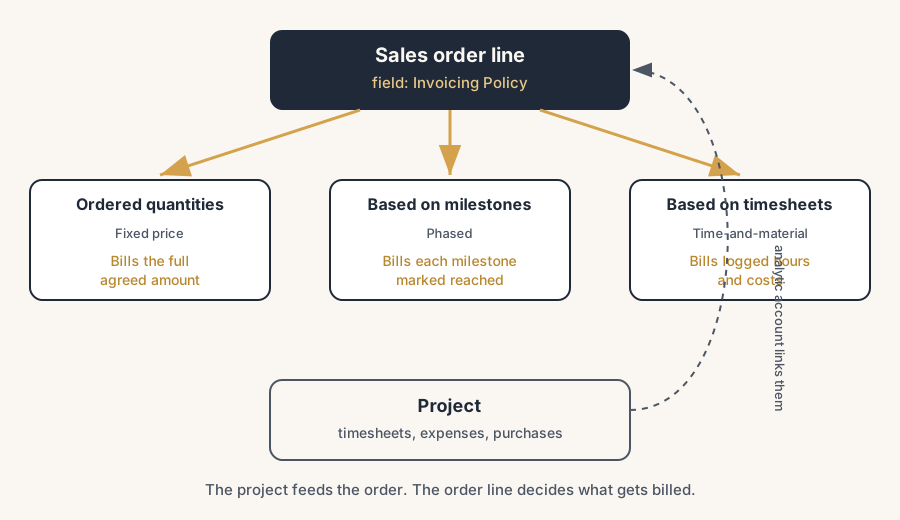
The three ways to bill a project
You pick the method per product, on the sales order line, using the Invoicing Policy field. The method you pick is the answer to one question: what triggers a billable amount.
Fixed price: bill the agreed amount, regardless of effort.
Set the service product's invoicing policy to "Ordered quantities". The customer agreed to a total for the deliverable, so Odoo lets you invoice the full ordered amount as soon as the order is confirmed, whether the team spent two hours or two hundred. Time still gets logged to the linked project for your own margin view, but it does not change the invoice. This is the method for a scoped deliverable at a set price: a website, a fixed-scope implementation, a defined audit. The customer pays the number you quoted. One wrinkle from our own fixed-price work: you usually do not want the customer to see the real hours, and the Odoo portal happily shows them. The workaround people reach for is a shadow project that is not linked to the customer, and that is a bad trade, because your margin per project and your timesheet discipline break with it. We solve it with a small module that hides timesheet detail from the portal on fixed-price projects. The hours stay on the real project for your own margin view; the customer sees the milestones and the result.
Milestones: bill each phase as you complete it.
Set the invoicing policy to "Based on Milestones". You break the deal into phases (design, build, go-live) each with its own amount, and you invoice a phase only once it is reached. This gives you a steady cash flow across a long project and gives the customer a clear payment schedule tied to visible progress. The catch that everyone hits: confirming the order does not bill anything, and finishing the work in the project does not bill anything. You invoice a milestone only after you mark it reached and then create the invoice from the order.
Time-and-material: bill what you actually spend.
Set the invoicing policy to "Based on Timesheets" (delivered quantities). The customer pays for the hours logged, plus any expenses and any purchases you made for them. This is the method when the scope is unclear or will change: support retainers, open-ended development, consulting. Every hour your team logs against the project task flows back to the sales order as a billable quantity, and at invoicing time Odoo bills the time that has been recorded but not yet invoiced.
The thread that ties all three to the project is the same. When you confirm a sales order with a service product, Odoo creates (or links to) a project and the analytic account behind it. Timesheets, expenses and vendor bills posted against that analytic account roll up to the order. That is the connection people miss: the sales order and the project are joined through the analytic account, and that is what lets Odoo know which costs and hours belong to which deal.
How to set it up so the right amount is billed
The setup is short. Getting it right is about doing it in the correct order and choosing the policy before you confirm.
Set the invoicing policy on the service product first.
On the product, set Product Type to Service and pick the Invoicing Policy: Ordered quantities for fixed price, Based on Milestones for phased, or Based on Timesheets for time-and-material. This is the decision that everything else follows from. Change it after the order is confirmed and you will be fighting the system.
Tell the service product to create a project or task.
On the service product, set the "Create on Order" field so that confirming the order spins up a project, a task in an existing project, or nothing, depending on how you work. This is what physically links the sale to the place the work and the timesheets will live.
Quote it, confirm it, and let Odoo build the project link.
Put the service product on the quotation, confirm it, and Odoo creates the project or task and the analytic account that ties them together. Smart buttons appear on the sales order (Project, Tasks, or Milestones) so you can jump straight to the work from the deal.
Do the work in the project, then invoice from the order.
Log timesheets against the task, mark milestones reached, record expenses. None of that bills the customer on its own. When you are ready, open the sales order and click Create Invoice. Odoo then bills according to the policy: the full amount (fixed price), the reached milestones only, or the recorded-but-unbilled time and costs.
Bill expenses and purchases by setting them to "at cost" or "at sales price".
For time-and-material, expenses and purchases re-invoiced to the customer need their own setting (at cost or at the sale price) and an analytic distribution pointing at the project. Set that and they appear on the sales order as billable lines alongside the time. Skip it and you eat costs you meant to pass on.
The part that trips people up
A few things catch almost everyone
This is where the wrong number comes from. A handful of traps catch almost everyone.
Logging time never bills the customer by itself. Time-and-material people expect a timesheet to be an invoice. It is not. A timesheet only becomes billable if the order line is set to invoice on timesheets, and it is only billed when you create the invoice from the sales order. Hours logged against a fixed-price line are visible for margin but are never billed; that is correct behaviour, not a bug.
A reached milestone is not an invoiced milestone. Marking a milestone reached in the project, or even on the order's Milestones smart button, does not raise an invoice. You still have to click Create Invoice on the sales order, and Odoo will then bill only the milestones marked reached. People mark everything done, see no invoice, and assume Odoo is broken.
Milestone invoicing only exists on service-type products. The "Based on Milestones" policy only appears for service products (and event tickets, booths, courses). Put a storable or consumable product on the line and the option is not there. If you cannot find milestone billing, check the product type first.
Fixed price ignores effort on purpose. On an "Ordered quantities" line you can invoice the full amount the moment the order is confirmed, before a single hour is logged. That is the point of fixed price, but it surprises people who expect the invoice to track progress. If you want the invoice to follow progress, you wanted milestones, not fixed price.
Mixing methods on one order is fine, but each line bills on its own rules. A single sales order can carry a fixed-price line, a milestone line and a time-and-material line. Each invoices by its own policy. The mistake is hitting Create Invoice and expecting one clean total; instead you get the sum of what each line currently considers billable, which can be a partial invoice. Read the invoice draft before you post it.
Changing the policy after confirmation does not retro-fix anything. The invoicing policy is read when the order line is created. If you confirmed on the wrong policy, edit the order line (or recreate it) rather than only changing the product; changing the product template alone will not rewrite a line that already exists.
Quick checklist
- Service product type set, with the right Invoicing Policy chosen before the order is confirmed.
- Fixed price = Ordered quantities. Phased = Based on Milestones. Time-and-material = Based on Timesheets.
- "Create on Order" set so confirming the quote creates the project or task.
- Order confirmed, so Odoo builds the project, the task and the analytic link.
- Milestones defined with amounts, and marked reached only when actually done.
- Timesheets logged against the task, expenses and purchases set to re-invoice with analytic distribution to the project.
- Invoice raised from the sales order, not the project, and the draft checked before posting.
- For mixed orders, every line's billable amount checked on the invoice draft.
FAQ
How do I bill a project in Odoo, and what decides what gets invoiced?
The sales order produces the invoice, not the project. Each service product on the order has an Invoicing Policy field that decides what is billable: "Ordered quantities" for a fixed price, "Based on Milestones" for phased billing, or "Based on Timesheets" for time-and-material. The project and the timesheets feed the calculation, but you always create the invoice from the sales order, and Odoo bills according to that policy.
What is the difference between fixed price, milestones and time-and-material billing in Odoo?
Fixed price ("Ordered quantities") bills the agreed total regardless of how many hours the team spends. Milestones ("Based on Milestones") bills each phase as you mark it reached, giving a payment schedule across a long project. Time-and-material ("Based on Timesheets") bills the hours actually logged plus re-invoiced expenses and purchases, for work where the scope is open. You set the method per product on the order line.
Why does logging timesheets not create an invoice in Odoo?
Because a timesheet records work, it does not bill it. Time only becomes billable if the sales order line uses the "Based on Timesheets" invoicing policy, and even then it is only invoiced when you click Create Invoice on the sales order. On a fixed-price line, logged hours are shown for margin but are never billed. So you always invoice from the order, not from the project.
How do I invoice a milestone in Odoo?
Use a service product with the invoicing policy set to "Based on Milestones", confirm the sales order, then open the Milestones smart button on the order and tick the milestone in the Reached column once the work is done. Then click Create Invoice on the sales order. Odoo creates a draft invoice showing only the reached milestones. Marking a milestone reached does not raise the invoice on its own; you still create it from the order.
How does the sales order connect to the project in Odoo?
When you confirm a sales order that contains a service product, Odoo creates or links a project (and a task) and an analytic account that joins them. The "Create on Order" setting on the product controls whether a project, a task, or nothing is created. Timesheets, expenses and vendor bills posted against that analytic account roll up to the sales order, which is how Odoo knows which hours and costs belong to which deal.