
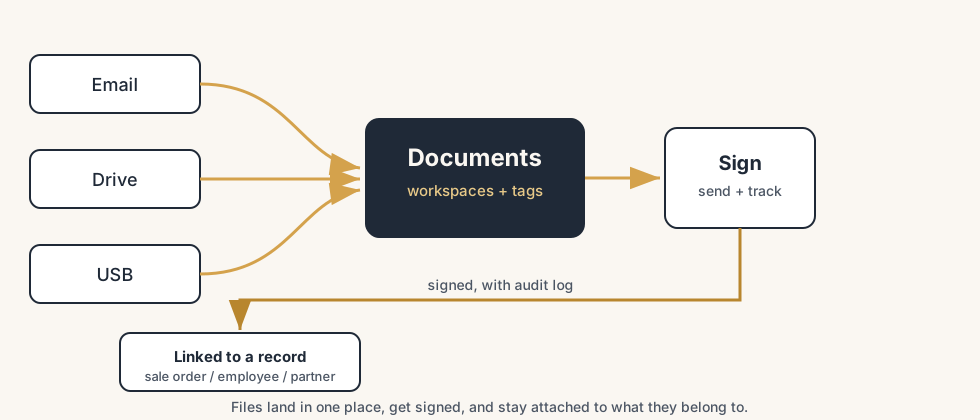
Paperwork stops needing a chase when every file has one home and every signature is a tracked request: Odoo Documents holds the files in workspaces with one-click actions, and Sign sends the PDF out, reminds the signer, and files the signed result back where it belongs.
A new customer needs to sign a service agreement. You find the template in a shared drive, export it to PDF, attach it to an email, and ask them to print it, sign it, scan it, and send it back. Three days later you chase them. Two days after that the scan arrives, crooked, missing the second page. Meanwhile the signed contract from last month is somewhere in someone's inbox, the supplier NDA is on a USB stick, and nobody can find the lease you signed in March. The work is small. The chasing, the version confusion, and the hunting for where a file ended up is what eats the day.
This is what document handling looks like when files live everywhere and signatures happen over email. Odoo fixes both halves with two apps that work together. Documents gives every file one home, with workspaces, tags and one-click actions. Sign turns a PDF into a fill-and-sign request you send by email and track to completion, with a legally valid electronic signature at the end. Here is how to set up both, how they link to the rest of Odoo, what trips people up, and when the setup gets complicated enough to call a partner.
Why paperwork piles up
Files have no single home, so they scatter. A contract gets emailed, saved to a personal drive, copied to a project folder, and attached to a record, and now there are four versions and no way to know which one is final. When someone leaves or goes on holiday, the file they were sitting on disappears with them. Finding a document means asking around instead of looking in one place.
Signatures happen outside the system, so they are slow and untracked. Print, sign, scan and email back is a multi-day loop with no status. You cannot see whether the other party opened it, you cannot prove when they signed, and the signed PDF that comes back is just another loose file to misplace. Nothing connects the signed contract to the customer, the order or the project it belongs to.
The deeper issue is that the document and the thing it relates to live apart. A signed quote should sit on the sales order. A signed employment contract should sit on the employee. When the file and the record are separate, you keep re-attaching, re-finding and re-explaining where things are. The fix is to give files one home in Documents, run signing inside Sign, and let both link straight to the records they belong to.
The fix, in steps
Set up the file home, the signing, and the links to the rest of Odoo in that order.
Build workspaces in Documents that match how you work
A workspace in Documents is a folder with its own tags, access rights and actions. Go to Documents > Configuration > Workspaces and create a structure that mirrors how your business already thinks: for example "Contracts", "HR", "Finance", "Projects". Workspaces are hierarchical, so a child workspace inherits the parent, and an action you set on a parent applies to its children too. Do not rebuild your entire shared drive on day one. Start with the few categories where files actually get lost, set who can see each one, and grow from there. Getting the workspaces right first means every file that lands later has an obvious home.
Get files into Documents and tag them
Files reach Documents in several ways, and you want more than one switched on:
- Upload or drag and drop straight into a workspace from your computer.
- Email alias. Each workspace can have its own address, so anything mailed to it lands as a document automatically. This is how you stop contracts living in inboxes.
- From other Odoo apps. Attachments and generated PDFs (an invoice, a signed order) can be pushed into a workspace.
Once a file is in, add tags. Tags are how you find things later without a deep folder tree: a contract can be tagged "signed", "2026", "supplier" and show up in every filter that matches. Spend the small effort to tag on the way in, and search stays fast as the volume grows.
Use workflow actions to handle files in one click
This is where Documents stops being a drive and starts saving time. Go to Documents > Configuration > Actions and create workflow actions: buttons that do a set of things to a file at once. An action can move a file to another workspace, add or remove tags, set a contact, create a task or a vendor bill from it, and, the relevant one here, request a signature or sign directly. So a contract that arrives in the "To process" workspace can be sent for signature with one click, then auto-filed in "Signed contracts" with a "signed" tag when it comes back. Actions set on a parent workspace apply to its children, so you set the rule once.
Create Sign templates for the documents you send often
Open the Sign app. For any document you send repeatedly (a service agreement, an NDA, an offer letter), upload the PDF once as a template and drop the fields onto it: signature, date, name, text fields, checkboxes. You assign each field to a role (for example "Customer", "Manager", "Witness"), so the template knows who fills what. In the template you can also set properties: which workspace the signed document lands in, which tags it gets, a redirect link after signing, and which users are allowed to use it. Build the template once and every future send is a few clicks instead of a rebuild.
Send for signature and track it to done
From a template, click Send and fill in the signers for each role. Odoo emails each external signer a secure portal link, no account needed on their side. The signer opens the link, fills the fields you placed, and signs in the browser. You watch the status on the Sign dashboard: each request shows as draft, sent, signed or archived, so you can see at a glance who still owes you a signature and chase only those. When everyone has signed, Odoo records a completion certificate and audit log: who signed, when, from where. The signed PDF lands in the workspace you set, linked to the right record, with proof attached. Signatures made this way are valid electronic signatures in the European Union and the United States.
How it links to the rest of Odoo
The point of doing this inside Odoo is that the document and the record stop living apart.
- Sales. Send a quotation for online signature so the customer signs the order itself, not a separate PDF, and the signed quote sits on the sale order.
- Employees. Send contracts from the HR app; the signed contract files against the employee record.
- Documents as the hub. A signing workflow action started from Documents files the signed result straight back into the right workspace with the right tags, and the audit log travels with it.
- Any record. Because a signed document can be linked to a partner, an order or a project, you open the customer and see the signed agreement there, instead of searching a drive.
That linkage is the difference between a file you store and a file that knows what it belongs to.
The part that trips people up
A few things catch almost everyone
A few things catch almost everyone.
Workspace access rights are not the same as who can sign. Documents access controls who sees and edits files in a workspace. Sign has its own authorized-users setting per template. Lock down a workspace and forget the template, and someone who cannot see the folder can still fire off the contract, or the reverse. Set both, and check them together.
A Sign template is not a contract review. Sign places fields and collects signatures. It does not check that the clauses are right, the amounts match, or the correct version went out. Garbage in, signed garbage out. Keep a human review before the template goes live and before a high-value send.
The email alias is only as safe as its workspace. A workspace with an open email alias will accept anything mailed to that address as a document. That is the feature, and the risk. Use a non-obvious alias, restrict who knows it, and tag and review what lands, or your tidy workspace fills with spam and stray PDFs.
Roles decide the order and the fields, so get them right before you send. If you assign the customer's signature field to the "Manager" role, the wrong person gets asked to sign it. Check the role-to-field mapping on the template once, carefully, because every future send inherits it.
Signed does not mean filed where you think. If the template's "signed document workspace" is not set, the result lands in a default spot, not your "Signed contracts" workspace, and you are back to hunting. Set the destination workspace and tags on the template, not after the fact.
Quick checklist
- You have a small set of Documents workspaces that match how your business already thinks, with access rights set per workspace.
- Files reach Documents by upload, by a workspace email alias, and from other Odoo apps, and they get tagged on the way in.
- Workflow actions handle routine moves (move, tag, request signature) in one click, set on parent workspaces.
- Every document you send often exists as a Sign template with fields mapped to the right roles.
- Each template sets its signed-document workspace, tags and authorized users.
- You track signing status (draft, sent, signed) on the Sign dashboard and chase only the open ones.
- Signed documents link back to the right record (sale order, employee, partner) so the file and the record stay together.
FAQ
What is the difference between the Documents app and the Sign app in Odoo?
Documents is where files live: workspaces (folders with tags, access rights and one-click workflow actions) that give every file one home and let you process it without leaving Odoo. Sign is the e-signature app: you upload a PDF as a template, place fields, assign them to roles, send it for signature by email, and track each request as draft, sent or signed. They work together, a Documents workflow action can request a signature, and a signed Sign document files back into a workspace.
Are Odoo Sign signatures legally valid?
Yes. Documents signed with Odoo Sign are valid electronic signatures in the European Union and the United States. Odoo records a completion certificate and an audit log for each request, showing who signed, when, and from where, so you can prove the signature later. For specific high-stakes or regulated documents, confirm the exact requirements for your jurisdiction.
How do I send a document for signature in Odoo?
Open the Sign app, upload the PDF as a template, and drop the fields onto it (signature, date, name, text). Assign each field to a role such as Customer or Manager, then click Send and fill in who signs each role. Odoo emails each signer a secure portal link, no account needed on their side, they sign in the browser, and you watch the status on the Sign dashboard until it shows signed.
How do I stop documents getting lost in Odoo?
Give files one home in the Documents app instead of email and shared drives. Build a small set of workspaces that match how you work, switch on a workspace email alias so mailed files land automatically, and tag files on the way in so search stays fast. Use workflow actions to move and tag files in one click, and link signed documents back to the record they belong to (the sale order, the employee, the partner) so the file and the record stay together.